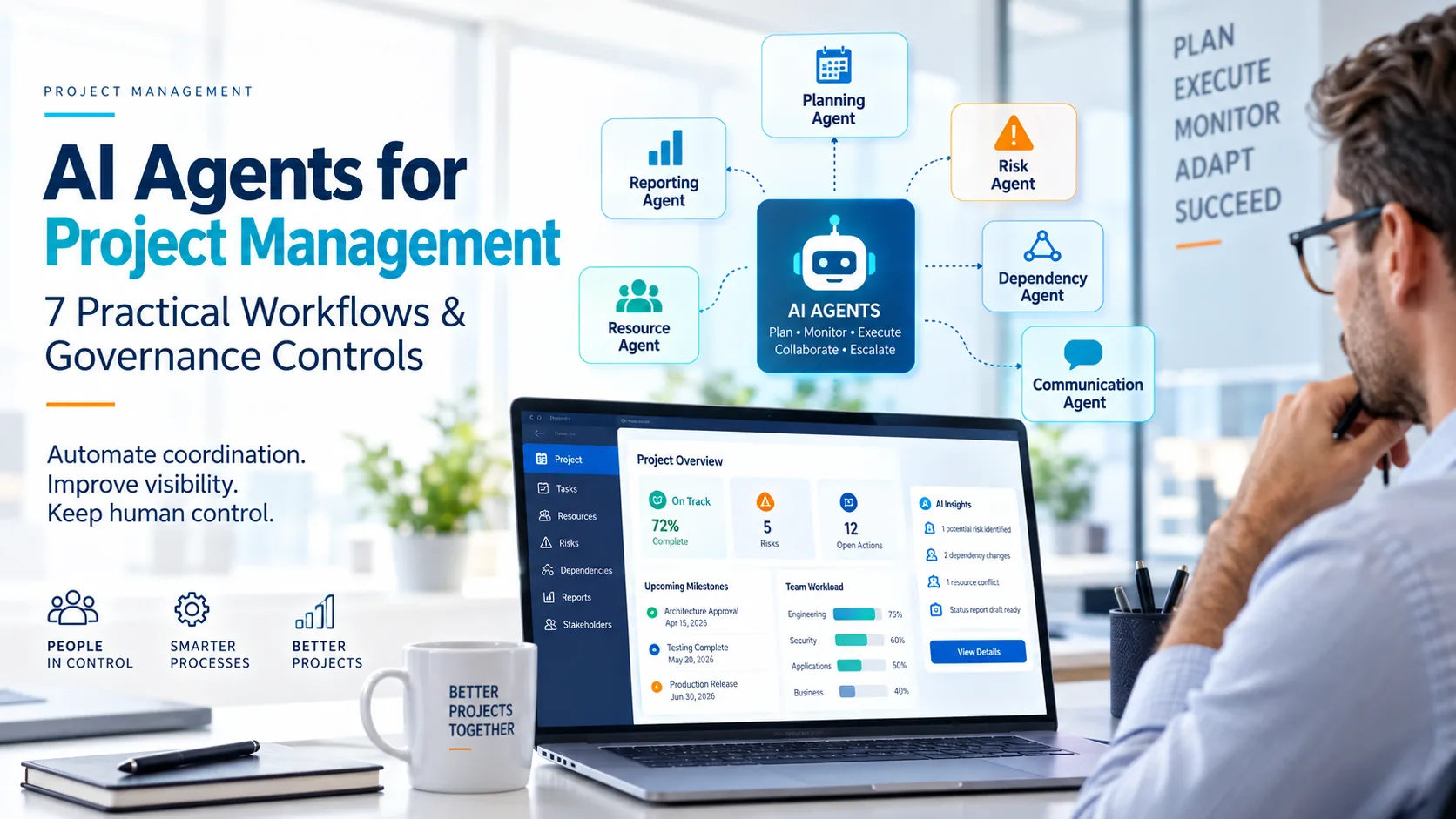
AI agents for project management can do more than generate plans, summarize meetings or draft reports. When connected to approved project data and tools, an AI agent can execute a bounded sequence of steps: collect information, analyze changes, perform authorized actions, check results and escalate when human judgment is required.
The key word is bounded.
An AI agent should not become an autonomous project owner. Project managers and governance bodies still decide what the agent may access, what it may change, which actions require approval and when execution must stop.
A practical model is:
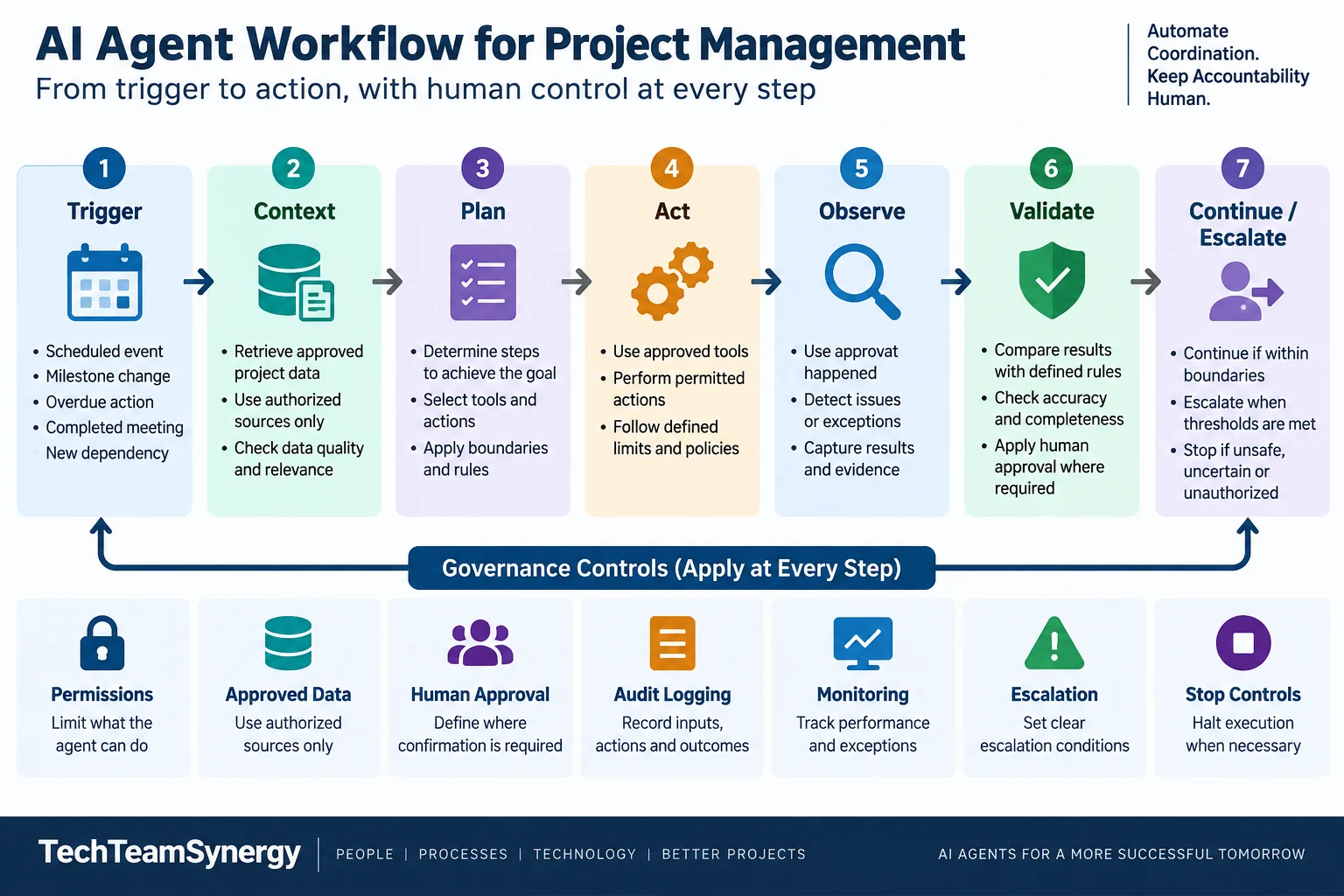
Trigger → Context → Plan → Act → Observe → Validate → Continue / Escalate
Around that workflow sit permissions, approved data access, approval thresholds, audit logging, monitoring and stop controls.
This guide explains how to apply that model to seven practical project-management workflows.
What Are AI Agents for Project Management?
An AI assistant typically responds to a request. You ask it to summarize a document, analyze a risk or draft a status report, and a human decides what happens next.
An AI agent can go further. It can receive a goal, retrieve approved context, determine several steps, use authorized tools, take permitted actions, observe the results and decide whether to continue or hand control back to a person.
A multi-agent workflow divides that work among specialized agents—for example, one monitoring dependencies while another prepares reporting.
| Model | Typical behavior | Example in project management | Human role |
|---|---|---|---|
| AI Assistant | Prompt → Response | Draft a weekly status summary | Reviews and performs the next action |
| AI Agent | Goal → Multiple authorized steps | Gather updates, detect missing information and prepare the report | Defines boundaries and approves sensitive actions |
| Multi-Agent Workflow | Several specialized agents coordinate bounded tasks | Dependency agent feeds changes to risk and reporting agents | Remains accountable for decisions and escalation |
This article focuses on the workflow layer rather than the broader technical architecture of agentic systems. For the underlying concepts—models, memory, tools, permissions and feedback loops—see the TechTeamSynergy guide to Agentic AI.
For the broader role of artificial intelligence across planning, forecasting, communication, governance and the project-management profession, start with the complete AI in Project Management guide.
How an AI Agent Workflow Works in Project Management
A useful project-management agent needs more than a prompt. It needs a controlled operating loop.
1. Trigger
Something starts the workflow.
The trigger could be a scheduled reporting deadline, a changed milestone, an overdue action, a completed meeting or a new dependency.
Triggers should be explicit. An agent that acts on every possible event can create noise and unnecessary actions.
2. Context
The agent retrieves only the information it is authorized to use.
- project schedules;
- RAID registers;
- approved meeting notes;
- task trackers;
- stakeholder registers;
- resource plans;
- previous status reports.
Good context matters because agents cannot reliably coordinate project work when source information is incomplete, stale or contradictory.
3. Plan
The agent determines which steps are required to achieve the assigned objective.
For a weekly report, for example, it might need to retrieve milestone updates, compare them with last week’s status, check open risks and actions, identify missing inputs and then prepare a draft.
4. Act
The agent uses approved tools to perform permitted actions.
That may involve retrieving records, creating a draft, updating a low-risk field or preparing an action for approval.
The ability to use tools is one of the main differences between an agent and a conventional AI response. OpenAI’s practical guide to building agents describes agents as systems capable of managing workflow execution and using tools within defined guardrails.
5. Observe
After taking an action, the agent checks what happened.
Did the task update successfully? Was a required source unavailable? Did the new milestone date introduce a dependency conflict?
Observation turns a fixed automation sequence into a feedback loop.
6. Validate
The workflow checks whether the result meets defined conditions.
Validation can combine deterministic controls, AI evaluation and human approval.
A low-risk reminder may pass automatically. A proposed baseline change should not.
7. Continue or Escalate
The agent continues only while the workflow stays inside its operating boundaries.
It should escalate when information is contradictory, confidence is insufficient, a threshold is exceeded, repeated actions fail or a decision requires human authority.
OpenAI recommends human intervention especially when failure thresholds are exceeded or actions are sensitive, high-impact or difficult to reverse.
The complete operating model is therefore:
Trigger → Context → Plan → Act → Observe → Validate → Continue / Escalate
Around every step:
Permissions + Approved Data + Human Approval + Audit Logging + Monitoring + Stop Controls
7 Practical AI Agent Workflows for Project Managers
The value of AI agents for project managers becomes clearer when applied to recurring workflows rather than abstract discussions about autonomy.
| Workflow | Primary role of the agent | Human-controlled outcome |
|---|---|---|
| Project planning | Structure and coordinate planning inputs | Approved project baseline |
| Risk monitoring | Detect signals and propose escalation | Risk assessment and acceptance |
| Status reporting | Consolidate and analyze project status | Official project status |
| Meeting follow-up | Extract and track actions | Decisions and commitments |
| Dependency monitoring | Detect cross-workstream impacts | Replanning and escalation |
| Stakeholder communication | Prepare targeted communications | Sensitive or external messaging |
| Resource coordination | Detect capacity conflicts and scenarios | Staffing and priority decisions |
1. Project Planning and Work Breakdown Coordination
Purpose: Structure project work and surface planning gaps without letting the agent define scope independently.
Trigger: Project initiation, phase planning or an approved scope change.
Inputs / context: Objectives, scope, deliverables, constraints, milestones, assumptions, templates and dependencies.
Agent actions: Propose work packages, identify dependencies, compare against templates, flag missing assumptions and draft milestones.
Tools / data required: Project repository, planning application, calendars and approved historical templates.
Human approval point: WBS, milestones, dependencies and baseline.
Output: Draft project structure, dependency map and assumptions to confirm.
Governance controls: Drafting is allowed; scope changes and rebaselining require authorization.
Failure / escalation path: Conflicting objectives, missing inputs or incompatible dates → project manager clarification.
Practical example: The agent proposes work packages for architecture, infrastructure, security, applications and business readiness, then flags that security approval must precede production deployment. The project manager validates the structure before baselining.
For simpler prompt-based planning, see 50 AI Prompts for Project Managers.
2. Risk Signal Monitoring and Escalation
Purpose: Monitor approved project information for signals that warrant risk review.
Trigger: Scheduled scan or events such as milestone slippage, overdue actions or supplier delay.
Inputs / context: RAID register, milestone changes, issue logs, actions and supplier updates.
Agent actions: Monitor → Detect Signal → Correlate Context → Propose Risk → Escalate
Tools / data required: Schedule, action tracker, RAID register and approved reporting sources.
Human approval point: The project manager or risk owner confirms whether a risk exists and how it should be assessed.
Output: Evidence-based risk signal with affected milestones, uncertainty and recommended review.
Governance controls: No autonomous risk acceptance, final scoring, mitigation funding or closure.
Failure / escalation path: Weak or conflicting evidence → uncertainty flag and human review.
Practical example: A supplier action becomes overdue as an integration milestone slips and testing contingency shrinks. The agent correlates the signals and proposes a schedule-risk review.
For detailed identification, analysis and response, see AI for Project Risk Management.
3. Project Status Reporting and Executive Briefing
Purpose: Reduce manual reporting effort while preserving traceability to source data.
Trigger: Weekly, monthly or steering-committee reporting deadline.
Inputs / context: Milestones, schedule, RAID data, actions, KPIs, previous status and workstream updates.
Agent actions: Gather updates, compare periods, detect exceptions, identify missing inputs and draft the executive narrative.
Tools / data required: PMIS, dashboards, project repository and reporting templates.
Human approval point: RAG status, interpretation, recommendations and distribution.
Output: Draft report, executive summary and unresolved data gaps.
Governance controls: Key statements remain traceable; missing facts are flagged, not inferred.
Failure / escalation path: Stale or unavailable critical data → request an update before finalizing.
Practical example: The agent detects one missing workstream update and one changed completion date, drafts the weekly report and flags both items for project-manager validation.
4. Meeting Follow-Up and Action Tracking
Purpose: Convert meetings into structured follow-up without treating ambiguous discussion as commitment.
Trigger: Meeting completion and availability of approved notes or transcript data.
Inputs / context: Agenda, notes/transcript, attendee list, action register and decision log.
Agent actions: Extract decisions, actions, owners and dates; reconcile with existing records; flag unresolved items.
Tools / data required: Meeting platform, project repository, action tracker and decision log.
Human approval point: Ambiguous decisions, commitments, ownership changes and sensitive actions.
Output: Meeting summary, proposed action updates and decision candidates.
Governance controls: Apply consent, retention, confidentiality and access rules; distinguish discussion from approved decision.
Failure / escalation path: Unclear owner, date or decision status → meeting chair or project manager.
Practical example: Of eight extracted action candidates, six are clear, one lacks an owner and one may be a recommendation rather than a decision. The last two are escalated for clarification.
5. Dependency and Blocker Monitoring
Purpose: Detect downstream effects of milestone changes, missing prerequisites and cross-team blockers.
Trigger: Task/milestone change or scheduled dependency scan.
Inputs / context: Integrated plan, workstream plans, backlogs, dependency registers, interface milestones and issues.
Agent actions: Check predecessor/successor relationships, identify affected workstreams and trace impact paths.
Tools / data required: PMIS, issue trackers and authorized cross-workstream schedules.
Human approval point: Replanning, commitments, priority changes and formal escalation.
Output: Dependency alert with changed item, affected activities and evidence.
Governance controls: Apply least-privilege access; read access does not imply write access. Microsoft guidance similarly emphasizes least privilege and human oversight for critical actions.
Failure / escalation path: Conflicting schedules, unclear ownership or missing dependency data → dependency owner or project manager.
Practical example: A one-week architecture delay threatens security validation and potentially application integration. The agent alerts owners but does not change committed milestones.
6. Stakeholder Communication Orchestration
Purpose: Prepare consistent, audience-appropriate communication from approved project facts.
Trigger: Approved status change, milestone, issue, decision or communication cycle.
Inputs / context: Stakeholder register, communications plan, approved status and audience requirements.
Agent actions: Select relevant facts, tailor drafts by audience and check consistency with approved status.
Tools / data required: Project repository, stakeholder register and approved communication channels.
Human approval point: Executive, customer, contractual, reputational or sensitive communication.
Output: Audience-specific drafts for review or approved low-risk distribution.
Governance controls: Data classification, audience restrictions and channel permissions.
Failure / escalation path: Disputed facts, confidentiality, contractual impact or conflict → human review.
Practical example: After a steering committee, the agent prepares executive, internal-workstream and business-stakeholder versions of the approved update; customer-facing communication waits for PM approval.
Communication preparation can be delegated. Stakeholder negotiation should remain human-controlled.
7. Resource and Capacity Coordination
Purpose: Detect capacity conflicts and evaluate alternatives without automating personnel decisions.
Trigger: Demand forecast, schedule change, resource-plan update or capacity threshold.
Inputs / context: Assignments, availability, role requirements, milestone demand and authorized skills data.
Agent actions: Identify overload, shortages and competing assignments; compare demand with capacity; generate scenarios.
Tools / data required: Resource planner, project schedule and authorized capacity information.
Human approval point: Staffing, reprioritization, assignment changes and personnel decisions.
Output: Capacity exceptions and scenario options.
Governance controls: Minimize personnel data access; recommendations must not become autonomous employment decisions.
Failure / escalation path: Unknown availability, conflicting priorities or incomplete data → resource manager and project manager.
Practical example: The agent finds one security architect double-booked for two critical reviews, proposes three scheduling scenarios and shows the milestone impact. Managers choose the option.
Bounded Autonomy: How Much Should an AI Agent Be Allowed to Do?
The right question is not simply whether an agent can perform a task.
It is:
How much authority should this agent have for this workflow?
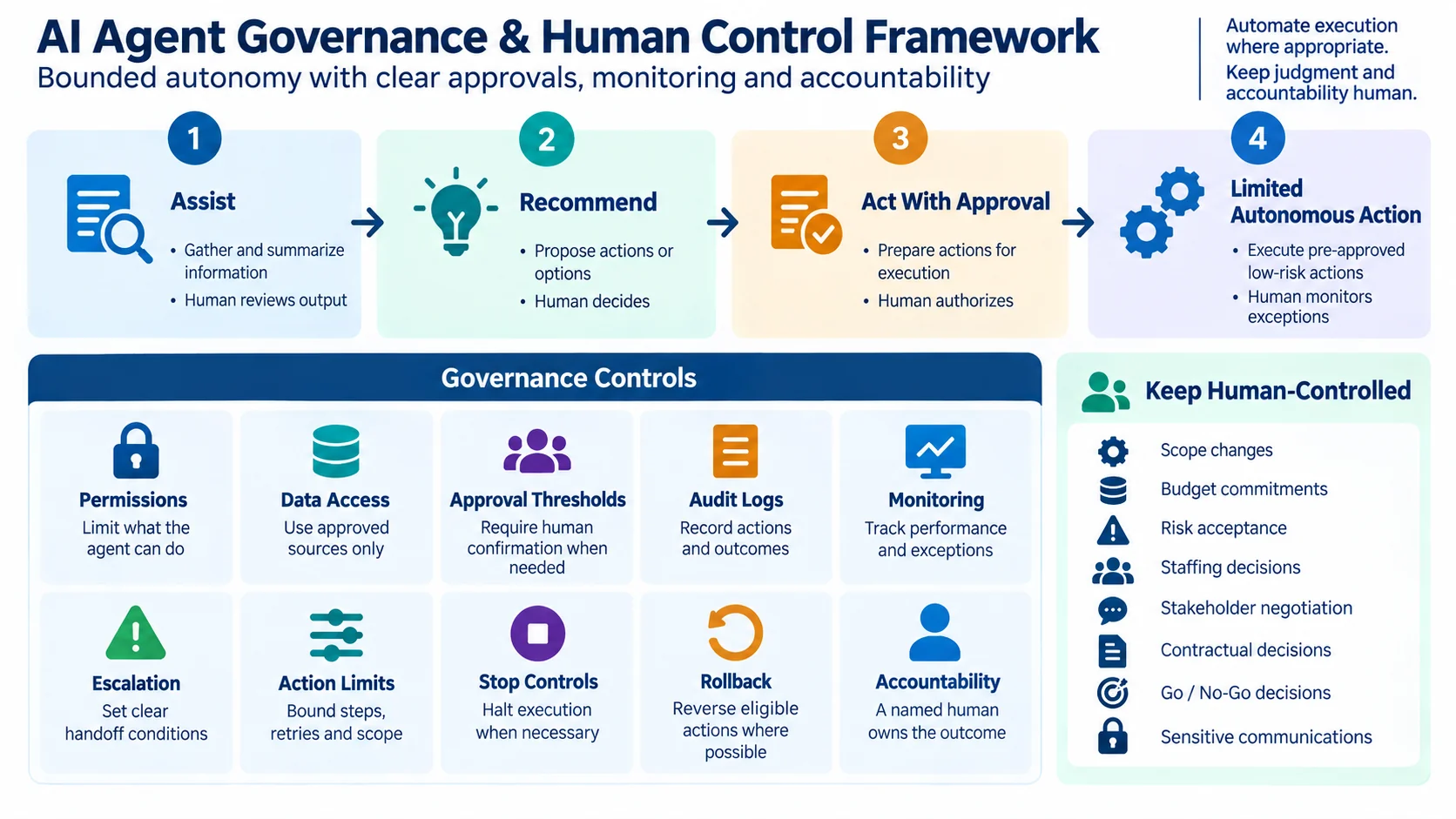
A practical four-level model helps project managers and PMOs define that boundary.
| Level | Agent authority | Project examples | Human involvement |
|---|---|---|---|
| Level 1 — Assist | Gather, summarize, structure or draft | Meeting summary, status-data collection | Human reviews output |
| Level 2 — Recommend | Analyze and propose actions | Dependency alert, capacity option, risk signal | Human decides |
| Level 3 — Act With Approval | Prepare an action but wait before execution | Task update, approved communication, workflow change | Human authorizes execution |
| Level 4 — Limited Autonomous Action | Execute explicitly pre-approved, low-risk and reversible actions | Routine reminder, synchronization, simple status update | Human monitors boundaries and exceptions |
Autonomy should increase only when the workflow, data quality, controls and reliability justify it.
For many organizations, meeting summaries may begin at Level 1. Dependency alerts may operate at Level 2. Updating a task after explicit approval may fit Level 3. Routine reminders can often fit Level 4.
The same agent does not need one autonomy level for every action.
An agent may autonomously collect status information while still requiring explicit approval before changing a milestone.
Where Human Control Should Remain
AI agents can execute work without owning the project outcome.
That distinction is essential.
Depending on organizational policy and regulatory context, the following decisions should normally remain under clear human authority:
- scope or baseline changes;
- budget and financial commitments;
- risk acceptance;
- staffing and personnel decisions;
- stakeholder negotiation;
- contractual commitments;
- major go/no-go decisions;
- sensitive external communications;
- ethical or legally significant decisions;
- accountability for project outcomes.
This boundary is consistent with the broader move toward structured human oversight in professional project work. PMI’s Standard for Artificial Intelligence in Portfolio, Program and Project Management includes human-in-the-loop practices, governance, risk considerations and accountability for AI-enabled project work.
A useful responsibility model is:
Agent performs bounded work → Human reviews when required → Authorized person decides → Accountable role owns the outcome
For practical examples of separating responsibility from accountability, see the RACI Matrix Examples guide.
Governance Controls Every AI Agent Workflow Needs
Governance does not require turning every project manager into an AI risk specialist.
At workflow level, the objective is simpler: define the operating boundaries before giving the agent meaningful authority.
| Control | Purpose | Practical PM/PMO question |
|---|---|---|
| Permissions | Limit what the agent can do | Can it read, create, modify or trigger? |
| Data access | Restrict information to approved sources | Which repositories and records may it use? |
| Approval thresholds | Preserve human authority | Which actions require confirmation? |
| Action limits | Prevent uncontrolled execution | How many steps, retries or changes are allowed? |
| Audit logs | Make actions reconstructable | Can we see inputs, actions, approvals and outcomes? |
| Monitoring | Detect failures and degradation | How will exceptions and quality be reviewed? |
| Escalation | Transfer control when needed | What conditions trigger human intervention? |
| Stop controls | Halt unsafe or incorrect execution | Who can disable the workflow or credentials? |
| Rollback | Reverse eligible actions | Which changes can be restored safely? |
| Accountability | Keep ownership visible | Which human role owns the outcome? |
NIST’s AI Risk Management Framework provides a broader structure for managing risks associated with AI systems, while Microsoft guidance emphasizes identity, authorization, least privilege, human oversight, audit logging and monitoring for agentic systems.
For project managers, the operating principle can remain simple:
Bounded autonomy + human accountability.
A later enterprise governance model may define organization-wide policies, AI risk classifications, lifecycle standards and oversight bodies. At project-workflow level, the priority is making permissions, approvals and escalation explicit.
Enterprise Scenario: AI Agents Supporting a Technology Transformation Project
Consider a multi-country technology transformation involving a project manager, architecture team, network team, security team, application teams, an external supplier and several business stakeholders.
The project already uses an approved PMIS, RAID register, action tracker, document repository and reporting process.
Instead of creating one unrestricted autonomous agent, the organization introduces four bounded agents.
Planning Agent
The Planning Agent reads approved schedule information and identifies changes to work packages and milestones.
A network-design milestone moves by five working days after a supplier deliverable arrives late.
The Planning Agent does not change the baseline. It records the proposed impact for analysis.
Dependency Agent
The Dependency Agent receives the schedule change and checks authorized cross-workstream dependencies.
It finds that the delay may affect architecture validation, security testing and application integration.
It produces an impact chain:
Supplier Deliverable → Network Design → Architecture Approval → Security Validation → Application Integration
The agent alerts the relevant owners.
Risk Agent
The Risk Agent correlates the schedule movement with existing actions and RAID information.
It discovers that testing contingency is already limited and proposes a new schedule-risk review.
It does not determine final probability, impact or response.
Those remain subject to human risk assessment.
Reporting Agent
The Reporting Agent receives the approved planning and dependency information plus the proposed risk signal.
It prepares a draft weekly steering update explaining:
- what changed;
- which milestones may be affected;
- which information remains uncertain;
- which management decision may be needed.
Project Manager Validation
The project manager reviews the evidence with the workstream leads.
The team confirms that the security milestone is affected but application integration can still remain on schedule if a temporary sequencing change is approved.
The project manager then decides what should be escalated to the steering committee.
The flow is:
Approved Project Data → Planning Agent → Dependency Agent → Risk Agent → Reporting Agent → Project Manager Validation → Authorized Decision / Escalation
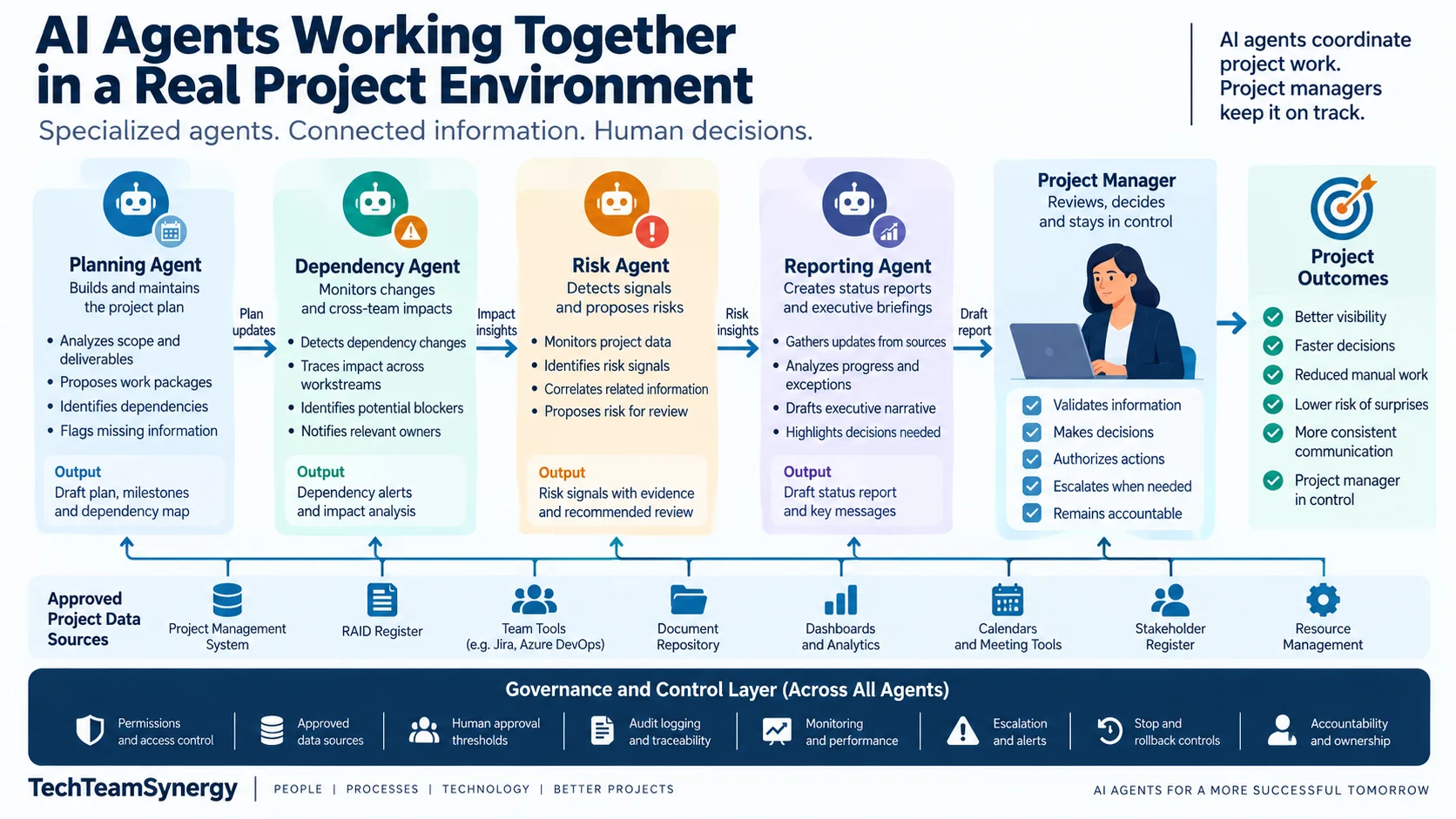
The agents accelerate coordination, but they do not change scope, accept risk, reallocate staff, authorize extra budget, negotiate with the supplier or make the steering decision. Multi-agent project management should improve specialization and information flow without transferring accountability away from people.
How to Pilot an AI Agent Workflow Safely
Start with one bounded workflow rather than broad autonomy. Status reporting, meeting follow-up or dependency monitoring are practical pilot candidates because their inputs, outputs and approval points are relatively easy to define.
Document the workflow using the same operating model:
Trigger → Context → Plan → Act → Observe → Validate → Continue / Escalate
Define the required data, authorized tools, read/write permissions, prohibited actions, approval checkpoints, escalation thresholds, stop conditions and expected output before deployment.
If the workflow depends on vague instructions, fix that first. The AI Prompting Guide can help structure goals, context, constraints and outputs, while the AI Tools for Project Managers comparison can help assess available platform capabilities.
Test failure scenarios as well as the happy path: unavailable sources, conflicting systems, stale data, repeated action failures and requests outside the agent’s authority.
Track completion, correction, human-intervention, policy-compliance and escalation rates. Increase autonomy only when the evidence supports it.
Practical AI Agent Workflow Design Template
Define the workflow before configuring the agent. This prevents a common mistake: selecting technology before deciding what work the agent performs, what authority it has and when control returns to a person.
A useful design template should answer five questions:
- What starts the workflow?
- What context may the agent use?
- What actions may it perform?
- Where must a human approve or intervene?
- What happens when the workflow fails or moves outside its boundaries?
AI Agent Workflow Design Template
| Design element | What to define | Example |
|---|---|---|
| Workflow name | Clear name describing the operational outcome | Weekly Project Status Agent |
| Objective | What the agent is expected to achieve | Prepare an accurate weekly status-report draft |
| Trigger | Event or schedule that starts execution | Every Thursday at 15:00 |
| Authorized context | Data the agent may retrieve and use | Schedule, RAID log, action tracker, previous report |
| Data restrictions | Information outside the workflow boundary | HR records, unrelated projects, restricted financial data |
| Plan | Expected sequence of steps | Gather → compare → identify exceptions → draft |
| Permitted actions | Actions the agent may execute | Read records and prepare a report draft |
| Prohibited actions | Actions explicitly outside its authority | Rebaseline schedule, close risks, publish externally |
| Tools / systems | Approved systems the agent may use | PMIS, dashboard, document repository |
| Validation rules | Conditions the result must satisfy | Critical milestones have current source data |
| Human approval point | Where execution pauses for authorization | Before final RAG status and distribution |
| Autonomy level | Assist, Recommend, Act With Approval or Limited Autonomous Action | Level 3 — Act With Approval |
| Output | Expected workflow result | Draft status report plus data-gap list |
| Audit requirements | Information that must be recorded | Sources, actions, exceptions and approvals |
| Monitoring metrics | Indicators used to assess performance | Correction rate, escalation rate, missing-data rate |
| Escalation conditions | Situations requiring human intervention | Conflicting dates, missing critical updates |
| Escalation owner | Person or role receiving the exception | Project Manager |
| Stop conditions | Conditions that immediately halt execution | Unauthorized access or repeated tool failure |
| Rollback | How eligible actions can be reversed | Restore previous task or status value |
| Accountable owner | Human role responsible for the outcome | Project Manager |
A Simple One-Page Workflow Canvas
For workshops or pilots, reduce the template to nine blocks:
- Objective: What outcome should the workflow produce?
- Trigger: What starts it?
- Context: Which approved information may the agent use?
- Agent Actions: What steps may it perform?
- Tools: Which systems may it access?
- Human Checkpoint: Where must a person approve, reject or modify an action?
- Output: What should the workflow produce?
- Guardrails: Which permissions, thresholds and prohibited actions apply?
- Escalation / Stop: When must execution stop and control return to a person?
These nine elements map directly to the operating model:
Trigger → Context → Plan → Act → Observe → Validate → Continue / Escalate
with permissions, approvals, audit logging, monitoring and stop controls surrounding the workflow.
Example: Weekly Project Status Agent
Objective: Prepare a traceable weekly status-report draft.
Trigger: Every Thursday afternoon.
Context: Integrated project schedule, RAID register, action tracker, KPI dashboard and previous weekly report.
Plan: Retrieve updates → compare against previous status → identify exceptions → detect missing information → prepare draft.
Permitted actions: Read approved project information, compare records, identify changes and create the draft report.
Prohibited actions: Change the official RAG status, modify the baseline, close risks or distribute the final report externally.
Tools / systems: PMIS, reporting dashboard and approved project repository.
Human checkpoint: The project manager validates the RAG status, major messages, interpretations and recommendations.
Output: Draft weekly status report plus a list of missing, stale or contradictory inputs.
Audit requirements: Record the sources used, material changes identified, exceptions raised and approval decision.
Monitoring metrics: Correction rate, missing-data rate, human-intervention rate and escalation rate.
Escalation conditions: Missing critical workstream updates, inconsistent milestone dates, unexpected project-state changes or unsupported conclusions.
Stop conditions: Required project systems are unavailable, unauthorized information is encountered or repeated execution fails.
Rollback: Any automatically updated low-risk project fields should retain the previous value where the system supports reversal.
Accountable owner: Project manager.
The design sequence should therefore be:
Define the work → Define the decision rights → Define the controls → Configure the agent → Test the workflow → Increase autonomy only when justified
This keeps technology subordinate to the operating model rather than designing the project process around what an AI tool happens to support.
Frequently Asked Questions About AI Agents for Project Management
What are AI agents for project management?
AI agents for project management are systems that can perform multiple steps toward a project objective using approved data, instructions and tools. Unlike a simple AI assistant that produces a response, an agent can potentially retrieve information, take authorized actions, observe results and continue or escalate according to defined controls.
How are AI agents different from AI assistants?
An AI assistant usually helps a person perform a task by generating information or analysis. An AI agent can manage part of the workflow itself, including selecting tools and executing permitted actions. The distinction depends on workflow execution and authority, not simply on how advanced the underlying AI model is.
Can AI agents update project plans automatically?
They can technically update project-management systems when given appropriate permissions, but that does not mean every planning change should be automatic. Low-risk administrative updates may be suitable for automation, while scope changes, baselines, major milestones and commitments normally require human authorization.
Can AI agents manage project risks?
Agents can monitor approved project information, identify changes, detect risk signals and prepare items for review. Risk judgment, acceptance and significant response decisions should remain under appropriate human governance. For the detailed methodology, see TechTeamSynergy’s AI for Project Risk Management guide.
What project tasks should AI agents not perform autonomously?
Activities involving significant financial commitments, scope changes, risk acceptance, contractual commitments, sensitive stakeholder negotiations, staffing decisions, major go/no-go choices or ethical judgment generally require explicit human authority. Exact boundaries depend on organizational policy, regulation and the consequences of an error.
How do you govern AI agents in project management?
Define who owns the workflow, which data and systems the agent may access, what actions it may perform, where approval is mandatory, what gets logged, how performance is monitored and what conditions cause escalation or shutdown.
Can several AI agents work together on one project?
Yes. Specialized agents can coordinate bounded functions such as planning, dependencies, risk signals and reporting. Multi-agent architectures add complexity, however, so they are most useful when specialization creates a clear operational benefit rather than simply increasing the number of agents.
Will AI agents replace project managers?
AI agents can automate coordination, monitoring, information gathering and other repeatable workflow steps. Project management also requires judgment, accountability, negotiation, leadership, trade-off decisions and governance authority. The more useful question is therefore not whether the project manager disappears, but which parts of project execution can be safely delegated while human decision rights remain clear.
AI Agents Should Automate Coordination, Not Accountability
The strongest use case for AI agents in project management is controlled execution, not unrestricted autonomy.
Well-designed workflows have clear triggers, reliable context, defined tools, bounded actions, observable results, explicit validation points and a way to stop.
The operating model remains:
Trigger → Context → Plan → Act → Observe → Validate → Continue / Escalate
Permissions and approved data determine what the agent can access. Approval thresholds determine what it can execute. Audit logs and monitoring make activity visible. Escalation and stop controls return authority to people when the workflow reaches its limits.
As AI agents become more capable, project-management discipline becomes more—not less—important: clear scope, reliable data, responsibility and decision rights still matter.
Automate execution where appropriate, but keep judgment and accountability human.
For a hands-on path from structured prompting to automation, AI agents, and responsible governance, explore the AI for Project Managers Complete Workbook.
Continue Learning
AI in Project Management
Explore how AI supports planning, risks, reporting, communication, governance and project leadership.
Agentic AI
Learn how AI agents use tools, memory, permissions and feedback loops to execute multi-step work.
AI for Project Risk Management
Apply AI to risk identification, analysis, response and continuous monitoring with human validation.
50 AI Prompts for Project Managers
Use practical prompts for planning, risks, reporting, meetings, stakeholders and governance.