
AI prompts for project managers can help professionals plan work, analyze risks, prepare meetings, summarize complex information, improve stakeholder communication and create clearer project status reports with AI. But useful AI results rarely come from vague instructions such as “create a project plan” or “analyze my risks.” The quality of the response depends heavily on the context, data, constraints and expected output included in the prompt.
Artificial intelligence is becoming increasingly relevant to professional project work. The Project Management Institute’s guidance on artificial intelligence addresses areas such as governance, risk, data quality, ethics and human oversight. For project managers, the practical lesson is straightforward: AI can support analysis and decision-making, but accountability remains with people. A practical framework can help teams govern AI use across projects while keeping human validation explicit.
If you are looking for a broader overview of AI use cases, tools, risks, governance and the future of the profession, start with our complete guide to AI in project management. You can also compare practical AI tools for project managers by use case. This article focuses specifically on practical prompts you can use in day-to-day project work.
These prompts show how AI can assist specific tasks; our guide to how AI is changing the project manager role looks at the broader question of task automation, accountability and the future of the profession.
You can adapt the 50 prompts below to ChatGPT, Microsoft Copilot, Gemini, Claude or another generative AI platform approved by your organization. Replace the placeholders in square brackets with information from your own project.
Table of Contents
Jump directly to the section you need.
What Are AI Prompts for Project Managers?
An AI prompt is an instruction that tells an AI system what you want it to do, what information it should consider, what constraints it must respect and how the answer should be presented.
Compare these two examples.
Weak prompt:
Create a project plan.Better project-management prompt:
Act as an experienced IT project management assistant.

I am managing a 6-month ERP migration involving
infrastructure, security, application, data and business teams.

Using the project information below, create a high-level project plan.

Include:
- Major workstreams
- Key milestones
- Dependencies
- Assumptions
- Major risks
- Governance checkpoints

Present the result as a table.

Do not invent dates, resources or commitments that I have not provided.

Clearly identify assumptions requiring project manager validation.
The second prompt gives the AI a role, project context, task, constraints and expected output.
For a deeper introduction to prompt design, see our guide on how to write effective AI prompts.
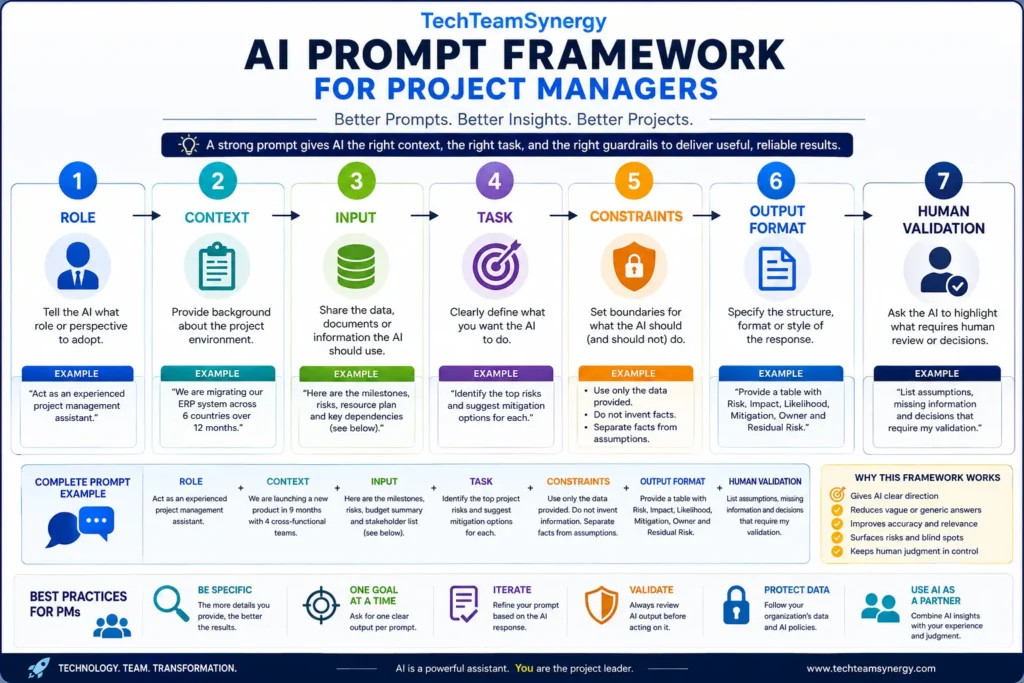
The TechTeamSynergy AI Prompt Framework for Project Managers
A practical project-management prompt can be structured around seven elements:
ROLE + CONTEXT + INPUT + TASK + CONSTRAINTS + OUTPUT FORMAT + HUMAN VALIDATION
1. Role
Tell the AI what perspective it should adopt.
- Act as an experienced project management assistant.
- Act as a PMO analyst.
- Act as a project risk analyst.
- Act as an Agile delivery coach.
2. Context
Explain the project environment. Useful context may include:
- project objective;
- project phase;
- teams involved;
- delivery methodology;
- important constraints;
- stakeholder expectations;
- known dependencies.
3. Input
Provide the information the AI should analyze, such as:
- milestones;
- risks;
- meeting notes;
- requirements;
- status updates;
- dependencies;
- budget information;
- stakeholder feedback.
4. Task
Define exactly what you want the AI to do.
- Identify risks.
- Summarize progress.
- Compare options.
- Challenge assumptions.
- Prepare an executive update.
- Identify missing information.
5. Constraints
Tell the AI what it should not do.
- Do not invent information.
- Use only the data provided.
- Separate facts from assumptions.
- Do not make the final project decision.
- Flag missing information.
6. Output Format
Specify the format you need.
- table;
- executive summary;
- risk register;
- action list;
- decision matrix;
- RACI matrix;
- bullet points.
7. Human Validation
Ask the AI to identify anything that requires human judgment.
At the end of your analysis, create a section called:

"Project Manager Validation Required"

List:
- Assumptions
- Missing information
- Decisions requiring human judgment
- Recommendations requiring stakeholder validation
This step is important because generative AI can produce convincing answers even when project information is incomplete.
Quick Guide: Choose the Right AI Prompt for Your Project Task
| Project Task | Prompt Numbers |
|---|---|
| Project Planning | 1–7 |
| Risk Management | 8–14 |
| Stakeholder Management | 15–20 |
| Status & Reporting | 21–27 |
| Meetings & Decisions | 28–33 |
| RACI & Responsibilities | 34–37 |
| Agile & Scrum | 38–42 |
| SAFe & PI Planning | 43–46 |
| Project Governance | 47–50 |
AI Prompts for Project Managers: Project Planning
1. Create a High-Level Project Plan
Act as an experienced project management assistant.

Project:
[describe the project]
Business objective:
[objective]
Target completion:
[date or timeframe]
Known workstreams:
[list]
Known constraints:
[list]
Create a high-level project plan. Include: 1. Major phases 2. Key activities 3. Milestones 4. Dependencies 5. Major assumptions 6. Major risks 7. Governance checkpoints Do not invent information that is not provided. Clearly mark assumptions requiring validation.
2. Break a Project into Workstreams
Analyze the following project objective:[project objective]
Propose a logical set of project workstreams. For each workstream provide: - Purpose - Main deliverables - Likely stakeholders - Dependencies - Key risks - Suggested completion criteria Highlight any workstreams that may be missing.
3. Build a Work Breakdown Structure
Act as a project planning assistant.

Using the following project scope:
[scope]
Create a draft Work Breakdown Structure. Organize it into: Level 1: Major deliverables Level 2: Work packages Level 3: Key activities where appropriate Do not create unnecessary detail. Identify assumptions separately and highlight unclear scope areas.
4. Identify Project Milestones
Review the following project description and planned activities:[paste information]
Identify the most meaningful project milestones. A milestone should represent an important: - Decision - Delivery - Approval - Transition - Business outcome Create a table with: - Milestone - Purpose - Prerequisites - Responsible area - Evidence of completion - Main risk Do not invent dates.
5. Challenge the Project Plan
Act as an independent project reviewer.

Review this project plan:
[paste plan]
Look for: - Missing activities - Unrealistic sequencing - Hidden dependencies - Unclear ownership - Weak assumptions - Missing approvals - Resource conflicts - Insufficient testing - Transition risks - Governance gaps Classify findings as: Critical High Medium Low Explain why each issue matters.
6. Identify Project Dependencies
Analyze the following project workstreams and milestones:[paste information]
Identify dependencies between teams, activities and milestones. Create a table containing: - Dependency - Providing team - Receiving team - Required-by milestone - Potential impact if delayed - Recommended coordination action Separate confirmed dependencies from possible dependencies requiring validation.
7. Review Project Assumptions
Review the following project assumptions:[list assumptions]
For each assumption: 1. Explain what could happen if it proves false. 2. Estimate whether it represents Low, Medium or High exposure. 3. Suggest how the assumption could be validated. 4. Identify whether it should become a risk, dependency, constraint or action. Do not convert assumptions into facts without evidence.
AI Prompts for Project Managers: Risk Management
AI can help project managers identify patterns, organize risk information and challenge a risk register. Risk ownership, acceptance and escalation should still remain with the appropriate people and governance bodies.
8. Identify Project Risks
Act as a project risk analyst.

Project context:
[context]
Objectives:
[objectives]
Workstreams:
[workstreams]
Constraints:
[constraints]
Identify potential project risks across: - Scope - Schedule - Resources - Technology - Suppliers - Security - Operations - Stakeholders - Governance - Business readiness For each risk provide: - Cause - Risk event - Potential impact - Suggested risk owner role - Possible mitigation Clearly label speculative risks.
9. Improve Risk Statements
Rewrite the following project risks using a clear:

Cause → Risk Event → Impact

structure.
[paste risks]
Do not change the underlying meaning. Flag any entry that is actually: - An issue - An assumption - A dependency - An action
10. Prioritize a Risk Register
Review this risk register:[paste register]
Using the probability and impact information provided, prioritize the risks. Create: - Critical risks - High risks - Medium risks - Low risks Explain the prioritization. Do not invent probability or financial-impact values. Identify missing data required for prioritization.
11. Generate Risk Mitigation Options
For the following project risk:[risk]
Generate several possible response strategies. Consider: - Avoid - Reduce / Mitigate - Transfer / Share - Accept For each option provide: - Proposed action - Expected benefit - Possible disadvantage - Resources required - Residual risk Do not select the final strategy. Identify what the project manager and risk owner should evaluate before deciding.
12. Find Emerging Risks from Project Status
Analyze the following project status information:[paste status, actions, issues and milestones]
Identify early warning signals that could become future risks. Look for: - Repeated delays - Growing action backlog - Unresolved dependencies - Resource pressure - Increasing defects - Supplier slippage - Delayed decisions - Scope instability Distinguish: 1. Current issues 2. Emerging risks 3. Weak signals requiring monitoring
13. Convert Assumptions into Potential Risks
Review these project assumptions:[list]
Identify which assumptions could create significant project exposure if incorrect. For each important assumption: - Convert it into a possible risk statement - Describe the impact - Suggest an early validation action - Suggest a trigger to monitor Do not automatically convert every assumption into a risk.
14. Perform a Risk Register Quality Review
Act as a PMO risk reviewer.

Audit this risk register:
[paste risk register]
Check for: - Duplicate risks - Vague descriptions - Missing owners - Missing mitigation actions - Risks without triggers - Issues incorrectly recorded as risks - Risks that may already have occurred - Weak mitigation - Excessive concentration on one category Provide a prioritized improvement list.
These prompts can help identify, structure and challenge project risks. For the complete workflow—from project signals and risk analysis to response planning, monitoring and human validation—read our AI for project risk management guide.
Want All 50 Prompts in One Practical PDF?
Download the free TechTeamSynergy 50 AI Prompts for Project Managers Prompt Pack and keep the complete library as a practical project-management reference.
Get the Free AI Project Manager Prompt Pack →
Looking for more practical templates and checklists? Browse the TechTeamSynergy Free Resources Hub.
Project Management AI Prompts for Stakeholder Management
15. Identify Project Stakeholders
Based on the following project context:[context]
Identify stakeholder groups that may need to be considered. Organize them by: - Business - Technology - Operations - Security - Finance - Suppliers - Leadership - End users - Governance For each stakeholder group explain why it may be relevant. Do not invent specific individual names.
16. Build a Stakeholder Map
Analyze these stakeholders:[list]
Create a stakeholder analysis using: - Influence - Interest - Project impact - Current engagement - Desired engagement Recommend an engagement approach for each stakeholder. Do not infer political relationships or personal motivations without evidence.
17. Create a Stakeholder Communication Plan
Create a stakeholder communication plan.

Project:
[context]
Stakeholders:
[list]
Available channels:
[list]
For each stakeholder or stakeholder group specify: - Information needed - Purpose - Frequency - Format - Communication owner - Feedback mechanism
18. Prepare for a Difficult Stakeholder Meeting
Help me prepare for a challenging project stakeholder meeting.

Context:
[context]
Stakeholder concern:
[concern]
Relevant project facts:
[facts]
Desired outcome:
[outcome]
Prepare: 1. Key messages 2. Facts to present 3. Questions to ask 4. Possible objections 5. Constructive responses 6. Decisions needed 7. Follow-up actions Do not invent stakeholder motivations.
19. Adapt a Project Update for Executives
Rewrite this detailed project update for an executive audience:[paste update]
Focus on: - Business outcome - Overall status - Major achievements - Critical risks - Decisions required - Financial or schedule impact if known - Next major milestone Keep the update concise. Remove operational detail unless it affects a decision or business outcome.
20. Analyze Stakeholder Feedback
Analyze the following stakeholder feedback:[paste feedback]
Group the comments into themes. Identify: - Common concerns - Conflicting expectations - Repeated requests - Possible scope implications - Decisions required - Questions requiring clarification Separate explicit stakeholder statements from interpretation.
AI Project Management Prompts for Status Reports and Reporting
21. Draft a Weekly Project Status Report
Create a weekly project status report using only the information below.[paste project data]
Structure: Overall Status: [Green / Amber / Red only if supported] Achievements This Week Planned Activities Next Week Milestone Status Top Risks Top Issues Dependencies Decisions Required Actions Requiring Leadership Support Do not hide negative information. Do not invent progress percentages.
22. Create an Executive Project Summary
Summarize the following project information for senior leadership:[paste information]
Maximum length: 200 words. Include: - Why the project matters - Current status - Most important progress - Most important concern - Decision or support required - Next milestone Use clear business language.
23. Review a RAG Status
Review this proposed project RAG status:

Current status:
[Green / Amber / Red]

Supporting information:
[paste facts]
Evaluate whether the proposed status is supported by evidence. Consider: - Milestones - Schedule variance - Budget - Scope - Risks - Issues - Resources - Dependencies Explain your reasoning. Do not change the official status. Provide a recommendation for project-manager validation.
24. Summarize Milestone Progress
Using the milestone data below:[paste milestone information]
Create a milestone report containing: - Milestone - Planned date - Current forecast if provided - Status - Key dependency - Risk - Required action Highlight milestones where confidence is decreasing.
25. Prepare a Steering Committee Update
Prepare a steering committee briefing from the following project information:[paste information]
Structure: 1. Executive summary 2. Progress since previous meeting 3. Major milestones 4. Top 3 risks 5. Top 3 issues 6. Budget or resource concerns 7. Decisions required 8. Next steps Focus on governance and decisions rather than operational detail.
26. Analyze Schedule Variance
Analyze the following schedule information:[paste baseline, actual and forecast data]
Identify: - Delayed activities - Potential critical dependencies - Milestone impact - Possible root causes - Recovery options - Missing information Do not claim an activity is on the critical path unless critical-path information is provided.
27. Turn Project Data into Key Messages
Review this project information:[paste data]
Extract the five most important messages for project leadership. For each message provide: - Fact - Why it matters - Potential consequence - Recommended discussion or action Separate factual observations from recommendations.
AI Prompts for Project Meetings and Decisions
28. Prepare a Project Meeting Agenda
Create a focused agenda for this project meeting.

Purpose:
[purpose]
Participants:
[list roles]
Topics:
[list]
Decisions required:
[list]
Duration:
[duration]
For each agenda item include: - Objective - Owner - Time allocation - Expected outcome Prioritize decision items where appropriate.
29. Convert Meeting Notes into Actions
Analyze these project meeting notes:[paste notes]
Extract: - Decisions - Actions - Action owners - Due dates if explicitly stated - Risks - Issues - Dependencies - Open questions Do not invent owners or dates. Mark missing information as "To be confirmed."
30. Summarize a Long Project Meeting
Summarize these meeting notes for people who did not attend:[paste notes]
Provide: 1. Purpose 2. Main discussion points 3. Decisions 4. Actions 5. Risks/issues 6. Unresolved questions 7. Next checkpoint if mentioned Keep the summary factual and concise.
31. Build a Decision Log Entry
Using the information below, draft a decision-log entry.

Decision topic:
[topic]
Options discussed:
[options]
Evidence:
[evidence]
Decision:
[decision if already made]
Create: - Decision statement - Context - Options considered - Rationale - Impact - Dependencies - Decision owner - Date if supplied - Follow-up actions Do not invent undocumented rationale.
32. Compare Project Decision Options
Compare the following project options:[options]
Evaluation criteria:
[criteria]
For each option identify: - Benefits - Risks - Dependencies - Cost implications if known - Schedule implications if known - Operational impact - Reversibility - Information gaps Create a decision matrix. Do not select a winner unless explicitly requested.
33. Identify Unresolved Decisions
Analyze these meeting notes, action logs and project updates:[paste information]
Identify decisions that appear: - Missing - Delayed - Ambiguous - Unowned - Blocking other work Create a decision backlog with: - Decision required - Why it matters - Work blocked - Recommended decision owner role - Required-by date if available
AI Prompts for RACI and Project Responsibilities
Unclear responsibility can create delays and conflict. A RACI matrix helps clarify who is Responsible, Accountable, Consulted and Informed for important project activities and decisions.
34. Draft a RACI Matrix
Create a draft RACI matrix.

Activities:
[list]
Roles:
[list]
Use: R = Responsible A = Accountable C = Consulted I = Informed Rules: - Aim for one clear Accountable role per activity. - Highlight uncertain assignments. - Identify activities requiring clarification. This is a draft for stakeholder validation.
35. Audit a RACI Matrix
Review this RACI matrix:[paste matrix]
Identify: - Activities without an Accountable role - Multiple Accountable roles - Activities without a Responsible role - Roles overloaded with responsibility - Too many Consulted roles - Important activities missing Do not change assignments automatically. Provide recommendations for discussion.
36. Find Responsibility Gaps
Analyze the following project activities, organization structure and responsibilities:[paste information]
Identify possible responsibility gaps. Look for: - Activities with no owner - Decisions without accountability - Cross-team handoffs without clear ownership - Duplicate responsibility - Missing governance responsibilities Present the results as questions the project team should resolve.
37. Convert a Process into RACI Activities
Analyze this project process:[paste process]
Identify activities and decisions important enough for a RACI matrix. Avoid creating a RACI row for every minor task. Focus on: - Deliverables - Approvals - Decisions - Cross-team handoffs - Governance activities - Major operational transitions
AI can help draft or audit a responsibility matrix, but the final assignments still need to reflect real authority and stakeholder agreement. For worked examples you can use as a reference, explore our
RACI matrix examples for real project scenarios
AI Prompts for Agile and Scrum Project Managers
38. Prepare for Sprint Planning
Act as an Agile delivery assistant.

Using the following backlog information:
[paste backlog]
Help prepare for Sprint Planning. Identify: - Items that appear ready - Items with unclear acceptance criteria - Dependencies - Missing information - Potential risks - Items that may be too large Do not assign story points or commit work on behalf of the team.
39. Improve Backlog Items
Review these backlog items:[paste items]
For each item evaluate: - Clarity - Business value - Acceptance criteria - Dependencies - Testability - Missing information Suggest improvements while preserving the original business intent.
40. Analyze Sprint Blockers
Analyze the following blockers reported across recent sprints:[paste blockers]
Group them into themes. Identify: - Repeated blockers - Systemic dependencies - Process issues - Technical constraints - Decision delays - External dependencies Suggest questions the team can investigate during retrospective. Do not assign blame to individuals.
41. Analyze Retrospective Feedback
Analyze the following anonymous retrospective feedback:[paste feedback]
Group the feedback into: - What worked - What did not work - Obstacles - Collaboration - Quality - Flow - Dependencies Identify recurring patterns and propose possible improvement experiments. Do not infer who wrote individual comments.
42. Find Cross-Team Agile Dependencies
Review these team backlogs and planned features:[paste information]
Identify possible cross-team dependencies. For each dependency provide: - Providing team - Receiving team - Required capability - Timing requirement - Potential delivery impact - Question requiring confirmation Do not treat inferred dependencies as confirmed facts.
AI Prompts for Project Managers Using SAFe and PI Planning
Organizations coordinating multiple Agile teams may use the Scaled Agile Framework. Our SAFe PI Planning guide explains Planning Intervals, PI Objectives, dependencies, risks and ART-level coordination in more detail.
43. Assess PI Planning Readiness
Act as a SAFe PI Planning readiness reviewer.

Review the following preparation information:
[paste information]
Assess readiness across: - Business context - Vision - Prioritized features - Architecture guidance - Team capacity - Dependencies - Risks - Logistics - Tools - Stakeholder availability Classify each area: Ready Partially Ready Not Ready Unknown Provide the most important actions before PI Planning.
44. Review Draft PI Objectives
Review these draft PI Objectives:[paste objectives]
Evaluate each objective for: - Clarity - Business outcome - Measurability - Dependency awareness - Excessive technical language - Ambiguity Suggest clearer wording where appropriate. Do not change the intended business outcome.
45. Analyze PI Planning Dependencies
Analyze these planned features, team plans and dependencies:[paste information]
Create an ART-level dependency view. For each dependency show: - Providing team - Receiving team - Feature/objective affected - Required timing - Risk if delayed - Coordination action - Escalation required if any Separate confirmed dependencies from potential dependencies.
46. Review PI Risks Using ROAM
Review these PI Planning risks:[paste risks]
For each risk, suggest which ROAM discussion may be appropriate: Resolved Owned Accepted Mitigated Explain the reasoning. Do not make the final ROAM decision. Identify: - Missing risk owners - Weak mitigation - Risks needing escalation - Risks that may actually be current issues
AI Prompts for Project Managers: Governance
47. Perform a Project Governance Review
Act as an independent project governance reviewer.

Project information:
[paste information]
Review: - Decision rights - Escalation paths - Project roles - Steering governance - Risk governance - Change control - Reporting - Financial governance - Quality controls - Benefits ownership Identify governance gaps and explain their potential impact.
48. Prepare a Professional Project Escalation
Help structure a professional project escalation.

Situation:
[describe]
Evidence:
[facts]
Impact:
[impact]
Actions already taken:
[actions]
Decision/support required:
[need]
Create: - Situation - Evidence - Business/project impact - Actions completed - Options - Recommendation if supported by evidence - Decision required - Required timing Avoid emotional or accusatory language.
49. Perform a Project Health Check
Act as a project assurance reviewer.

Analyze the following project data:
[paste data]
Assess: - Scope - Schedule - Budget - Resources - Risks - Issues - Dependencies - Stakeholders - Governance - Quality - Operational readiness - Benefits For each area classify: Healthy Watch At Risk Insufficient Information Explain the evidence supporting each assessment. Finish with the five most important questions the project manager should investigate.
50. Challenge the Project Manager's Own Assessment
Act as a constructive independent reviewer.

Below is my assessment of the project:
[paste assessment]
Do not simply agree with me. Challenge my reasoning by identifying: - Assumptions I may be making - Evidence that may contradict my conclusion - Risks I may be underestimating - Stakeholder perspectives I may be missing - Alternative interpretations - Questions I should answer before deciding Separate evidence-based challenges from speculative possibilities.
How to Get Better Results from AI Prompts for Project Managers
Provide Real Project Context
Instead of asking:
Identify risks in my migration project.provide meaningful context:
The project is migrating 120 enterprise sites
from a legacy WAN architecture.

The migration will be completed in six waves.

Critical applications include voice, ERP and Microsoft 365.

Several sites have limited local IT support.

Identify the major delivery and transition risks.
Ask AI to Separate Facts from Assumptions
A useful instruction is:
Separate:
1. Facts supported by the information provided
2. Assumptions
3. Recommendations
4. Missing information
Ask for Options Rather Than One Answer
Generate three realistic options.

For each option explain:
- Benefits
- Risks
- Dependencies
- Trade-offs
- Information required before deciding

Do not make the final decision.
Use AI to Challenge Your Thinking
What might I be missing?

What assumptions am I making?

What evidence could prove my conclusion wrong?

Which stakeholder perspective is not represented?
For experienced project managers, using AI as a structured challenger can be more valuable than simply asking it to generate documentation.
Protect Project Data When Using AI Prompts
Project information can contain confidential, commercially sensitive or personal information. Use only AI platforms approved by your organization and follow applicable security, privacy and AI-governance policies.
Potentially sensitive information may include:
- customer information;
- employee personal data;
- credentials or authentication information;
- confidential contracts;
- non-public financial information;
- security architecture;
- supplier information;
- unreleased product information;
- regulated data;
- source code or intellectual property.
When possible, anonymize or generalize sensitive project information before including it in a prompt.
Keep Human Judgment in the Loop
AI prompts can help project managers analyze information, identify patterns, generate options and prepare draft outputs. They should not transfer accountability to the AI system.
Project commitments, risk acceptance, stakeholder decisions, budget choices, escalations and other high-impact decisions should remain under appropriate human governance.
For a broader discussion of responsible AI adoption, governance and human accountability, see our complete guide to AI in project management. PMI also emphasizes practical human oversight as organizations apply AI to project work; see its resources on applying AI on projects.
From AI Prompts to AI Agents
Today, most project managers interact with generative AI through individual prompts. More advanced AI agents can extend this model by combining multiple steps, approved tools and project data within controlled workflows.
That evolution makes good instructions, constraints and human approval points even more important. Learn more in our guide to Agentic AI and autonomous agents.
Organizations exploring more advanced AI-enabled delivery should also consider formal governance, permissions, monitoring and approval mechanisms. PMI provides additional guidance on leading and managing AI-enabled projects.
Build a Reusable AI Prompt Library for Your PMO
Instead of every project manager creating prompts independently, a PMO can develop reusable prompt templates for recurring project-management activities.
A prompt library might include:
- project initiation;
- planning;
- risk management;
- stakeholder management;
- status reporting;
- steering committees;
- meeting management;
- RACI;
- change management;
- Agile delivery;
- PI Planning;
- project closure.
Each reusable template can define:
- approved instructions;
- required project inputs;
- data-handling rules;
- expected output format;
- human review requirements.
This can improve consistency while making responsible AI expectations clearer across multiple projects.
A Simple Human + AI Prompt Workflow
- Define the objective — What result do you need?
- Provide context — Give the AI enough information to understand the problem.
- Generate — Ask the AI to analyze, structure or draft.
- Validate — Check facts, assumptions, omissions and relevance.
- Decide — Keep the final decision under appropriate human accountability.
Prompt → AI Draft → Human Validation → Decision
Common Mistakes When Using AI Prompts for Project Management
Using Vague Prompts
“Create a risk register” gives the AI very little useful project context.
Trusting the First Answer
AI-generated output should normally be treated as a draft or analysis requiring review.
Allowing AI to Invent Missing Data
Add instructions such as:
Do not invent missing values.

Mark missing information as "Unknown."
Sharing Sensitive Project Information
Always follow your organization's policies and use approved AI platforms.
Automating an Unclear Process
AI cannot fix unclear governance, missing ownership or poor project-management discipline simply by generating more documentation.
Generating Reports Without Analysis
Instead of asking only for a summary, ask:
What changed?

Why does it matter?

What could happen next?

What decision is required?
Frequently Asked Questions About AI Prompts for Project Managers
What are the best AI prompts for project managers?
The best AI prompts for project managers are specific to a real project task and include enough context for the AI to understand the situation. Common examples include prompts for planning, risk analysis, stakeholder communication, reporting, meetings, RACI, Agile delivery and governance.
How do I write a good project management AI prompt?
A good prompt should include the AI role, project context, relevant input data, the exact task, important constraints, the expected output format and any points requiring human validation.
What information should I include in a project management prompt?
Include only information relevant to the task. This might include project objectives, milestones, risks, dependencies, stakeholders, constraints, known issues and the decision or output you need.
How detailed should an AI prompt be?
A prompt should be detailed enough to remove important ambiguity without overwhelming the AI with unrelated information. Start with the objective and relevant context, then add constraints and a clear output format.
Can I reuse the same AI prompt across different projects?
Yes. Reusable templates can save time, but the project context, data and constraints should be adapted for each project. A generic template should not replace project-specific information.
How can I stop AI from inventing project information?
You cannot guarantee that generative AI will never produce an incorrect statement, but you can reduce the risk. Tell the AI to use only the supplied information, mark unknown values, separate facts from assumptions and identify missing information.
Can AI prompts be standardized across a PMO?
Yes. A PMO can maintain approved prompt templates for recurring activities such as project status reporting, risk analysis, steering committee preparation and project health checks. Templates can also include data-handling and human-review requirements.
How can I create prompts for project status reports?
Provide the AI with verified project information and specify the structure required, such as overall status, achievements, milestones, risks, issues, dependencies, decisions and next steps. Tell the AI not to invent progress percentages or unsupported RAG statuses.
How can I prompt AI to analyze project risks?
Provide project context, objectives, workstreams and constraints. Ask the AI to identify potential causes, risk events, impacts and mitigation options. Any probability, impact score or final risk response should still be validated by the appropriate project stakeholders.
Should project managers include confidential information in AI prompts?
Only use confidential or personal project information when the AI platform and use case are approved by your organization. Follow applicable security, privacy and AI-governance rules and anonymize information where appropriate.
Final Thoughts: Better Prompts, Better Project Decisions
The real opportunity of AI in project management is not simply producing documents faster.
Well-designed prompts can help project managers analyze more information, recognize patterns, challenge assumptions, structure complex discussions and spend less time on repetitive administrative work.
The most useful model is:
Project Management Expertise + Reliable Project Data + Effective AI Prompts + Human Validation
The 50 prompts in this guide are a starting point. Adapt them to your organization, project methodology, risk profile and governance requirements.
Get the Free 50 AI Prompts for Project Managers Prompt Pack
Want to keep all 50 prompts as a practical reference?
Download the TechTeamSynergy 50 AI Prompts for Project Managers Prompt Pack, including prompts for:
- Project Planning
- Risk Management
- Stakeholder Management
- Project Reporting
- Meetings and Decisions
- RACI
- Agile and Scrum
- SAFe and PI Planning
- Project Governance
To go beyond individual prompts and build repeatable AI-assisted project workflows, explore the AI for Project Managers Complete Workbook.
Continue Learning
Continue exploring practical AI workflows for project managers with these related TechTeamSynergy guides.