

AI prompting is the practice of giving an artificial intelligence system clear instructions, context and information so that it can produce a useful response or perform an intended task.
A prompt can be as simple as a question or as detailed as a structured set of instructions containing background information, examples, constraints and a required output format.
Effective prompting is becoming an important digital skill because generative AI is increasingly used for writing, research, analysis, software development, project management, brainstorming and knowledge work.
But good prompting is not about discovering secret commands.
It is primarily about communicating the task clearly.
A practical framework is:
Goal + Context + Input + Instructions + Constraints + Output Format + Examples
This guide explains how to use that framework, how prompt engineering works, when to use examples and multi-step prompting, common mistakes to avoid, how to verify AI-generated information and how prompting is evolving alongside AI agents.
Table of Contents
Jump directly to the section you need.
What Is AI Prompting?
AI prompting means providing instructions or information to an AI system in order to influence the response or action it produces.
For a generative system, the prompt becomes part of the context used to generate the output.
For example, a basic prompt might be:
Explain cloud computing.
A more useful prompt might provide additional context:
Explain cloud computing to a business manager who understands IT basics but is not a cloud specialist. Cover IaaS, PaaS and SaaS using one simple business example for each. Keep the explanation under 500 words and finish with a comparison table.
The second prompt communicates considerably more about the objective, audience, scope and desired format.
Why Does AI Prompting Matter?
Generative systems need enough information to understand what the user wants.
If a request is ambiguous, several different answers may reasonably satisfy it.
Consider:
Write something about digital transformation.
The system does not know whether the user wants:
- A LinkedIn post
- An executive summary
- A technical explanation
- A blog introduction
- A presentation outline
- A definition for a student
Adding context reduces this ambiguity.
However, prompt quality is only one factor affecting results. Model capabilities, available context, source quality, tools, system configuration and the complexity of the task can also affect the output.
AI Prompting vs Prompt Engineering
The terms are closely related but can describe different levels of practice.
AI prompting generally refers to writing instructions that help a user interact effectively with an AI system.
Prompt engineering can involve a more systematic process of designing, testing, evaluating and improving prompts or instructions for repeatable applications.
For an everyday user, prompting might mean improving a request to obtain a better report.
For an AI application team, prompt engineering might involve:
- Designing reusable instructions
- Testing multiple prompt variations
- Providing examples
- Structuring model inputs
- Defining expected output formats
- Evaluating results across test cases
- Managing prompt versions
Prompt Engineering vs Context Engineering
Prompt engineering focuses on how instructions are designed, tested and refined. Context engineering takes a broader view: it considers all of the information and capabilities made available to the AI system when it performs a task.
That context can include documents, conversation history, retrieved data, examples, system instructions, available tools, permissions and application state. For modern AI workflows, improving this surrounding context can be as important as improving the wording of the prompt itself.
Google Cloud's prompt engineering guide emphasizes context, instructions and examples as core parts of effective prompt design. Anthropic's prompting best practices similarly emphasize clear instructions, relevant context, examples and structured inputs.
This distinction becomes especially important for AI agents, where success can depend not only on the initial request but also on which tools, data sources and permissions the system can use while working toward a goal.
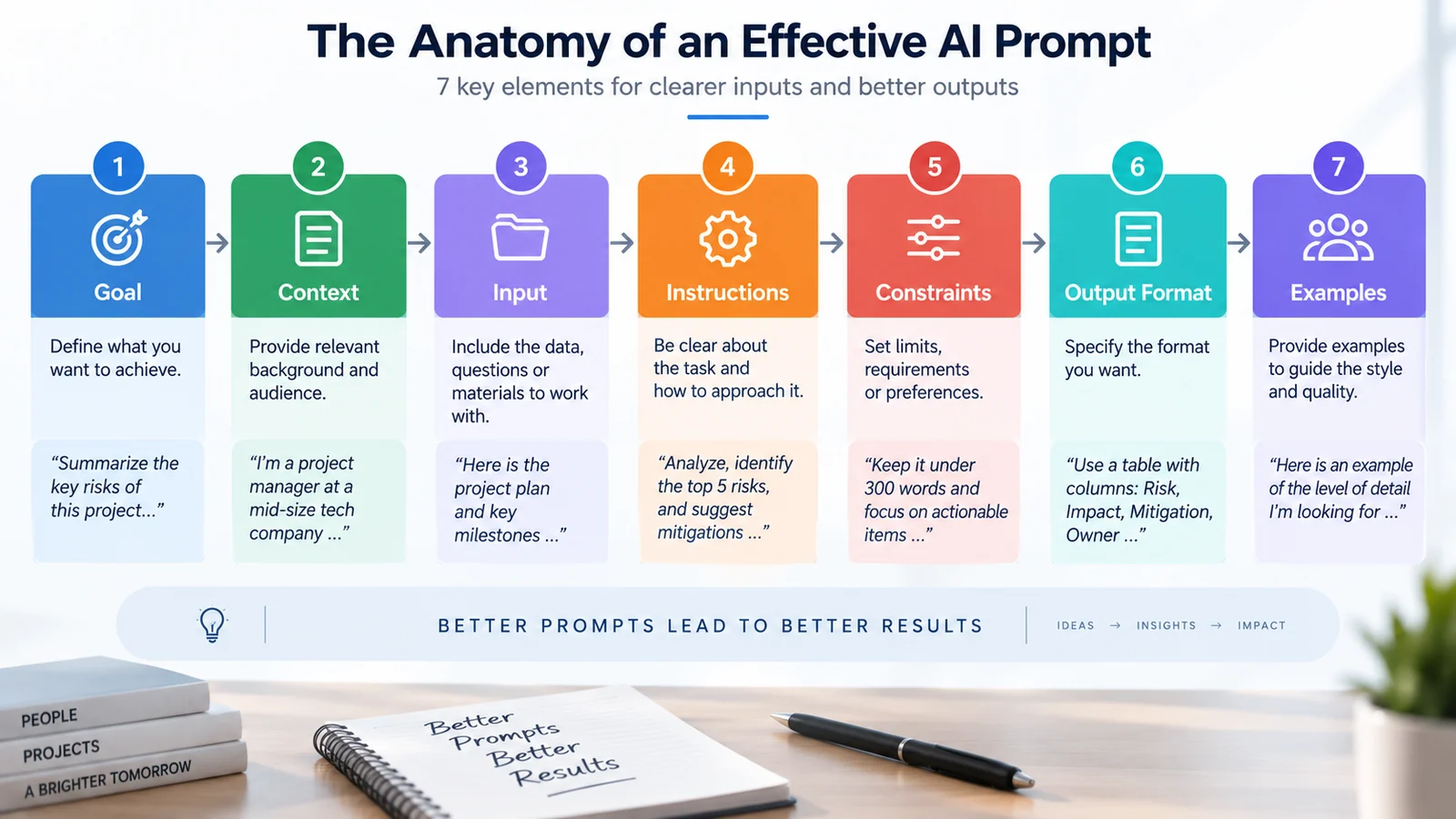
The 7 Elements of an Effective AI Prompt
Not every prompt requires all seven elements. For complex tasks, however, this framework provides a useful starting point.
Goal + Context + Input + Instructions + Constraints + Output Format + Examples
1. Goal
Start by defining the result you want.
Instead of:
Tell me about Agile.
Try:
Explain the main differences between Agile and Waterfall project management.
The second version gives the system a clearer objective.
2. Context
Context explains the situation surrounding the request.
For example:
I am preparing a short presentation for business managers who understand project management but have limited experience with Agile.
This information can influence terminology, depth and examples.
3. Input
Provide the material the system needs to work with whenever possible.
This might include:
- A document
- A table
- Meeting notes
- A draft
- Requirements
- Source text
- Structured data
Providing relevant source material can often be more useful than simply making a prompt longer.
4. Instructions
Tell the system what it should do with the information.
Useful instructions might include:
- Summarize
- Compare
- Classify
- Explain
- Rewrite
- Extract
- Evaluate
- Generate
Use precise verbs that describe the required task.
5. Constraints
Constraints define important boundaries.
For example:
Keep the explanation below 500 words. Use simple English. Focus only on enterprise networking. Do not include consumer examples.
Useful constraints can prevent the response from expanding into areas you do not need.
6. Output format
Tell the system how the result should be organized.
For example:
- Bullet points
- Table
- Executive summary
- Presentation outline
- Checklist
- JSON or another structured format when appropriate
Formatting instructions can make an answer immediately usable in the next stage of a workflow.
7. Examples
When format or style is difficult to describe precisely, examples can demonstrate what you expect.
This is particularly useful for repetitive tasks.
A Simple AI Prompting Template
For many professional tasks, the following structure is enough:
Goal: [What should be accomplished?]
Context: [What background information is relevant?]
Input: [What information should the AI work with?]
Instructions: [What should it do?]
Constraints: [What boundaries should it respect?]
Output: [How should the answer be structured?]
You do not need to use these labels every time. Their purpose is to help ensure that important information is not forgotten.
Basic vs Structured AI Prompts
Compare these two requests.
Basic prompt
Write a project status report.
Structured prompt
Create a weekly project status report for senior management using the project information below.
Summarize progress, completed milestones, upcoming milestones, major risks, decisions required and next steps.
Use a professional and concise tone. Do not invent missing information. Clearly mark any information that requires confirmation.
Format the response with six short sections and keep it below 700 words.
The second prompt defines the task, audience, structure and boundaries much more clearly.
Give the AI an Audience
Specifying the intended audience can be more useful than simply asking the model to “act as” a person.
For example:
Explain Zero Trust networking to a CIO who understands enterprise IT but does not need implementation-level configuration details.
Or:
Explain the same concept to a university student studying networking for the first time.
The underlying topic is identical, but the appropriate terminology and depth are different.
Should You Give AI a Role?
Role instructions can sometimes help establish perspective, expertise level or style.
For example:
Review this project plan from the perspective of an experienced program manager. Identify unclear dependencies, assumptions and risks.
Project managers looking for ready-to-use examples can also explore our 50 AI prompts for project managers covering planning, risk management, stakeholders, reporting, meetings, Agile and governance.
This does not literally change the model's personality or turn it into the professional being described.
It provides additional context about the type of analysis expected.
When possible, describe the actual task and evaluation criteria rather than relying only on “Act as...” instructions.
Use Clear Constraints
Constraints can significantly improve usability.
You can specify:
- Length
- Audience
- Scope
- Tone
- Language
- Required topics
- Excluded topics
- Formatting
For example:
Explain SASE in fewer than 300 words for an IT manager. Cover SD-WAN, SSE and Zero Trust. Avoid vendor-specific products and finish with three key takeaways.
Good constraints reduce ambiguity without unnecessarily restricting the model.
Specify the Output Format
One of the simplest ways to improve a prompt is to specify what the final answer should look like.
For example:
Compare SD-WAN and MPLS in a table with columns for architecture, performance, flexibility, cloud connectivity, security considerations and typical use cases.
A presentation:
Create an eight-slide presentation outline. For each slide, provide a title, three key points and one suggested visual.
An email:
Write a client email with a subject line, greeting, message and closing. Keep the body below 150 words.
What Is Zero-Shot Prompting?
Zero-shot prompting means asking a model to perform a task without providing examples of the expected answer.
For many straightforward tasks, this is sufficient.
Example:
Classify the following customer comment as positive, neutral or negative: [comment]
The instruction itself explains the task.
What Is Few-Shot Prompting?
Few-shot prompting provides examples that demonstrate the expected relationship between inputs and outputs.
For example:
Classify each message as Billing, Technical Support or Sales.
Example: “I was charged twice this month.” → Billing
Example: “My connection keeps disconnecting.” → Technical Support
Now classify: “Can you tell me the price of the business plan?”
Examples can help establish categories, style or formatting more clearly than lengthy explanations.
Use Delimiters to Separate Instructions and Data
When a prompt contains source material, clearly separate the instructions from the content being analyzed.
For example:
Summarize the document between the <document> tags. Use only information from the document. If an answer is not supported by the source, say that it is not available.
<document>
[document content]
</document>
This makes the structure of the request easier to interpret.
Prompting With Source Material
For research and document-based tasks, provide reliable sources whenever possible.
A useful instruction is:
Answer using only the attached source material. Distinguish clearly between information supported by the sources and any additional inference. If the sources do not contain enough information, say so rather than guessing.
This does not guarantee correctness, but it can make the expected evidence boundary much clearer.
Break Complex Tasks Into Stages
Large tasks can sometimes be easier to manage when divided into smaller stages.
For example, instead of requesting an entire business report immediately, you might use:
Research → Outline → Draft → Review → Final Version
For a blog article:
- Identify the search intent
- Create the outline
- Review the structure
- Draft the article
- Check factual claims
- Improve readability
- Prepare the final version
This approach is often called prompt chaining.
Ask for a Concise Rationale When Needed
For analytical tasks, it can be useful to ask the system to explain the basis for its recommendation in a concise, checkable form.
For example:
Recommend the best option based on the criteria above. Give the recommendation first, followed by the three most important reasons and any assumptions that materially affect the answer.
This is generally more useful than requiring the system to expose an extensive internal reasoning process.
Use Iterative Prompting
Your first prompt does not need to produce the final result.
Iteration is often one of the most effective techniques.
For example:
The explanation is too technical. Rewrite it for a business audience while preserving the technical meaning.
Or:
The structure is good, but the introduction is too long. Reduce it to two paragraphs and move the technical detail into the next section.
Specific feedback is more useful than simply saying “make it better.”
Ask the AI to Identify Missing Information
When a task depends on important information that may be missing, tell the system how to handle the gap.
For example:
Before preparing the project plan, identify any critical information missing from the requirements. Do not invent dates, budgets or responsibilities that have not been provided.
This can reduce unnecessary assumptions.
AI Prompting for Writing
For writing tasks, specify:
- Purpose
- Audience
- Key message
- Tone
- Length
- Format
- Required facts
Example:
Write a LinkedIn post for technology leaders about why AI adoption is an organizational transformation challenge, not just a technology project.
Audience: CIOs, CTOs and transformation leaders.
Tone: professional and thoughtful.
Length: 150–200 words.
Start with a strong observation, include three practical considerations and finish with a question for discussion.
AI Prompting for Research
AI can assist with research, but users should distinguish between generating an explanation and verifying information.
A useful research prompt might say:
Research this topic using reliable sources. Separate established facts from interpretation. Include publication dates for time-sensitive claims and identify areas where reliable sources disagree.
If the AI system has access to web search, connected files or databases, those capabilities can provide information beyond the model's pretrained knowledge.
Whether current information is available therefore depends on the specific AI product, configuration and tools—not simply on a universal knowledge cutoff.
AI Prompting for Summarization
Instead of asking only:
Summarize this document.
Specify what matters:
Summarize this document for senior management. Focus on decisions, financial impact, major risks and actions required. Keep the summary below 400 words and do not add information that is not supported by the document.
AI Prompting for Data Analysis
For analytical work, explain the objective and what the data represents.
For example:
Analyze the attached monthly performance data. Identify the three largest changes, any unusual patterns and possible questions that should be investigated.
Do not assume that correlation demonstrates causation. Separate observations from possible explanations.
Return the result as a short executive summary followed by a table.
AI Prompting for Project Management
Project managers can use generative systems to support activities such as:
- Status reporting
- Meeting preparation
- Risk identification
- Action tracking
- Stakeholder communications
- Document summarization
- Requirements analysis
Example:
Review the following project status information and prepare a weekly steering-committee update.
Organize the output into: Overall Status, Achievements, Upcoming Milestones, Risks, Issues, Decisions Required and Next Steps.
Do not create missing dates or status information. Mark incomplete information as “Confirmation required.”
Project managers looking for ready-to-use examples can explore our 50 AI prompts for project managers, covering planning, risks, stakeholders, reporting, RACI, Agile and governance.
Risk analysis is one of the project-management workflows where prompt structure and human validation matter most. See our practical AI project risk management workflow for examples covering risk discovery, analysis, responses and monitoring.
AI Prompting for Brainstorming
Brainstorming prompts work better when they include criteria.
Instead of:
Give me ideas for improving employee collaboration.
Try:
Generate 10 practical ideas for improving collaboration in a distributed technology team.
Prioritize ideas that can be piloted within 30 days without purchasing new software. For each idea, provide expected benefit, implementation effort and one potential limitation.
AI Prompting for Software Development
For coding assistance, provide relevant technical context.
Useful information can include:
- Programming language
- Framework
- Environment
- Expected behavior
- Existing code
- Error messages
- Constraints
- Required tests
AI-generated code should still be reviewed and tested before being used in production.
AI Prompting for Learning
Generative systems can also support learning when prompts define the learner's current level and objective.
For example:
Teach me the basics of SD-WAN. Assume I understand IP routing and enterprise WANs but have never worked with SD-WAN.
Start with the architecture, then explain overlays, underlays, centralized policy and application-aware routing. After each section, give me three questions to check my understanding.
AI Prompting and ChatGPT
The same general principles apply when using conversational AI applications such as ChatGPT. If you are deciding which assistant best fits a particular workflow, our ChatGPT vs Gemini vs Claude comparison provides a practical side-by-side view.
Clear goals, relevant context, source material, constraints and output requirements can make conversations more productive.
For practical product-specific workflows, see our guide on how to use ChatGPT.
AI Prompting and Artificial Intelligence
Prompting is only one part of the broader artificial intelligence landscape.
Generative AI applications are built on models and systems whose behavior also depends on training, architecture, available context, tools, configuration and governance. In project environments, project AI governance controls can help teams make human validation and accountability explicit.
Our Artificial Intelligence guide explains how AI, machine learning, deep learning, generative AI and AI agents relate to one another.
AI Prompting and Agentic AI
Prompting is also changing as systems become more agentic.
A traditional interaction is often:
Prompt → Response
An agentic workflow can be:
Goal → Plan → Tools → Actions → Feedback → Adaptation
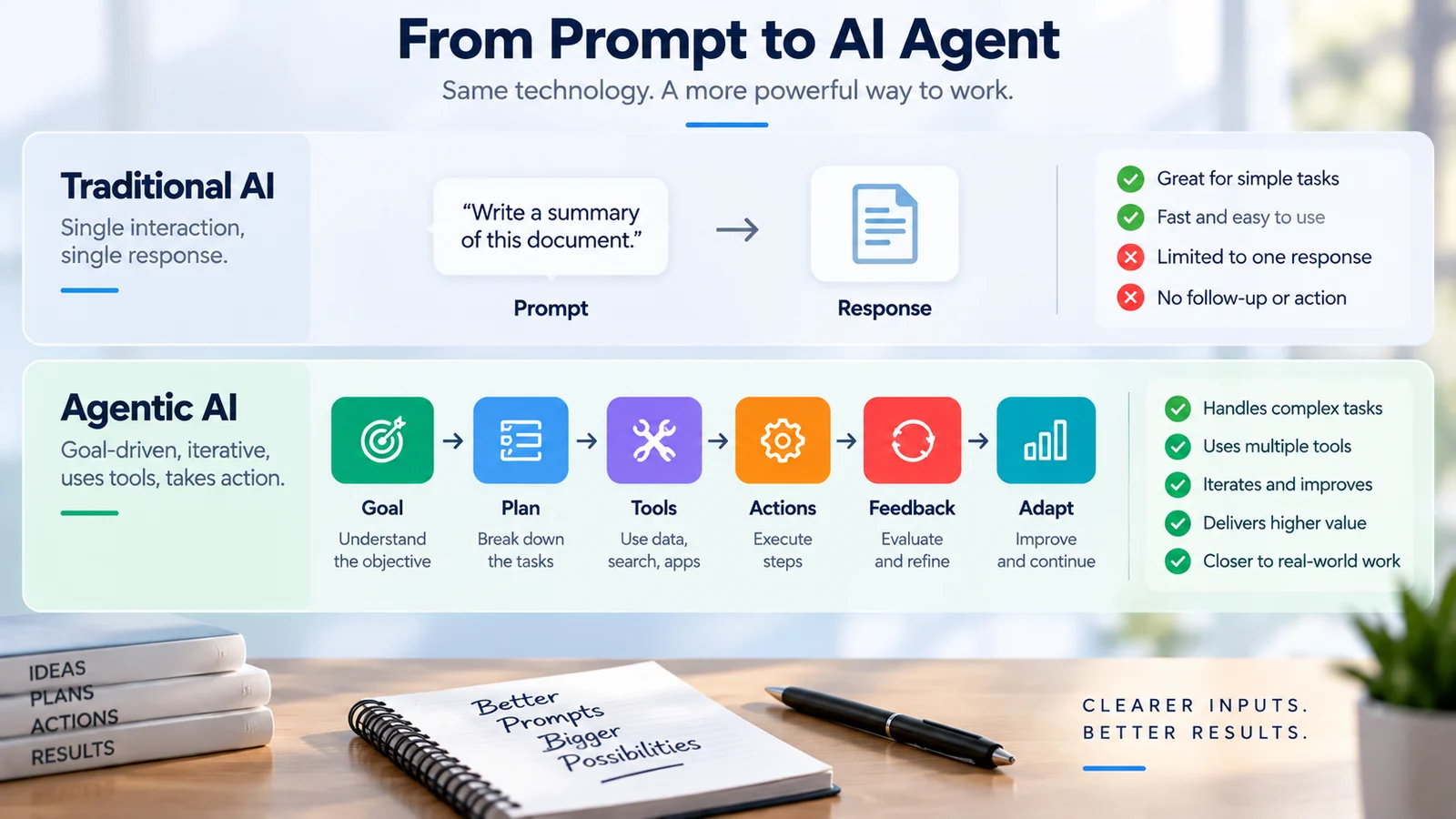
Instead of describing every individual step manually, a user may define the objective, constraints and permissions while an agent coordinates parts of the workflow.
Our Agentic AI guide explains how AI agents use planning, tools, permissions and feedback to perform multi-step tasks.
Common AI Prompting Mistakes
Being too vague
“Write a report” provides little information about the objective, audience or structure.
Adding unnecessary detail
More words do not automatically create a better prompt.
Include information that helps define the task rather than filling the prompt with irrelevant instructions.
Using conflicting instructions
A prompt might simultaneously ask for a detailed explanation and an extremely short response.
Make priorities clear when requirements compete.
Assuming the model knows your context
The system may not know your organization's terminology, project history or intended audience unless that information is provided or available through connected context.
Asking for facts without verification
Generative models can produce incorrect or unsupported information.
Important factual claims should be checked against appropriate sources.
Trying to solve every problem with one giant prompt
Complex workflows can often be easier to manage as several clearly defined stages.
Assuming the prompt controls everything
The final result can also depend on the model, system instructions, available tools, retrieved information and product configuration.
How to Verify AI-Generated Information
Verification should match the importance of the task.
For factual work:
- Ask for sources when the system can retrieve them
- Open and inspect important sources yourself
- Check dates for time-sensitive information
- Compare critical claims with authoritative references
- Distinguish facts from recommendations
- Check calculations when accuracy matters
AI-generated confidence is not evidence of correctness.
Privacy and Confidential Information
Before entering sensitive information into an AI service, understand the policies and controls of the specific service being used.
Data handling varies by product, account type, configuration and organizational agreement.
Organizations should establish policies covering information such as:
- Personal data
- Customer information
- Credentials
- Confidential documents
- Intellectual property
- Internal financial information
Do not assume either that every AI service trains on everything entered into it or that every service automatically keeps all inputs private. Check the applicable service and organizational policy.
Prompt Injection and Untrusted Content
Prompting also has a cybersecurity dimension when AI applications process information from external or untrusted sources.
Instructions embedded in documents, websites or other content can potentially interfere with the intended behavior of an AI-enabled application.
This type of risk is commonly known as prompt injection.
Developers and organizations building AI applications should therefore treat untrusted input carefully and use appropriate security controls rather than relying only on instructions written into a prompt.
Responsible Use of Generative AI
Effective prompting cannot eliminate every limitation or risk associated with generative systems.
Organizations also need broader controls covering areas such as:
- Accuracy and validation
- Security
- Privacy
- Human oversight
- Data governance
- Access control
- Monitoring
- Accountability
The NIST Generative AI Profile provides a broader risk-management perspective for organizations developing or using generative AI systems.
For a wider introduction to digital security, see our cybersecurity guide.
Quick AI Prompt Checklist
Before sending an important prompt, check these seven questions:
- Goal: Is the desired outcome clear?
- Context: Does the AI have the background it needs?
- Input: Have you provided the relevant source material or data?
- Instructions: Is the required task expressed with precise verbs?
- Constraints: Are the important boundaries, exclusions and quality requirements clear?
- Output: Have you specified the format, structure or length you need?
- Verification: Have you identified which claims or outputs require human review?
How to Improve an AI Prompt Step by Step
A practical optimization process is:
- Define the outcome. What exactly should the system produce?
- Add relevant context. What does it need to understand?
- Provide the input. What material should it use?
- Clarify instructions. What should it do with the input?
- Add useful constraints. What boundaries matter?
- Define the output format. What should the answer look like?
- Add examples when useful. Can an example clarify expectations?
- Review the result. What specifically needs improvement?
- Verify important information. Which claims require checking?
A Reusable Professional AI Prompt Template
Objective
I need you to [describe the required outcome].Context
[Provide the relevant background, audience and purpose.]Input
[Provide the information or source material to work with.]Instructions
[Explain what should be analyzed, created, compared or transformed.]Constraints
[Specify scope, length, tone, exclusions or other boundaries.]Output format
[Specify sections, bullets, table, email, report or another format.]Quality requirements
Do not invent missing facts. Identify important assumptions and distinguish sourced information from inference where relevant.
Does Prompt Engineering Still Matter?
As models become more capable, users may need less elaborate wording for straightforward tasks.
That does not make clear communication irrelevant.
In professional environments, the important skill is increasingly broader than discovering clever prompt phrases.
It includes:
- Defining the problem
- Providing appropriate context
- Selecting reliable sources
- Structuring workflows
- Evaluating outputs
- Managing risk
- Knowing when human judgment is required
Prompting is therefore becoming part of a broader discipline of effective human-AI collaboration.
The Future of AI Prompting
Prompting is evolving from individual questions toward richer interactions with systems that can access tools, documents and applications.
Users may increasingly describe outcomes rather than every individual action required to achieve them.
At the same time, organizations will need stronger methods for defining:
- Objectives
- Permissions
- Constraints
- Trusted information sources
- Approval points
- Evaluation criteria
This makes effective communication with AI systems more important, not less—but the emphasis moves from finding “magic words” toward designing clear objectives, context and workflows.
Frequently Asked Questions About AI Prompting
What is AI prompting?
AI prompting is the practice of providing instructions, context or information to an AI system so that it can generate a useful response or perform an intended task.
What makes a good AI prompt?
A good prompt clearly communicates the objective and provides the context, input, instructions, constraints and output requirements that are relevant to the task.
Do longer prompts produce better answers?
Not necessarily. Relevant information is more important than length. An unnecessarily long prompt can contain redundant or conflicting instructions.
What is prompt engineering?
Prompt engineering is the systematic process of designing, testing and improving prompts or instructions for AI systems, particularly when prompts are reused within applications or workflows.
What is zero-shot prompting?
Zero-shot prompting asks a model to perform a task without first providing examples of the expected answer.
What is few-shot prompting?
Few-shot prompting provides several examples that demonstrate the expected input-output pattern, style or format.
What is prompt chaining?
Prompt chaining divides a larger task into multiple stages where the result of one stage can inform the next.
Should I tell AI to act as an expert?
Role instructions can provide useful context about perspective or expertise, but they do not literally transform the model into that professional. Clear task requirements and evaluation criteria are usually more important.
Should I ask AI to think step by step?
For difficult tasks, it can be more useful to ask for a concise explanation, assumptions, evidence or a checkable rationale rather than requiring an extensive internal reasoning transcript.
Can AI prompts guarantee accurate answers?
No. Better instructions can improve relevance and clarity, but they cannot guarantee factual accuracy. Important information should still be verified.
Can AI access current information?
It depends on the product and configuration. Some systems can search the web or access connected sources, while others rely primarily on information available within the model and conversation context.
Is it safe to enter confidential information into AI?
That depends on the service, account configuration, organizational agreement and applicable policy. Users should understand how a particular system handles data before providing sensitive information.
How is prompting different for AI agents?
With an agent, users may define a goal, boundaries and permissions while the system plans and performs multiple authorized steps. This makes controls, monitoring and human oversight increasingly important.
Conclusion
Effective AI prompting is primarily about communicating clearly with an AI system.
You do not need secret commands or complicated formulas.
For many tasks, the following framework provides an excellent starting point:
Goal + Context + Input + Instructions + Constraints + Output Format + Examples
Start with the outcome you need, provide relevant context, clearly define the task and specify how the result should be structured.
Then iterate.
Review the output, provide specific feedback and verify important information.
As generative AI evolves toward systems capable of using tools and performing multi-step workflows, prompting will increasingly become part of a broader skill: designing effective collaboration between people and intelligent systems.
To go beyond prompt technique and build broader professional and technical ChatGPT workflows, explore ChatGPT Unlocked: From Fundamentals to Advanced Applications.
Continue Learning
Continue exploring practical AI, prompting and project-management workflows with these related TechTeamSynergy guides.
Comments are closed.