
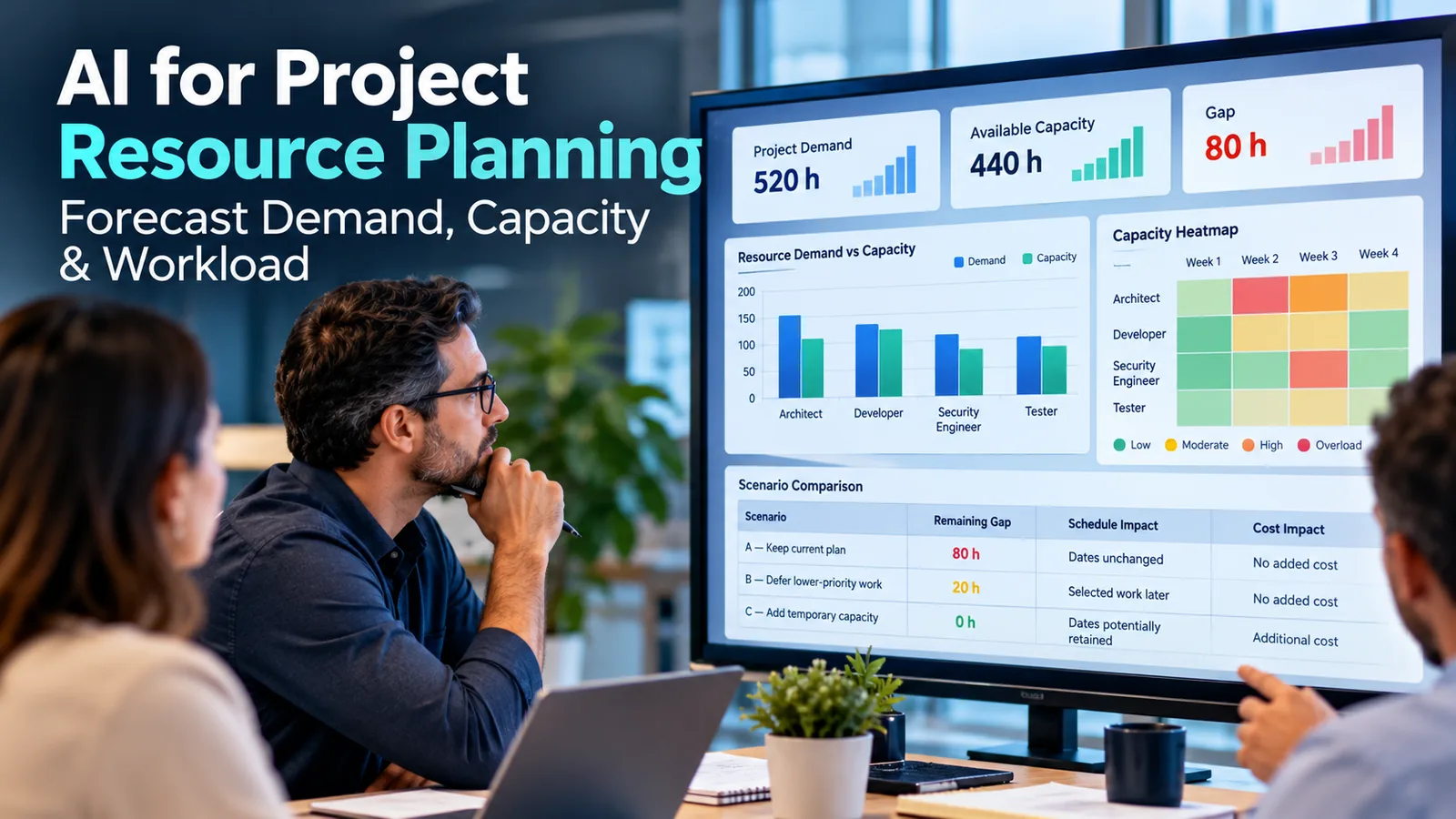
AI for project resource planning helps project managers forecast staffing demand and compare it with realistic team capacity. Several projects may need the same architect next month, while delivery dates move, estimates remain incomplete, and operational support, leave, and existing commitments reduce actual availability.
To address these competing demands, project managers can use AI-assisted analysis to consolidate forecasts, assess realistic capacity, identify skills shortages, and compare staffing responses. For example, AI can highlight conflicts and challenge assumptions. However, people must make the final project staffing decisions.
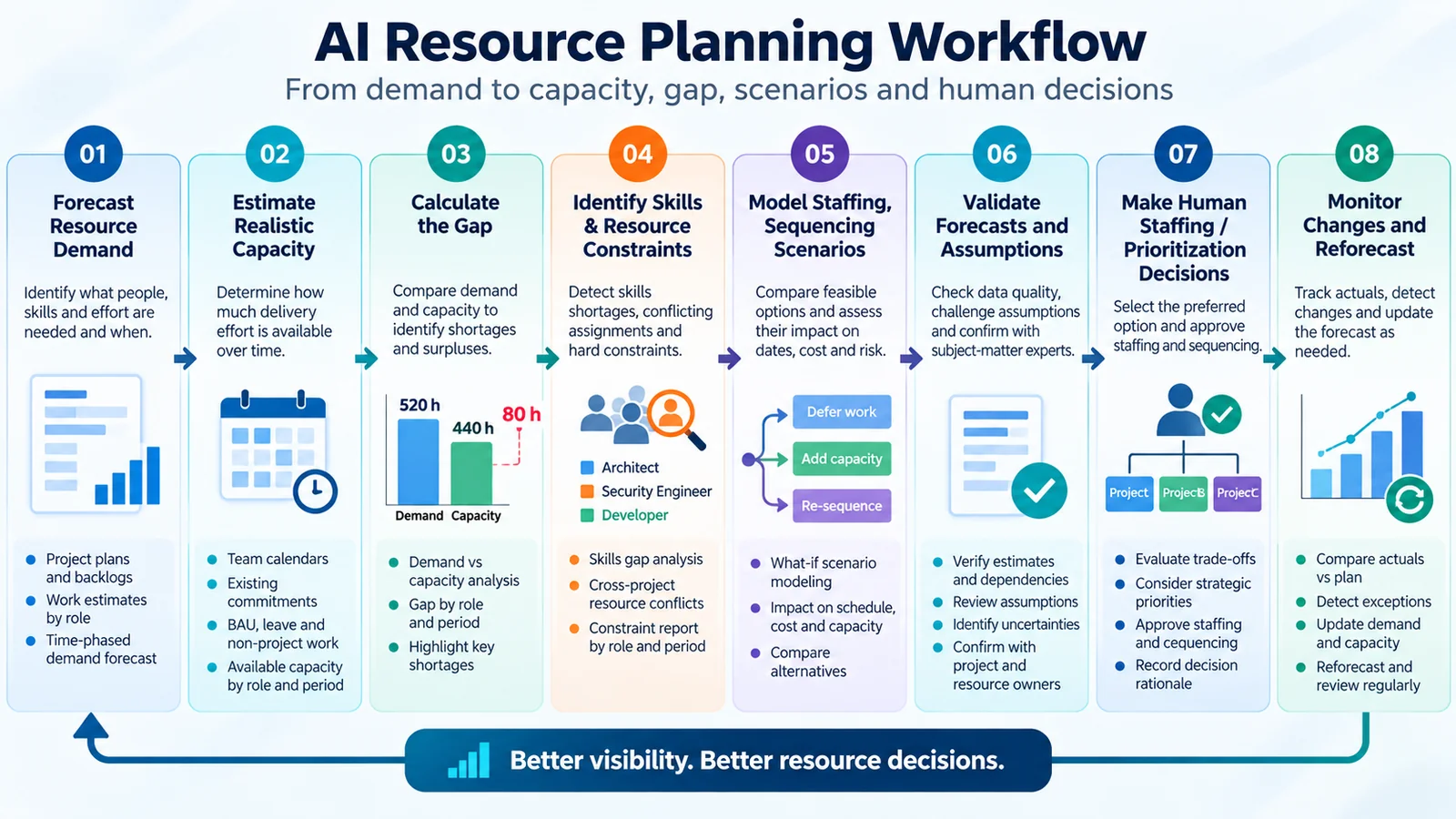
In practice, the approach is straightforward: forecast demand, estimate capacity, calculate the gap, compare scenarios, and make a human-approved decision. This guide explains that process for individual projects and PMOs managing shared resources across a portfolio.
AI for Project Resource Planning at a Glance
| Planning step | Key question | How AI helps | Human decision |
|---|---|---|---|
| Demand | What effort is required? | Consolidates estimates | Confirm scope |
| Capacity | What effort is available? | Highlights commitments | Approve assumptions |
| Gap | Where are shortages? | Identifies differences | Validate constraints |
| Skills | Which roles are missing? | Matches role requirements | Verify competence |
| Scenarios | What could change? | Compares alternatives | Select feasible options |
| Decision | What should we do? | Summarizes trade-offs | Approve staffing |
| Monitoring | Has the situation changed? | Detects exceptions | Reforecast |
Therefore, the objective is not to maximize automated assignments. Instead, teams should make resource decisions earlier, using consistent information.
What Is AI-Assisted Project Resource Planning?
AI-assisted project resource planning combines structured project information with AI techniques to support forecasts and resource decisions. Traditional planning uses schedules, staffing tables, estimates, and calendars. In addition, AI can analyze these inputs, identify inconsistent assumptions, surface patterns, and explain possible outcomes. The resource model still needs reliable data and valid calculations: a convincing AI explanation does not prove that its forecast is correct.
Resource Planning vs Capacity Management, Allocation and Workload
Resource planning identifies which people, roles, skills, and effort a project needs, and when. Capacity management determines realistic available delivery effort. Resource allocation assigns approved capacity to work. Workload management balances existing assignments. Forecasting estimates future demand, capacity, and resulting gaps.
For example, knowing that a project requires 120 security-engineering hours is resource planning. By contrast, determining that only 80 suitable hours are available is capacity management. Finally, assigning an engineer to cover part of the requirement is allocation.
What AI Analyzes—and What Humans Decide
AI can consolidate resource demand, identify conflicting commitments, detect missing estimates, and compare scenario assumptions. However, managers must still verify whether specialists have the right experience, whether assignments are appropriate, and whether schedule changes are acceptable. Ultimately, staffing approval, priorities, sensitive employment decisions, and final accountability remain human responsibilities.
For broader lifecycle context, see our complete guide to AI in project management.
Why Resource Planning Becomes Difficult Across Projects
A basic resource plan may work well for one project. However, difficulties increase when several projects depend on the same specialists. For example, managers may assign an architect to a migration, an infrastructure upgrade, and a security review. Consequently, individual project managers may overlook commitments recorded by other teams.
In addition, uncertain estimates, changing milestones, operational support, training, planned leave, and specialist dependencies complicate the forecast. Calendar availability can also mislead managers. For instance, someone may work a nominal 40-hour week but have substantially fewer hours for project delivery.
Moreover, frequent context switching makes nominal capacity less dependable. As a result, a portfolio may appear fully staffed while being unable to execute its highest-priority work on time. The solution is a shared view of required effort, realistic capacity, and competing commitments, reviewed at appropriate intervals.
AI for Project Resource Planning: Demand vs Capacity
Resource Demand, Available Capacity and the Planning Gap
Resource demand represents the effort needed to deliver planned work during a particular period. By comparison, available capacity represents the realistic effort suitably skilled resources can contribute during that same period. Therefore, the basic calculation is Demand Gap = Required Effort − Available Capacity.
A positive result indicates a shortage. Conversely, a negative result suggests spare capacity. However, managers cannot always transfer those hours to another skill or project.
Why Calendar Hours Are Not Productive Capacity
Available Capacity = Calendar Hours − Non-Project Commitments − Known Unavailable Hours. Non-project commitments can include business-as-usual operations, support responsibilities, administration, and training. Similarly, approved leave reduces available delivery hours. However, these categories must not overlap: if a calendar already excludes leave, the same hours must not be deducted again.
Therefore, managers should not assume a universal utilization percentage. PMI’s resource management case study explains how teams match skill requirements and reassess staffing over time; it does not establish an AI-specific standard.
Illustrative Demand-Capacity Calculation
Suppose four projects collectively need 520 hours during a defined four-week planning period. After accounting for existing commitments and unavailable time, the team therefore has realistic capacity of 440 hours.
| Measure | Hours |
|---|---|
| Required project demand | 520 |
| Available delivery capacity | 440 |
| Demand-capacity shortage | 80 |
The capacity coverage ratio is 440 ÷ 520 × 100 ≈ 84.6%. This is an illustrative example, not an industry benchmark or recommended utilization target. However, an 80-hour total shortage does not reveal which skills are constrained: spare development capacity cannot automatically cover a security engineer’s critical milestone.
An Eight-Step AI for Project Resource Planning Workflow
The following TechTeamSynergy framework shows how to apply AI for project resource planning using conventional planning discipline and AI-assisted analysis. It is a practical editorial workflow, not a PMI or NIST standard.
Step 1: Forecast Resource Demand from Projects and Backlogs
Begin by establishing what each project needs during the planning horizon. For instance, useful inputs include schedules, roadmaps, backlogs, work-package estimates, milestones, approved pipeline opportunities, and historical effort records. Next, teams should express demand in consistent units—usually hours or person-days—and group it by period and required role.
For example, a network modernization project may need architecture effort during design, implementation engineers during deployment, and security specialists before release. AI can assist by extracting resource assumptions from documents, consolidating inconsistent role names, identifying missing estimates, and highlighting unusual changes.
If one project requests a security engineer while another describes a cybersecurity specialist, AI may suggest a common category. Nevertheless, a project manager must confirm whether the skills are genuinely equivalent. Output: a demand forecast by project, period, and role, with uncertainty visible.
Step 2: Estimate Realistic Capacity from Calendars and Commitments
Start with approved team calendars and existing staffing commitments. In addition, account for planned leave, training, operational work, support responsibilities, and previously approved projects. For teams supporting live technology services, business-as-usual obligations may consume substantial capacity. Otherwise, the forecast overstates availability.
For instance, AI can reconcile calendars, identify conflicting data, and flag unusual availability patterns. Nevertheless, an empty calendar slot does not confirm that an employee is available. Team leads or resource managers must validate capacity before planning assignments.
Output: available delivery hours by role and period, with assumptions recorded and non-project commitments accounted for once.
Step 3: Calculate Gaps by Period
In AI for project resource planning, gap calculations still require consistent units and time buckets. First, assess the portfolio. Then examine individual roles and weeks or months. Consider the following distribution of the approved fictional 520-hour demand.
| Period | Demand | Capacity | Gap |
|---|---|---|---|
| Week 1 | 110 h | 110 h | 0 h |
| Week 2 | 150 h | 110 h | +40 h |
| Week 3 | 140 h | 110 h | +30 h |
| Week 4 | 120 h | 110 h | +10 h |
| Total | 520 h | 440 h | +80 h |
AI can highlight the largest shortages, identify trends, and explain which projects drive the increase. However, teams should calculate the underlying differences with validated formulas or a planning engine rather than trusting a language model’s arithmetic. Output: a time-phased shortage and surplus view.
Step 4: Identify Skills Shortages and Cross-Project Conflicts
Hours alone do not deliver projects. In addition, the right capabilities must be available at the right time. For example, a portfolio may have spare development capacity but still lack the security engineer required for a critical release. Compare role requirements with an approved skills inventory and identify overlapping assignments.
Project Alpha and Project Beta may both need the same architect during Week 2, while Project Gamma requires that architect for a design review immediately afterward. As a result, AI can flag the conflict and display its consequences. However, managers must consider approved business commitments before deciding which project takes priority.
Consequently, managers should use skills information to establish role coverage, not to create unverified employee rankings. Output: a role-level shortage report and cross-project conflicts requiring resolution.
Step 5: Model Staffing, Sequencing and Capacity Scenarios
After identifying constraints, compare feasible responses. For example, teams might move lower-priority work, change task sequence, reduce scope, reassign qualified capacity, cross-train, or obtain approved temporary resources. AI can help structure these alternatives and summarize potential effects.
For each scenario, recalculate the remaining gap and record schedule, budget, skills, and dependency implications. For instance, deferring a noncritical work package may reduce a shortage without adding staffing cost. Alternatively, temporary specialist capacity might preserve a date but require spending, access approvals, and onboarding.
Nevertheless, not every scenario is feasible: a contractor may lack availability, or a contractual deadline may prevent resequencing. Output: a scenario comparison with explicit consequences and assumptions.
Step 6: Validate Forecasts and Assumptions with Humans
Before relying on AI-generated analysis, project managers and experts must challenge its assumptions. They should verify effort estimates, delivery assumptions, role requirements, availability, dependencies, and data completeness. Moreover, historical patterns are useful only when the previous work is genuinely comparable.
For example, a standard server deployment and a complex network transformation may share role names but not effort profiles. Ask: What has been assumed? Which inputs are confirmed? What is missing? Which recommendations fail if assumptions change?
Therefore, uncertain estimates should remain visible. Output: a reviewed forecast with accepted assumptions, unresolved uncertainties, and documented corrections.
Step 7: Approve Staffing and Prioritization Decisions
Authorized managers should select the preferred option using both resource data and organizational context. For example, a mathematically efficient scenario may conflict with customer commitments, regulatory milestones, strategic priorities, or team-specific knowledge.
For instance, a lower-cost option may delay a launch; meanwhile, a contractor may close a numerical gap but introduce onboarding or security constraints. AI can present trade-offs, but should not independently assign people, approve hiring, evaluate employee worth, or override priorities.
Record the approved option, accountable owner, assumptions, expected consequences, and next review point. Output: a human-approved decision supported by a traceable rationale.
Step 8: Monitor Changes and Reforecast
As conditions change, project teams must revise resource plans. Common triggers include new projects, scope changes, delayed milestones, supplier issues, changes in approved availability, unexpected operational work, and revised priorities.
AI can compare updated resource data with the approved baseline, flag unusual changes, and prepare assumptions for review. For this reason, a recurring PMO review can combine demand changes, capacity updates, major skills constraints, and pending decisions.
Forecast outputs may also feed AI-assisted project status reporting, where verified concerns are communicated to stakeholders. Output: a refreshed and approved forecast rather than a static staffing plan.
Worked Example: AI-Assisted Capacity Planning Across Projects
Consider a fictional PMO coordinating four initiatives over the same four-week planning period: Project Alpha (network modernization), Project Beta (customer platform upgrade), Project Gamma (security controls implementation), and Project Delta (reporting automation). All four share architects, developers, security engineers, and testers.
Baseline: Four Projects Sharing Specialist Roles
| Role | Demand | Capacity | Gap |
|---|---|---|---|
| Architect | 160 h | 110 h | +50 h |
| Developer | 140 h | 140 h | 0 h |
| Security Engineer | 120 h | 90 h | +30 h |
| Tester | 100 h | 100 h | 0 h |
| Total | 520 h | 440 h | +80 h |
Identify the Bottleneck and Calculate the Shortage
The 80-hour shortage is concentrated in architecture and security. AI can help identify project activities depending on these roles, assignments that overlap, and tasks that could be resequenced. Therefore, the PMO must not treat available developer hours as interchangeable with architecture or security capacity.
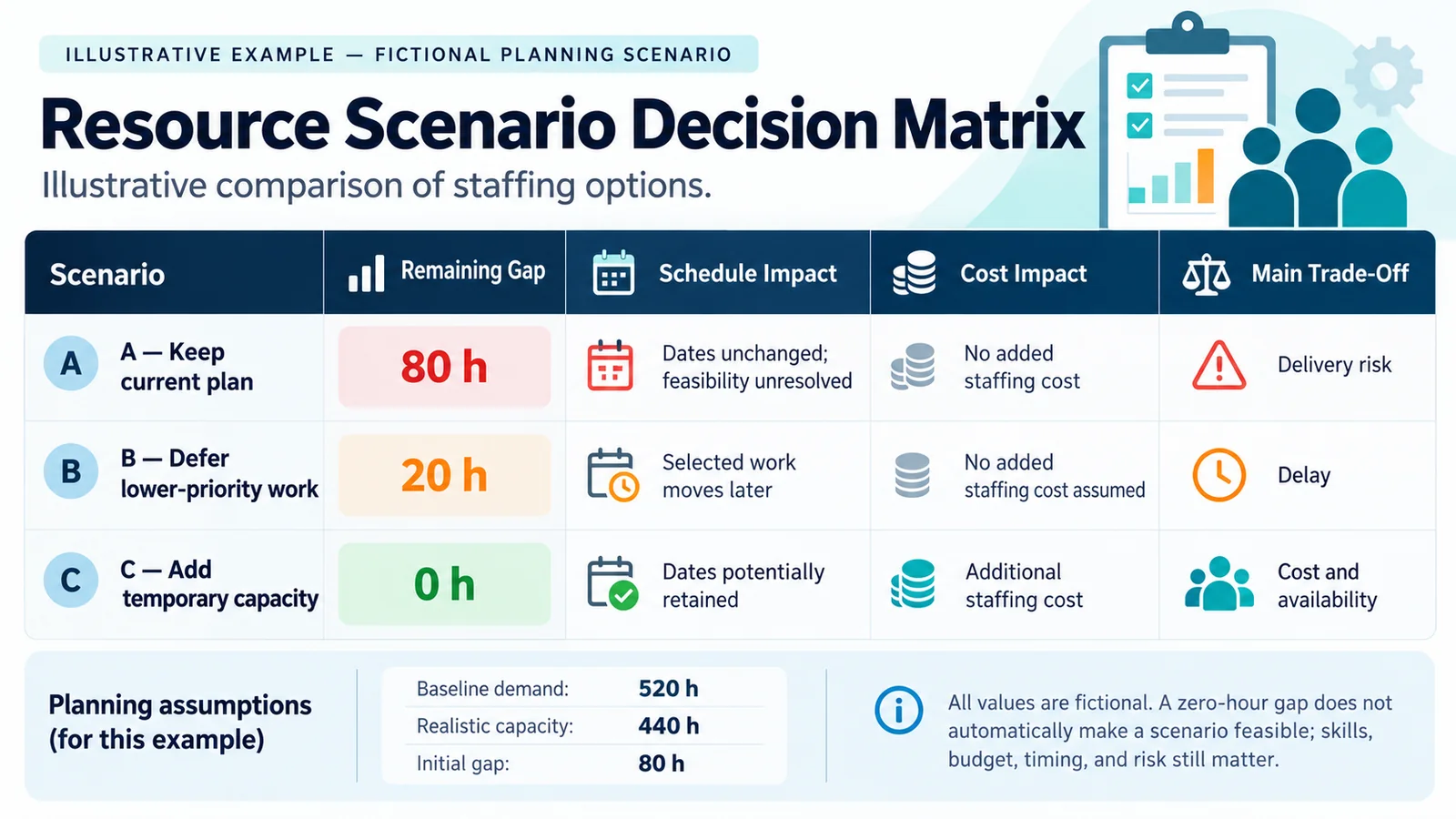
Compare Three What-If Scenarios
| Scenario | Remaining gap | Schedule impact | Cost impact | Main trade-off |
|---|---|---|---|---|
| A — Keep current plan | 80 h | Dates unchanged, shortfall unresolved | None added | Delivery feasibility |
| B — Defer lower-priority work | 20 h | Selected work moves later | No added staffing cost assumed | Delay |
| C — Add temporary capacity | 0 h | Dates potentially maintained | Additional staffing cost | Availability and cost |
All numbers are fictional. Scenario B assumes 60 hours of demand move outside the planning period. Scenario C assumes 80 hours of suitably skilled capacity can be secured within the period. A zero-hour gap does not guarantee delivery feasibility.
Select an Option with Human Review
Scenario C closes the numerical gap, but that does not automatically make it the best choice. The PMO must verify that temporary capacity matches required skills, can start when needed, and is financially approved. Alternatively, Scenario B may be preferable if deferred work has lower strategic value and no contractual deadline.
The preferred decision should reflect feasibility, priorities, costs, and practical constraints—not only the smallest remaining gap.
AI for Project Resource Planning: Project vs PMO
| Dimension | Project level | PMO / portfolio level |
|---|---|---|
| Planning horizon | Project phases and milestones | Cross-project planning periods |
| Demand | Individual project requirements | Combined portfolio demand |
| Shared resources | Dependencies with other teams | Competing assignments |
| Main decision | Deliver approved scope | Distribute scarce capacity |
| Escalation | Sponsor / resource manager | Portfolio governance |
At project level, a manager may identify a missing architect for design. At portfolio level, the PMO can decide whether resequencing another project’s work would release sufficient capacity. PMI’s PMO resource management guidance offers professional background on coordinating resource demands, not an AI-specific methodology.
Workload Balancing Without Targeting 100% Utilization
A resource plan should not assume that every working hour can be assigned to project delivery. Teams need capacity for operations, incidents, coordination, training, and changes to approved work. With no margin for uncertainty, a small delay can affect multiple dependent activities.
AI can highlight periods of persistent overload and compare workload distributions. However, high utilization does not automatically imply effective delivery, and lower utilization is not evidence of poor performance. The goal is a feasible workload consistent with available skills and business needs.
For Agile teams, the PI Planning capacity checklist provides a related way to validate commitments and dependencies.
Capacity Heatmaps and Resource Forecast Outputs
Useful outputs include demand heatmaps, capacity heatmaps, skills-gap matrices, shortage forecasts by role, and scenario comparisons. These should help managers see where attention is needed, which assumptions changed, and which decisions remain unresolved.
Although AI can help summarize these views, charts must reflect validated source data and calculations. A polished heatmap cannot compensate for incomplete estimates or misleading capacity assumptions.
What Data Does AI Resource Planning Need?
Minimum Planning Dataset
| Data category | Examples | Planning purpose |
|---|---|---|
| Demand | Backlogs, milestones, estimates | Estimate future work |
| Roles and skills | Approved capability categories | Match demand to capability |
| Capacity | Calendars, approved availability | Estimate available effort |
| Commitments | Projects, BAU, training | Avoid double-booking |
| Priorities | Approved rankings, deadlines | Evaluate trade-offs |
| History | Relevant actual effort | Challenge assumptions |
Microsoft’s official project resourcing documentation illustrates how role requirements and resource matching can be represented in an operational system. It is an example, not a recommendation to purchase Microsoft software.
Data Quality, Missing Estimates and Uncertainty
Incomplete or outdated information can make an AI forecast appear more credible than it is. For example, teams should flag missing roles, inconsistent effort units, and stale calendars rather than fill gaps with confident predictions. Record assumptions and ranges where estimates are uncertain.
Poor planning data produces unreliable forecasts, regardless of how sophisticated the analysis appears.
Data Governance and Sensitive People Decisions
Resource planning can involve confidential employee and organizational information. Use approved data sources, limit access to authorized roles, and provide AI systems only the information necessary for the planning task. Where possible, analyze capacity by team, role, or skill rather than exposing identifiable employee records.
Avoid entering sensitive HR information, private absence reasons, health information, or individual performance details into unapproved AI tools. AI should not independently make hiring, dismissal, disciplinary, performance-ranking, or sensitive staffing decisions.
The voluntary NIST AI Risk Management Framework offers relevant governance principles. For practical controls, see AI governance for project managers.
AI Resource Planning vs Traditional Spreadsheet Planning
Spreadsheets remain useful because formulas are transparent, data structures familiar, and assumptions directly inspectable. A structured Excel dashboard can visualize demand, capacity, and gaps without AI.
By contrast, AI adds value when there are many documents, inconsistent role descriptions, unusual patterns, or multiple scenarios needing explanation. For instance, formulas should calculate differences, while AI can help explain why a shortage arose and which assumptions need review.
Therefore, project managers do not need to replace every spreadsheet to benefit from AI. For tool selection rather than this planning workflow, see AI tools for project managers.
AI for Project Resource Planning: Common Mistakes
- Weak effort estimates: incomplete work breakdowns distort demand.
- Missing operational commitments: ignoring BAU overstates capacity.
- Using nominal calendar hours: working time is not always delivery time.
- Ignoring skill differences: spare hours in one role may not cover another.
- Optimizing only for utilization: high allocation leaves little flexibility.
- Trusting AI without validation: plausible recommendations can contain wrong assumptions.
- Using unnecessary sensitive data: planning does not justify unrestricted HR access.
- Failing to reforecast: approved plans become outdated as conditions change.
- Ignoring dependencies: moving work may create another conflict.
- Treating recommendations as authority: people and priorities require human approval.
When shortages create uncertainty about delivery objectives, use a separate AI project risk management process to evaluate exposure and responses. Capacity planning identifies constraints; risk management evaluates uncertain consequences.
AI for Project Resource Planning: Practical Checklist
- Confirm approved scope and planning periods.
- Collect demand estimates by project and role.
- Flag missing or uncertain estimates.
- Use current approved resource calendars.
- Account for BAU and non-project commitments once.
- Confirm realistic capacity by role and period.
- Calculate demand-capacity gaps in consistent units.
- Identify skill shortages and conflicting assignments.
- Compare feasible staffing and sequencing scenarios.
- Document cost, schedule, and dependency trade-offs.
- Validate assumptions with project and resource owners.
- Obtain authorized staffing and prioritization approval.
- Record the chosen scenario and decision rationale.
- Define monitoring triggers and a reforecast date.
Frequently Asked Questions
How can AI help with project capacity planning?
AI can consolidate demand forecasts, analyze approved availability, detect conflicting commitments, and help compare scenarios. Nevertheless, teams should independently validate calculations and assumptions.
What is demand vs capacity in project management?
Demand is the effort required for planned work. Capacity is realistic available effort during the same period. A positive demand-minus-capacity gap indicates a shortage.
Can AI forecast staffing needs?
AI can assist with forecasts using plans, role requirements, historical effort, and approved capacity data. However, reliability depends on estimates and their relevance to future work.
How does AI detect resource conflicts?
AI-assisted analysis can compare schedules, role requirements, and existing commitments to flag overlapping assignments. Then resource managers verify whether those conflicts are real.
What data is needed for accurate forecasts?
Key inputs are project demand, reliable effort estimates, resource calendars, skills requirements, existing commitments, operational workload, and relevant historical information.
Can AI automatically allocate people to projects?
Software may propose allocations, but sensitive people decisions and final resource commitments should remain under appropriate human authorization and organizational controls.
How can PMOs use AI for portfolio capacity planning?
PMOs can combine demand across projects, identify shared specialist constraints, compare sequencing options, and present staffing trade-offs for management approval.
Conclusion: Better Visibility, Better Resource Decisions
Effective resource planning begins with five questions: What demand is coming? What capacity is genuinely available? Where are the shortages? Which scenarios are feasible? Who is authorized to decide?
AI can help project managers answer analytical questions faster and examine alternatives more consistently. However, an accurate calculation does not automatically produce the right business decision. The value lies in better visibility, clearer assumptions, and more informed human decisions—not in removing accountability.
Continue Learning
Explore AI applications throughout the project lifecycle.
Turn constraints and uncertainty into controlled risk responses.
Communicate verified project information to stakeholders.
Maintain accountability and safeguards in AI-supported decisions.