

AI governance for project managers defines how AI may participate in project work: who can use it, which tools and data the organization approves, what decisions AI may influence, where humans must approve, how teams validate outputs, and who remains accountable. For PMOs, the goal is not to approve every prompt. It is to set clear boundaries before AI-generated analysis becomes a project decision or automated action.
A practical governance framework preserves AI’s speed while protecting human judgment, accountability and traceability. For the broader use of AI across planning, risk, reporting and delivery, see our AI in Project Management guide.
AI Governance for Project Managers at a Glance
| Governance Area | Key Question | Practical Control | Typical Owner |
|---|---|---|---|
| Approved AI use | Is AI appropriate here? | Approved-use register | Project Manager / PMO |
| Tools/models | Is the system authorized? | Approved tool, account and model list | AI / Tool Owner |
| Data | What may be submitted? | Data classification and input rules | Data Owner |
| Roles | Who performs, reviews and owns? | Named roles and RACI | Project Manager / Business Owner |
| Decision rights | What can AI do versus recommend? | Decision-right matrix | Business Owner / PMO |
| Human review | When must a person intervene? | Approval thresholds | Project Manager / Functional Owner |
| Output validation | How is the result checked? | Validation checklist | Named Reviewer |
| Auditability | What needs evidence? | Material-use record | PMO |
| Escalation | What happens when controls fail? | Incident and stop path | Governance Owner |
| Monitoring | Are controls still effective? | Periodic review | PMO / Tool Owner |
However, the central idea is simple: govern the decision, not just the tool. Teams can still use an approved AI system with inappropriate data, insufficient review or more authority than the project intended.
What Does AI Governance for Project Managers Mean in Practice?
In a PM/PMO context, AI governance is the structured set of roles, decision rights, controls and review mechanisms applied when AI contributes to project work. It coordinates tools, data, authority, approval, validation, accountability and monitoring.
In practice, this is narrower than enterprise AI governance. Project managers translate enterprise rules into delivery controls that answer practical questions: What is allowed? Who approves it? What needs human validation? What evidence should be retained? Who owns the final decision?
Therefore, governance is related to, but different from, project risk management, cybersecurity, privacy, ethics, compliance and enterprise AI policy. Those disciplines can supply requirements and constraints; project governance connects them to who can decide what and under which controls.
The NIST AI Risk Management Framework is useful context because it is a voluntary, cross-sector framework designed to help organizations manage AI risks. NIST also publishes a Generative AI Profile for risks particular to generative AI. These resources inform governance; they are not universal project mandates.
At the same time, PMI’s current Standard for Artificial Intelligence in Portfolio, Program, and Project Management also addresses accountable AI use in project-based work and human-in-the-loop practices. For a PMO, the practical value is translating such principles into usable controls rather than copying a standard into a project plan. Our guide to the PMI AI Standard 2026 explains the principles and performance domains behind this professional foundation.
Why Project Teams Need AI Governance
However, AI often enters projects from the bottom up. A team member summarizes notes with a chatbot, an analyst uploads data for forecasting, or a project manager connects an AI capability to documents, tickets or workflows. The productivity benefit can be real, but so can the control gap.
- Shadow AI: teams use tools that are not visible to the organization.
- Unapproved tools: consumer accounts or unofficial models may be used for project work.
- Confidential-data exposure: sensitive project, customer or commercial information may be submitted without an approved basis.
- Inconsistent output validation: some outputs are checked rigorously while others are accepted because they sound convincing.
- Automation bias: teams may defer to an AI recommendation even when project context contradicts it.
- Unclear ownership: nobody is explicitly accountable for accepting or rejecting the AI recommendation.
- Tool proliferation: different tools and models may be used for the same workflow with different controls.
- Undocumented decisions: an important AI-assisted recommendation may influence delivery without being traceable later.
- Excessive permissions: connected AI systems may receive more access than their workflow requires.
- Uncontrolled agents: semi-autonomous systems may act beyond the intended boundary.
- Model or tool changes: behavior, functionality or data handling can change after initial approval.
As a result, governance becomes most important when AI moves from personal productivity to a shared workflow, recommendation, approval or action. Effective AI governance for project managers creates a consistent control model before that transition becomes consequential.
The AI Project Governance Framework
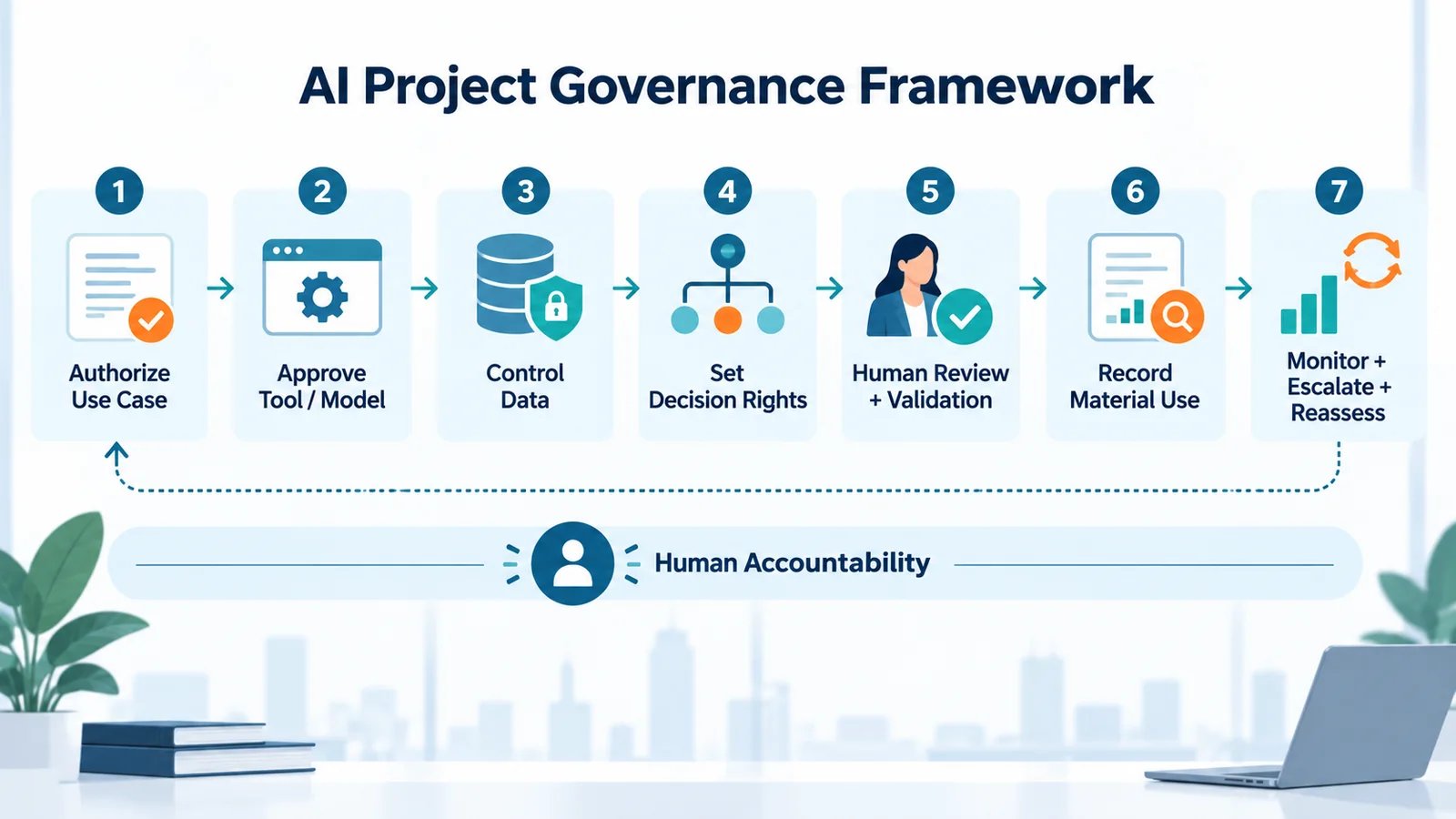
For AI governance for project managers to work in practice, the PMO framework should be easy to remember and practical during delivery. Use this seven-control model:
- Authorize the use case — define what AI is being used for and why.
- Approve the tool or model — confirm the system, account, capability and relevant configuration are permitted.
- Control the data — define which data categories may enter the system.
- Set decision rights — define what AI may do, recommend or only support. Human accountability remains a cross-cutting layer.
- Apply human review and validate outputs — match oversight and verification to potential impact.
- Record material AI use — retain evidence when AI materially influences a governed decision or action.
- Monitor, escalate and reassess — review exceptions, incidents, model/tool changes and control effectiveness.
Therefore, this is not a one-time gate. The final step loops back whenever the use case, data, model, permissions or project context materially changes.
ISO/IEC 42001:2023 is relevant at the organizational level because it specifies requirements for establishing, implementing, maintaining and continually improving an AI management system. The practical PMO lesson is that governance should evolve as technologies, integrations and use cases change rather than exist as a one-time policy exercise.
1. Define Roles and Accountability
In practice, typical roles can include the Project Manager, PMO, Business Owner, AI or Tool Owner, Data Owner, Security/Privacy, Legal/Compliance and Technical Owner. Organizations may combine roles, but they should keep responsibility and authority explicit.
Who Owns the AI-Generated Recommendation?
For example, AI can generate analysis, forecasts, summaries or recommendations. A named human role should decide whether the output is sufficiently reliable and appropriate to use. If an AI system proposes a schedule change, for example, the planner or project manager validates the assumptions and context before acting.
Who Owns the Final Decision?
AI may assist with the decision. AI does not become the accountable project owner.
Ultimately, the human role holding the relevant authority should remain accountable for material decisions. TechTeamSynergy’s RACI Matrix Examples can help define who is Responsible, Accountable, Consulted and Informed in mixed human-and-AI workflows.
2. Establish Approved AI Tools and Use Cases
First, an approved AI tool should mean more than a brand name on a list. Approval may specify the enterprise account, permitted models or features, integrations, data categories, use cases and access controls. Teams should not automatically treat a personal account as equivalent to an approved enterprise environment.
Therefore, a useful sequence is:
Business need → Use case → Impact → Data → Control requirements → Approved technology
This keeps governance focused on the work rather than the vendor. For product capabilities and selection factors, use the separate TechTeamSynergy guide to AI tools for project managers.
In addition, reusable prompts and templates can improve consistency for recurring project activities. TechTeamSynergy’s AI prompts for project managers can support that practice without replacing governance rules.
3. Govern the Data Entering AI Systems
However, tool approval does not approve every input. Projects may handle public, internal, confidential, personal, customer, financial, contractual, technical and regulated information.
| Data Category | Example | Governance Question |
|---|---|---|
| Public | Published documentation | Is the source reliable and current? |
| Internal | Routine internal notes | Is this account approved for internal information? |
| Confidential | Commercial plans, project financials | Is the tool approved for this classification? |
| Restricted / regulated | Sensitive personal or protected information | Is processing permitted under policy, contract and applicable requirements? |
| Secrets | Passwords, tokens, private keys | Is there any legitimate reason to submit this? |
What Data Should Never Be Entered into an Unapproved AI Tool?
Therefore, do not enter information when organizational policy, contractual obligations, data classification or applicable regulation prohibits that use.
Credentials, restricted personal information, confidential contracts, protected customer information and proprietary source code may require especially strict controls. The exact boundary depends on organizational policy, the tool, contract and jurisdiction. Use the minimum data needed for the task.
4. Define AI Decision Rights
In practice, decision rights turn “keep a human in the loop” into an operational rule.
| Decision Level | AI Role | Project Examples | Required Control |
|---|---|---|---|
| AI MAY | Perform bounded, low-impact work | Summarize, classify, draft, brainstorm, extract actions, flag possible issues | Approved tool, permitted data, proportionate review |
| AI MAY RECOMMEND; HUMAN APPROVES | Analyze and propose | Prioritize work, score risks, recommend responses, propose record updates or workflow actions | Named reviewer, validation, human approval |
| HUMAN MUST DECIDE | Decision support only | Scope or budget commitments, contractual obligations, risk acceptance, people decisions, go/no-go, major stakeholder commitments, production-impacting changes | Authorized decision owner, evidence, approval and audit trail |
Tailor these categories to organizational policy. A useful test is: If the output is wrong, what commitment could be made and how hard would the action be to reverse?
Consequently, as potential impact rises, human authority should increase.
5. Set Human Oversight and Approval Thresholds
Human oversight should be proportional rather than ceremonial. Project managers can practise this judgment alongside data handling and output validation using our AI competency framework for project managers.
Human-in-the-loop generally means a person reviews or approves before a consequential action occurs. PMI’s AI standard includes practices for reviewing AI outputs, determining what should be escalated and deciding when to accept or override AI recommendations.
Human-on-the-loop is commonly used for supervised automation: AI operates within predefined limits while a human monitors the process and can intervene.
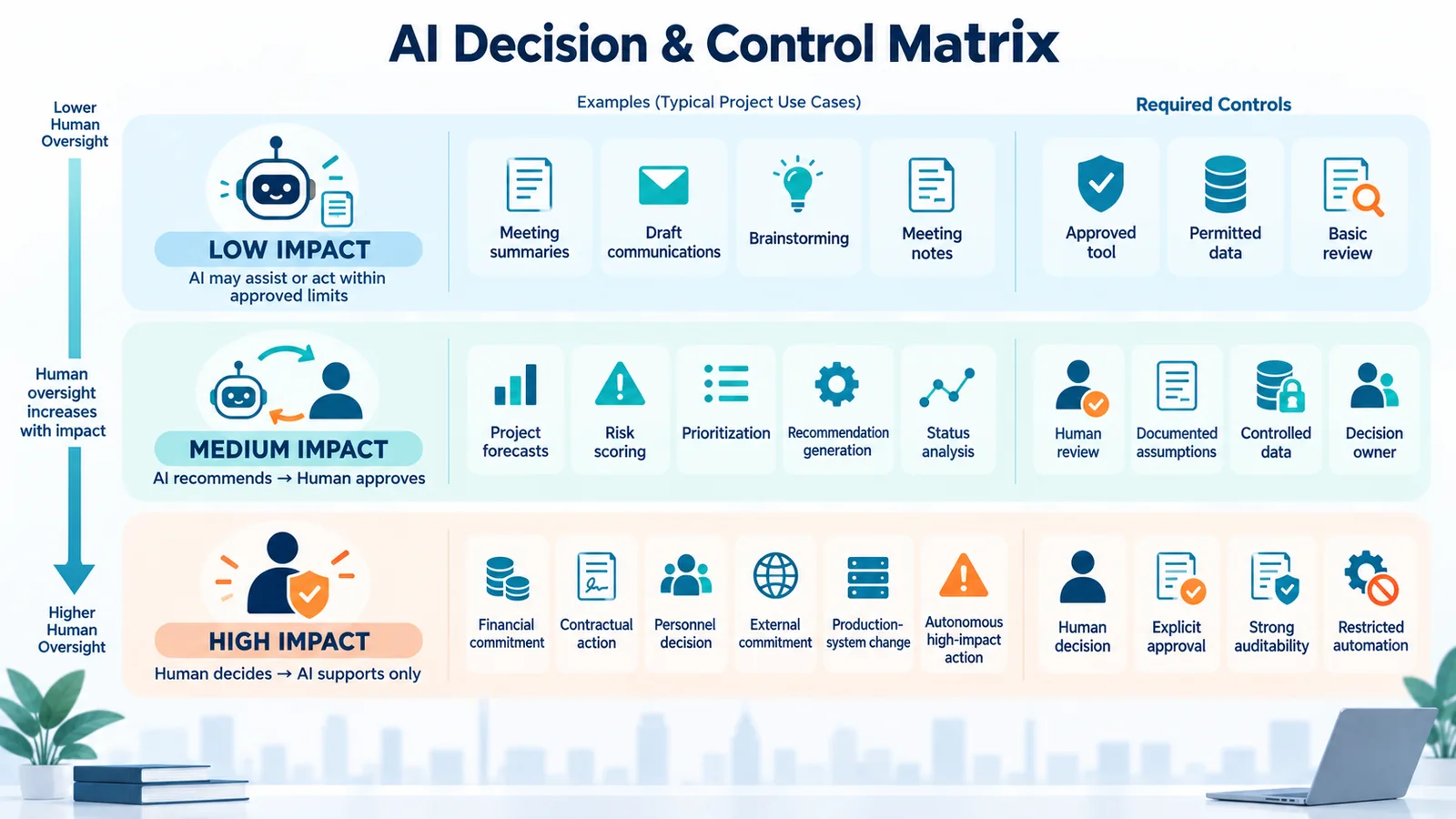
- Low impact: AI may operate within predefined limits.
- Medium impact: AI recommends; a human approves.
- High impact: a human decides; AI supports only.
For example, a meeting summary may need a quick check. By contrast, a steering-committee forecast needs stronger review. Budget, contractual or other consequential commitments should remain with an authorized human decision-maker.
6. Validate AI Outputs Before They Become Project Decisions
Fluent output is not the same as reliable output. A polished response can still contain incorrect facts, hidden assumptions, weak evidence or a recommendation that ignores current project constraints.
Therefore, before material use, validate five areas:
- Facts: Are facts, calculations and references correct?
- Context: Does the output reflect current project constraints, stakeholders and dependencies?
- Assumptions: What did the model infer, simplify or invent?
- Impact: What financial, contractual, delivery, people or stakeholder consequences could follow?
- Authority: Is the person accepting the recommendation authorized to make that decision?
For higher-impact decisions, also check completeness, source quality, consistency and relevant bias or fairness concerns. Validation should remain proportional: a draft status message needs less review than a milestone, supplier or risk-acceptance recommendation. Our AI-assisted status reporting workflow illustrates how to apply human validation to project updates.
7. Build Auditability and Documentation
Likewise, auditability does not mean storing every prompt. Instead, ask:
Did AI materially influence a governed decision, recommendation, workflow or action?
If yes, the record may include:
- tool or model;
- purpose;
- relevant data source;
- material prompt, instruction or workflow version;
- AI output or reference;
- human reviewer;
- final decision;
- override or exception;
- timestamp.
This preserves traceability without burying important decisions in low-value logs. The OECD AI Principles support context-appropriate traceability and accountability based on the roles and circumstances of AI use.
8. Create Escalation and Stop Controls
Escalation triggers can include:
- unexpected AI behavior;
- sensitive-data exposure;
- repeated inaccurate recommendations;
- unauthorized AI use;
- policy violations;
- an agent acting outside scope;
- a recommendation that cannot be adequately validated;
- audit failure;
- repeated control failure.
Use a simple response flow:
Pause → Escalate → Investigate → Correct → Resume or Disable
For example, “Pause” may mean stopping automation, revoking access or switching to manual processing. OECD guidance also supports having mechanisms to override, repair or safely decommission AI systems where appropriate. For projects, the practical lesson is to identify an owner and a usable stop path before automation becomes critical.
9. Govern AI Across the Project Lifecycle
| Phase | Governance Focus | Example |
|---|---|---|
| Initiation | Define use case, value, owner and impact | Decide whether AI may support business-case analysis |
| Planning | Approve tools/data; set roles and thresholds | Define which project data may enter the AI system |
| Execution | Apply permissions, validation and approvals | Review AI-generated external communication |
| Monitoring & Control | Track errors, overrides and changes | Reassess a model update that changes forecast behavior |
| Closing | Retain material records and lessons learned | Capture important AI-assisted decisions and incidents |
Meanwhile, governance can change during the lifecycle. If the team later connects a drafting tool to live systems and gives it authority to act, the PMO should reassess its controls.
Practical AI Governance RACI for Project Teams
| Activity | Project Manager | PMO | Business Owner | AI / Tool Owner | Data Owner | Security / Privacy |
|---|---|---|---|---|---|---|
| Approve AI use case | R | C | A | C | C | C |
| Approve tool/capability | C | C | I | R/A | C | C |
| Approve data category | C | I | I | C | A/R | C |
| Define decision threshold | R | C | A | C | I | C |
| Validate high-impact output | R | C | A | C | C | I |
| Approve autonomous action | R | C | A | C | C | C |
| Review AI incident | R | C | A | R | C | R |
| Audit governed AI use | C | R/A | I | C | C | C |
This is an illustrative starting point; actual accountability should follow the organization’s governance model. See our RACI Matrix Examples for additional responsibility patterns.
AI Governance by Risk Level
| Level | Typical Use | Governance Pattern |
|---|---|---|
| Low | Brainstorming, summaries, draft communications, meeting notes | Approved tool, permitted data, basic human check |
| Medium | Forecasts, risk scoring, prioritization, recommendations, status analysis | Controlled data, documented assumptions, named reviewer, human approval |
| High | Financial or contractual commitments, personnel decisions, external commitments, production-system changes, autonomous high-impact actions | Human decision authority, explicit approval, strong auditability, restricted automation, escalation path |
However, this is an operational model, not a legal classification. Therefore, PMOs should tailor the examples and thresholds to their project environment.
Governance for AI Agents in Projects
Because AI agents can combine analysis with tool use and action, they require additional controls. Define permissions, tool and data access, action boundaries, approval gates, memory/context access, audit logs, escalation ownership and a stop control. Grant only the access needed for the workflow.
As a result, do not treat an agent’s ability to execute work as accountability for the outcome. The dedicated AI Agents for Project Management: 7 Practical Workflows & Governance Controls guide will carry the deeper project-agent workflow discussion once its final live URL is available. Until then, TechTeamSynergy’s Agentic AI guide provides broader context on autonomy and governance.
Example: Governed AI Risk-Management Workflow
AI detects a signal → identifies a possible risk → suggests likelihood/impact → proposes responses → Project Manager reviews → decision is recorded → owner is assigned → AI monitors changes
Here, governance intervenes at each important point:
- The data source and AI tool are approved.
- The Project Manager treats AI analysis as a recommendation, not automatic risk acceptance.
- The Project Manager validates evidence, assumptions and project context.
- The authorized human decides whether to accept the assessment and response.
- The team records the decision and assigns a risk owner.
- Monitoring continues, with escalation if the risk changes.
Therefore, this keeps risk acceptance with a human. For the full risk workflow, see our AI for Project Risk Management guide.
How PMOs Can Introduce AI Governance for Project Managers
Fortunately, a PMO can start without building a large bureaucracy.
Stage 1: Inventory Current AI Use
Identify tools, tasks, data categories and any automated actions already in use. The first objective is visibility, including unofficial or team-level use.
Stage 2: Define Approved Tools and Data
Publish a short approved-tool list and practical data boundaries that project teams can understand and apply.
Stage 3: Assign Roles and Decision Rights
Name accountable owners and define what AI may do, recommend or only support.
Stage 4: Introduce Human Approval Thresholds
Define low-, medium- and high-impact examples based on the project environment rather than creating approval for every AI-assisted task.
Stage 5: Add Auditability and Monitoring
Record material decisions, exceptions, incidents and meaningful overrides. Review whether controls remain effective.
Stage 6: Extend Controls to AI Agents and Automation
Add permissions, action boundaries, approval gates, logs and stop controls before increasing autonomy.
Stage 7: Review and Improve Continuously
Finally, reassess governance when tools, models, integrations, data, regulations or project requirements materially change.
This improvement cycle is consistent with the management-system logic of ISO/IEC 42001, which focuses on establishing, implementing, maintaining and continually improving an AI management system.
Common AI Governance Mistakes
Good AI governance for project managers avoids both extremes: unnecessary bureaucracy for low-impact work and weak controls for consequential decisions.
- Banning everything: an absolute ban can push AI use into less visible channels without resolving the underlying demand.
- Allowing everything: convenience is not a governance model.
- Making governance IT-only: technology owners can govern platforms, but business and project owners still own use and outcomes.
- Leaving accountability vague: “human review” is weak unless a role is named.
- Skipping data classification: approved tools can still be misused with inappropriate data.
- Using one threshold for every task: this creates either unnecessary friction or insufficient control.
- Treating AI output as authoritative: fluency does not prove correctness.
- Documenting everything: excessive logging can hide material decisions in noise.
- Having no incident process: teams need a pause, investigate and restart path.
- Ignoring tool/model changes: material changes can alter behavior, capability or access.
- Ignoring agents: action-taking systems need stronger controls than drafting tools.
AI Governance Checklist for Project Managers
Use this AI governance for project managers checklist as a practical review before introducing or expanding AI in a project workflow.
Tools
- ☐ Is the tool, account and capability approved?
- ☐ Is the proposed use case permitted?
Data
- ☐ Is this data category allowed in the selected system?
- ☐ Have unnecessary sensitive inputs been removed?
Roles
- ☐ Is a human reviewer named?
- ☐ Is one human or business role accountable for the outcome?
Decision Rights
- ☐ Is it clear what AI may do, recommend or only support?
- ☐ Are human-only decisions defined?
Human Oversight
- ☐ Is the approval threshold proportional to potential impact?
- ☐ Can a human interrupt or override automated action?
Validation
- ☐ Are facts, assumptions and project context checked?
- ☐ Are material financial, contractual or stakeholder consequences reviewed?
Auditability
- ☐ Are material AI-assisted decisions and overrides recorded?
- ☐ Is the tool, model or workflow version identifiable where needed?
Monitoring
- ☐ Is there a clear incident and escalation path?
- ☐ Will governance be reassessed when the tool, model, data or workflow changes?
Frequently Asked Questions
What is AI governance in project management?
In practice, it is the set of roles, decision rights and controls that determines how teams may use AI in project workflows, what data AI may process, when humans must review, how teams validate important outputs and who remains accountable.
Why do project managers need AI governance?
Because AI can influence schedules, forecasts, risks and decisions. Therefore, governance makes authority, data, validation and accountability boundaries explicit before AI-supported work creates commitments.
Who is accountable for AI-generated project decisions?
For material decisions, accountability should remain with the human or organizational role authorized to make that decision. AI may analyze or recommend; it does not become the accountable project owner.
What AI tasks require human approval?
The threshold depends on impact and organizational policy. For example, stronger approval is appropriate when AI can affect commitments, budget, contracts, risk acceptance, people, external stakeholders or production environments.
How should PMOs govern generative AI?
Approve use cases, tools and data; define roles and decision rights; set human-review thresholds; validate important outputs; record material decisions; and monitor exceptions and changes.
What data should project teams avoid entering into AI tools?
Avoid data that organizational policy, contract, classification or applicable regulation does not permit in that tool or account. Sensitive personal data, confidential contracts, customer information, credentials, proprietary code and financial information may require additional controls.
How do you audit AI use in projects?
Instead, focus on material use. Record the tool/model, purpose, relevant inputs, important output, reviewer, final decision, exceptions and timestamp when AI materially influences a governed action.
How does AI governance differ from AI risk management?
AI governance defines authority and controls for AI use. AI risk management identifies, assesses, treats and monitors risks. Risk management is one input into governance, not a substitute for it.
How should AI agents be governed?
Define least-necessary permissions, allowed tools and data, action boundaries, approval gates, logging, monitoring, escalation ownership and a stop control.
Does AI governance slow down project delivery?
Poorly designed governance can. However, good governance keeps low-impact work lightweight and reserves stronger review for higher-impact decisions.
Conclusion: Govern the Decision, Not Just the Tool
Effective AI governance for project managers starts with operational questions, not a long policy:
Approve the use case → Control the tool and data → Assign accountability → Define decision rights → Require appropriate human oversight → Validate outputs → Record material decisions → Monitor and improve
This gives teams room to use AI where it adds value without confusing speed with authority.
AI can accelerate analysis and execution, but accountability for consequential project decisions still needs a clearly identifiable human owner. For the broader role impact, see how AI is changing the project manager role.
Continue Learning
AI in Project Management
Explore how AI supports planning, risk, reporting, communication and the wider project lifecycle.
Agentic AI
Understand how AI agents plan, use tools and execute multi-step work under human governance.
AI for Project Risk Management
See how AI can support risk identification, assessment, response planning and monitoring with human validation.
RACI Matrix Examples
Use practical RACI examples to clarify responsibility and accountability across human and AI-assisted workflows.