

Choosing between today’s leading project management tools often means comparing Asana vs monday.com vs ClickUp vs Jira. The right choice is not simply the platform with the longest feature list. It is the tool that best fits how your team plans, collaborates, automates work and makes decisions.
All four platforms can manage projects, tasks, deadlines and team collaboration, but they approach work management differently.
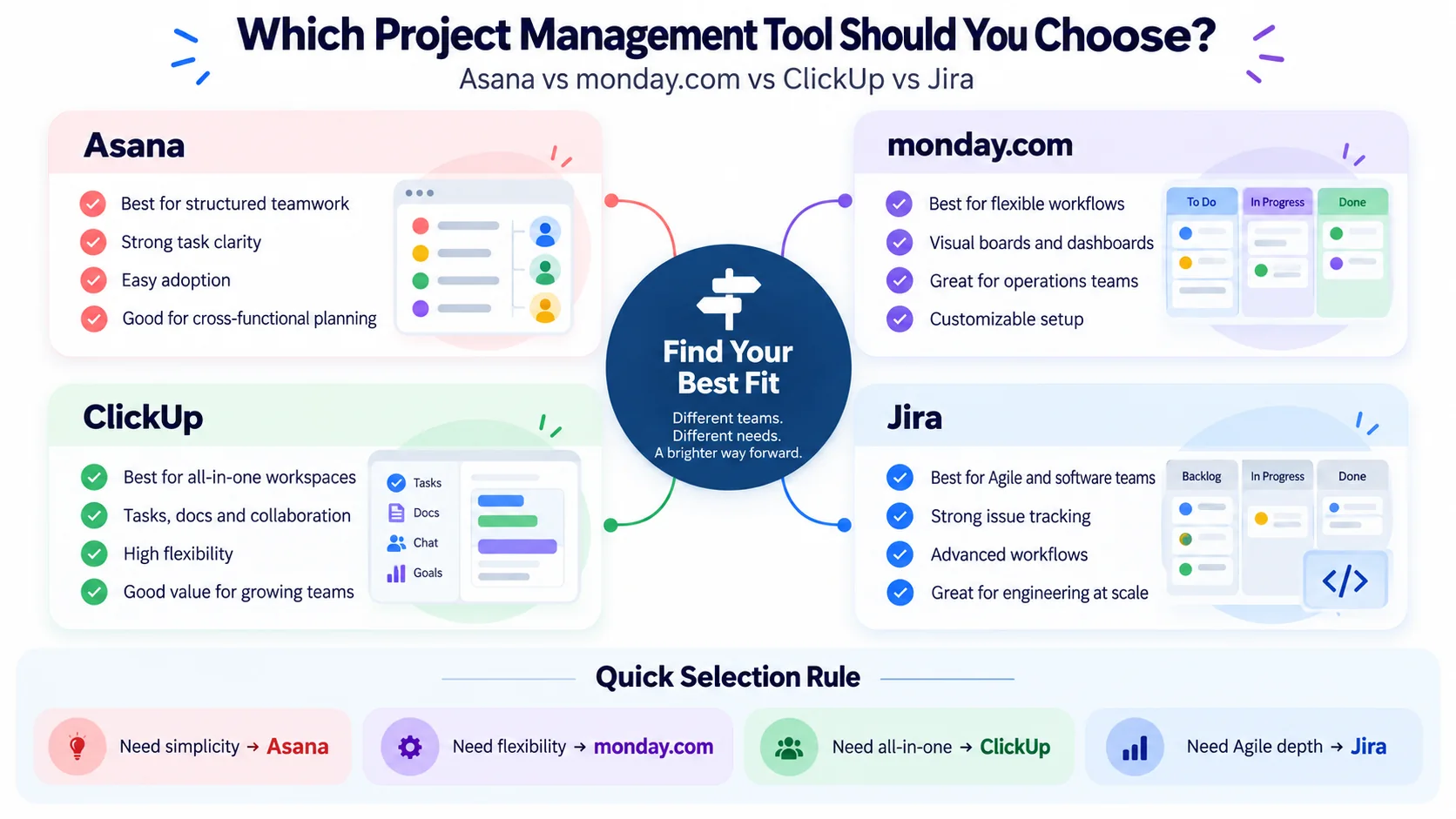
Asana emphasizes structured cross-functional work management.
monday.com emphasizes visual and highly configurable business workflows.
ClickUp combines project management, documents, collaboration and other productivity capabilities in a broader workspace.
Jira has particularly deep roots in software, product and Agile delivery while increasingly supporting broader project-management use cases.
AI is also changing the comparison. These platforms are adding AI assistants, agents, workflow automation, search, summarization and other AI-supported capabilities directly into everyday work.
This 2026 guide compares the four project management tools across usability, project planning, Agile delivery, automation, AI, reporting, collaboration, integrations, governance, pricing and different team requirements.
Pricing note: Pricing and plan packaging change frequently. Pricing information referenced in this guide was checked on August 31, 2026. Always verify current pricing and plan limits directly with the vendor before purchasing.
Project Management Tools Comparison: Asana vs monday.com vs ClickUp vs Jira
| If You Need… | Starting Shortlist |
|---|---|
| Structured cross-functional project management | Asana |
| Visual and highly configurable business workflows | monday.com |
| A broad all-in-one work-management workspace | ClickUp |
| Software and Agile engineering delivery | Jira |
| Deep backlog and sprint workflows | Jira |
| Marketing and business operations | Asana / monday.com |
| Combining project work with documents and broader workspace capabilities | ClickUp |
| Highly configurable workflow management | monday.com / Jira |
This should be treated as a starting shortlist, not a universal ranking.
The best project management tool depends on your workflow, users, governance requirements, integrations, technology environment and total cost.
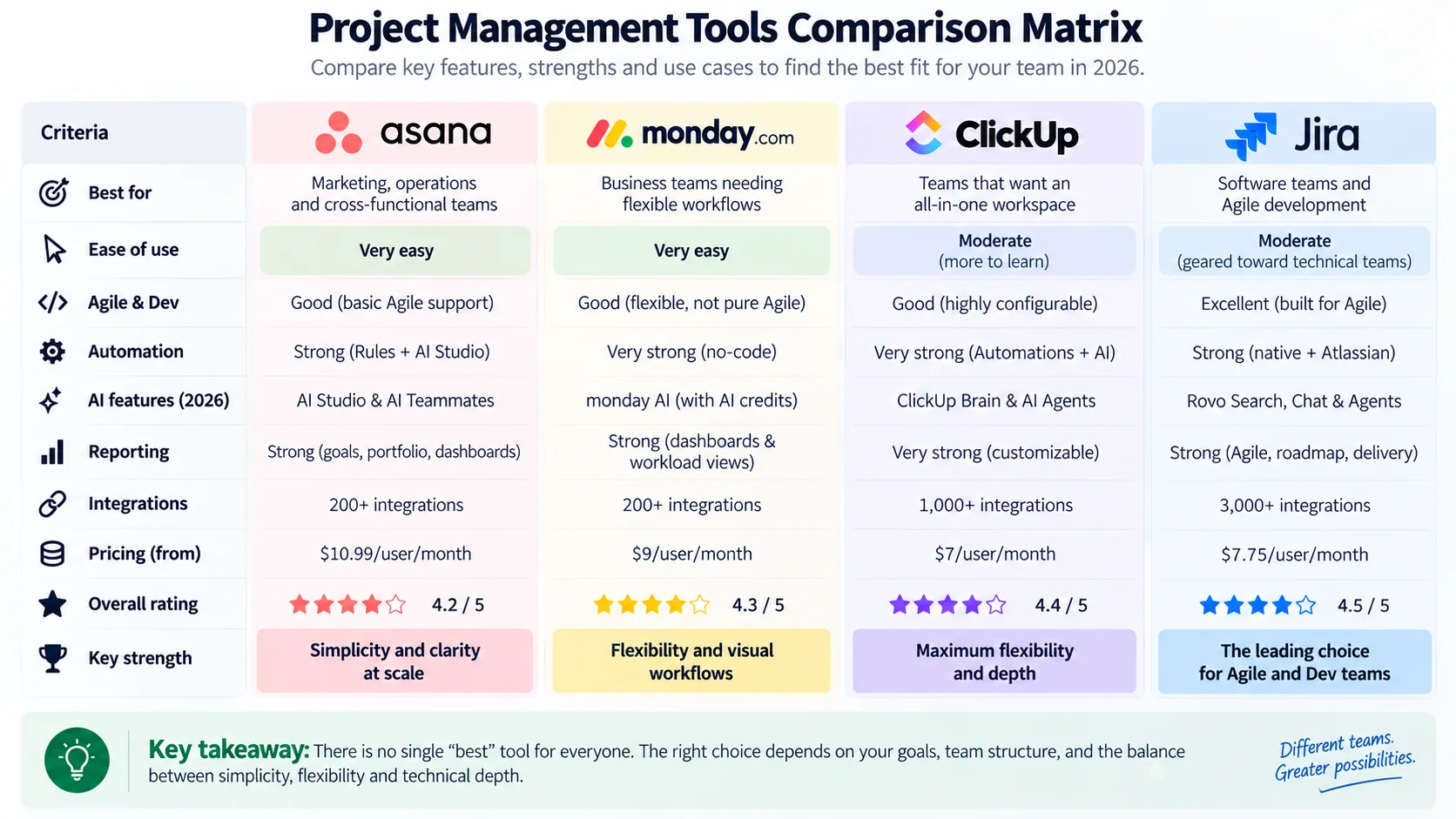
Asana vs monday.com vs ClickUp vs Jira at a Glance
| Area | Asana | monday.com | ClickUp | Jira |
|---|---|---|---|---|
| Primary positioning | Work management | Flexible work platform | Broad work/productivity platform | Project and software delivery |
| Cross-functional projects | Strong | Strong | Strong | Capable |
| Visual customization | Strong | Very strong | Very strong | Strong but structured |
| Agile software delivery | Capable | Capable | Strong | Particular strength |
| Documents / knowledge | Integrated work context | Workdocs and ecosystem capabilities | Strong Docs integration | Often combined with Atlassian ecosystem tools |
| Automation | Strong | Strong | Strong | Strong |
| AI direction | AI Studio and AI-enabled workflows | AI platform, Sidekick and agents | ClickUp Brain and agents | Rovo AI and agents |
| Learning curve | Generally approachable | Generally approachable | Can increase with customization | Can increase with workflow complexity |
How We Compare Project Management Tools
A useful comparison needs more than feature counting.
This guide evaluates the platforms across:
- Core project and task management
- Ease of use
- Customization
- Agile and software delivery
- Portfolio and program management
- Collaboration
- Documents and knowledge
- Automation
- AI capabilities
- Reporting and dashboards
- Resource and workload management
- Integrations
- Administration and governance
- Pricing
- Different team and organizational use cases
The goal is not to declare one platform objectively superior.
Instead, use this decision sequence:
Requirements → Workflow Fit → Adoption → Governance → Cost → Decision
What Are Project Management Tools?
Project management tools help teams organize, coordinate and track work.
Depending on the platform, capabilities can include:
- Tasks and assignments
- Projects
- Milestones
- Dependencies
- Calendars
- Timelines and Gantt views
- Kanban boards
- Dashboards
- Automations
- Documents
- Resource management
- Goals
- Portfolio management
- Agile backlogs and sprints
- AI assistance
Modern platforms are increasingly broader than traditional project-management applications.
They are becoming environments where teams plan, communicate, automate, analyze and execute work.
Start With How Your Team Actually Works
Feature comparisons can become misleading because all four platforms now offer extensive functionality.
Start with your operating model.
Ask:
- Do we manage business projects, technical projects or software delivery?
- Do we need formal backlogs and sprints?
- How much customization do we need?
- Do non-technical stakeholders need regular access?
- Do we manage individual projects or portfolios?
- How important are documents and knowledge management?
- What should be automated?
- How do we intend to use AI?
- Which integrations are essential?
- What security and governance requirements apply?
- What will the platform cost as the organization grows?
These questions usually narrow the shortlist faster than comparing hundreds of individual features.
Asana Overview
Asana is a work-management platform designed to help teams coordinate tasks, projects, workflows, goals and cross-functional initiatives.
Its structured approach makes it particularly relevant when multiple departments need to collaborate within a common work-management environment.
Key Asana Capabilities
- Tasks and subtasks
- Projects
- List and board views
- Timelines
- Dependencies
- Forms
- Rules and workflows
- Dashboards
- Portfolios
- Goals
- Workload
- AI-enabled workflows
Where Asana Fits Well
- Cross-functional project coordination
- Structured project management
- Standardized workflows
- Portfolio visibility
- Goal alignment
- Business and transformation projects
Potential Asana Trade-Offs
Asana may be less attractive when extremely deep workflow customization or software-development-specific delivery is the primary requirement.
Some portfolio, workload, reporting, administration and AI capabilities also depend on the selected subscription tier or add-ons.
monday.com Overview
monday.com uses flexible boards and configurable workflows to support projects, operations, marketing, requests and other business processes.
Its visual approach allows organizations to model workflows using customizable columns, statuses, views, automations and dashboards.
Key monday.com Capabilities
- Boards
- Items and subitems
- Custom columns
- Kanban views
- Timelines
- Gantt views
- Calendars
- Dashboards
- Forms
- Automations
- Integrations
- Workload capabilities
- AI functionality
Where monday.com Fits Well
- Visual workflow management
- Marketing teams
- Operations
- Agencies
- Business processes
- Custom request workflows
- No-code workflow configuration
Potential monday.com Trade-Offs
Flexibility can create inconsistency if every team builds its own structures without common governance.
Buyers should also evaluate seat structures, automation allowances, integrations and AI usage rather than comparing only headline pricing.
ClickUp Overview
ClickUp takes a broad approach by combining tasks, projects, documents, whiteboards, communication and other productivity capabilities within one workspace.
This makes it particularly interesting for organizations trying to reduce fragmentation across several productivity tools.
Key ClickUp Capabilities
- Tasks and subtasks
- Custom fields
- Multiple work views
- Gantt charts
- Dashboards
- Docs
- Whiteboards
- Time tracking
- Goals
- Automations
- Sprint capabilities
- Workload features
- ClickUp Brain
- AI agents and AI-enabled workflows
Where ClickUp Fits Well
- Broad feature requirements
- High customization
- Tasks and documents in one environment
- Multiple project views
- Business and technical teams
- Workspace consolidation
Potential ClickUp Trade-Offs
The breadth that makes ClickUp attractive can increase configuration and governance requirements.
A useful deployment principle is:
Start Simple → Standardize → Expand When Needed
Jira Overview
Jira is strongly associated with software development, product management and Agile delivery, although its current project-management capabilities extend beyond software-only use cases.
Its work-item model, workflows, backlogs, boards and planning features make it particularly relevant for technically complex delivery.
Key Jira Capabilities
- Projects and work items
- Backlogs
- Scrum boards
- Kanban boards
- Sprints
- Custom workflows
- Dependencies
- Roadmaps and planning
- Automation
- Reports and dashboards
- Development integrations
- Rovo Search, Chat and agents on supported paid plans
Where Jira Fits Well
- Software development
- Product teams
- Agile delivery
- Backlog management
- Issue and defect tracking
- Complex technical workflows
- Engineering organizations
- Organizations using the Atlassian ecosystem
Potential Jira Trade-Offs
Jira can support broad project use cases, but organizations should still evaluate how naturally its workflow model fits non-technical users.
Heavy customization can also create administrative complexity if teams create excessive fields, workflows and configurations without governance.
Project Management Tools and Ease of Use
Ease of use is not simply an interface question.
It depends on how closely the software matches the team’s existing way of thinking about work.
Asana
Asana’s task and project structure can feel familiar to users with conventional project-management experience.
monday.com
The board-oriented model can be intuitive for teams already comfortable with spreadsheets, columns and visual status tracking.
ClickUp
Basic task management can be straightforward, while extensive customization can increase the learning curve.
Jira
Jira can feel natural to experienced Agile and software teams but less familiar to users who do not regularly work with backlogs, sprints or configurable work-item workflows.
Recommendation: test shortlisted platforms with representative users rather than relying only on screenshots or vendor demonstrations.
Project Management Tools for Agile Teams
All four tools can support iterative work to some degree, but they are not equivalent for Agile software delivery.
Jira provides particularly deep support for software backlogs, Scrum, Kanban and development workflows.
ClickUp also supports sprint-oriented workflows and can fit organizations combining technical and business work.
Asana and monday.com can support boards and iterative workflows but may feel more natural when Agile techniques are being applied within broader business project management.
Before selecting a tool, understand the methodology itself. See our What Is Agile? guide.
Which Tool Is Better for Scrum?
For teams requiring formal product backlogs, sprint planning and deep software-development integration, Jira is an obvious platform to evaluate.
However, software should support Scrum rather than define it.
A complex Jira configuration does not automatically create an effective Scrum team.
Project Management Tools for Portfolio and Program Management
Organizations managing many projects usually require more than individual task boards.
Portfolio requirements may include:
- Cross-project visibility
- Dependencies
- Executive reporting
- Capacity visibility
- Goal alignment
- Program milestones
Asana offers portfolio and goal-oriented capabilities on appropriate plans.
monday.com can aggregate information from multiple boards through dashboards and broader workflow structures.
ClickUp can use its hierarchy, dashboards and portfolio-style structures across teams.
Jira supports cross-team planning and dependency management, especially in technically complex environments and within the broader Atlassian ecosystem.
The important question is not whether the product has a feature called portfolio.
Ask whether it can represent your organization’s portfolio model.
Collaboration and Communication
All four project management tools support collaboration around work.
Common capabilities include:
- Comments
- Mentions
- Notifications
- Attachments
- Status updates
- Activity history
Organizations should still answer one important question:
Where should important project conversations and decisions live?
If decisions remain spread across email, chat, meetings and project-management software without a clear system of record, adding another tool can increase fragmentation.
Documents and Knowledge Management
Knowledge capabilities are becoming increasingly important in work-management platforms.
ClickUp connects Docs closely with workspace content.
monday.com provides Workdocs and related collaboration capabilities.
Asana focuses on keeping work context connected to tasks, projects and goals.
Jira is often combined with other Atlassian products when organizations require deeper documentation and organizational knowledge.
Consider whether you need:
- Project notes
- Technical documentation
- Knowledge bases
- Policies
- Decision logs
- Collaborative documents
Automation Comparison
Automation is a major capability across all four tools.
Common uses include:
- Assigning work
- Changing status
- Creating tasks
- Sending notifications
- Routing requests
- Escalating overdue work
- Triggering downstream actions
When comparing automation, evaluate:
- Ease of configuration
- Usage limits
- Integration triggers
- Governance
- Administrative controls
- AI-agent interaction
Project Management Tools and AI in 2026
AI is now important enough to evaluate independently from conventional task-management functionality.
| Platform | AI Direction |
|---|---|
| Asana | AI Studio, AI Teammates and AI-enabled work management |
| monday.com | AI capabilities, Sidekick, credits and agents |
| ClickUp | ClickUp Brain, AI Super Credits and agents |
| Jira | Rovo Search, Chat, Agents and integrated AI features |
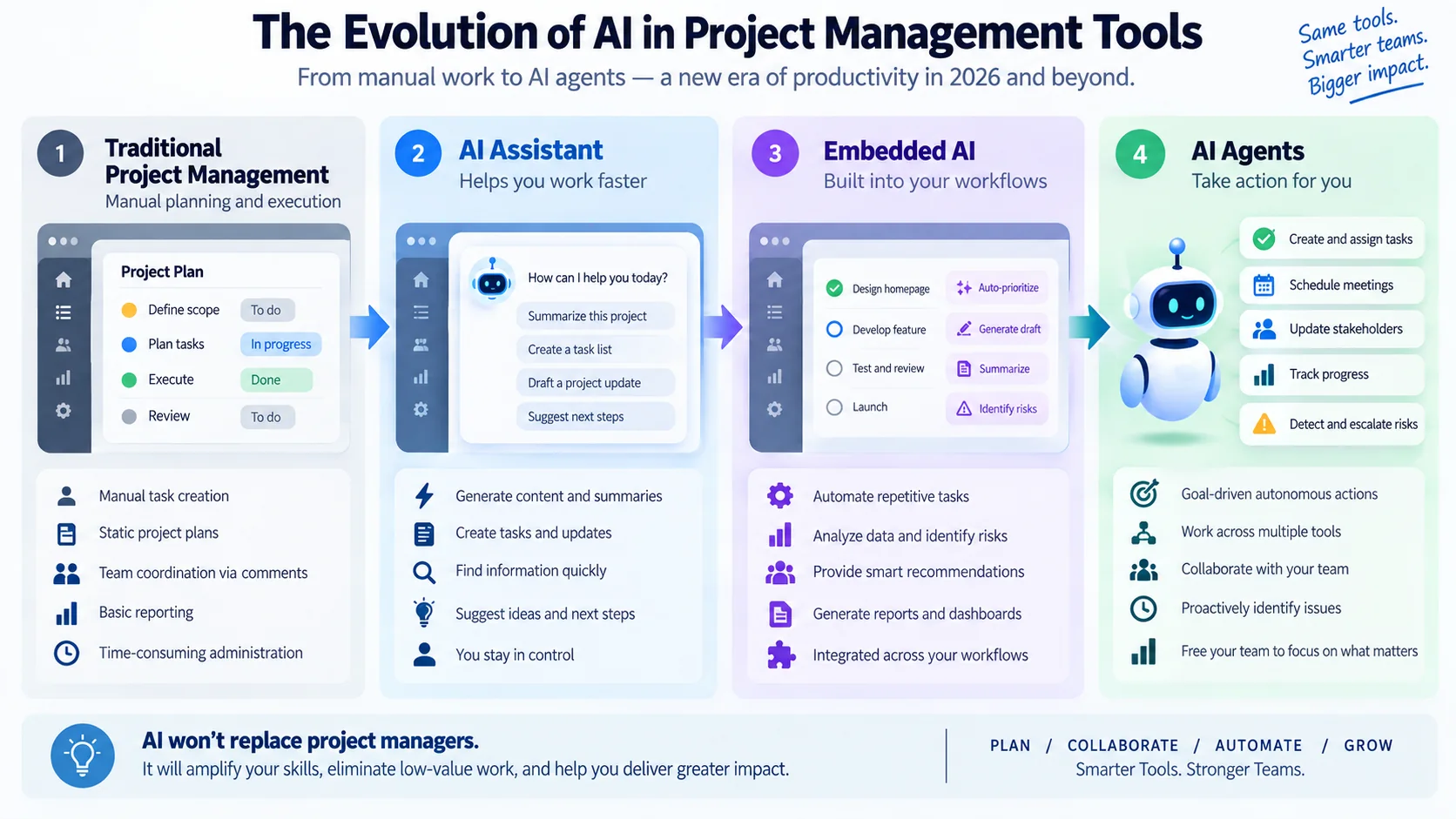
The overall direction is moving from:
AI Assistant → AI Embedded in Workflow → AI Agents Performing Bounded Work
Asana AI
Asana offers AI capabilities including AI Studio and AI Teammates. Asana’s current pricing information shows AI Teammates are available as an add-on on Starter, Advanced, Enterprise and Enterprise+ plans.
Organizations should therefore evaluate AI separately from the base subscription rather than assuming every capability is included automatically.
monday.com AI
monday.com increasingly embeds AI directly into its work platform.
Its current pricing model includes AI features from paid plans and uses AI credits for some capabilities. monday.com also offers Sidekick and agent-oriented functionality depending on product and plan.
ClickUp AI
ClickUp Brain and agent-oriented capabilities connect AI with workspace information and workflows.
ClickUp’s current pricing model also uses AI credits for capabilities such as Super Agents, AI Fields, automations and other AI operations.
Jira and Rovo AI
Atlassian currently includes Rovo Search, Chat and Agents on every paid Jira Cloud plan: Standard, Premium and Enterprise. The plans differ mainly in their included monthly Rovo credit allowances rather than whether Rovo is available.
This can be particularly relevant to organizations already using the broader Atlassian ecosystem.
Project management platforms are only one part of this evolution. Our guide to AI in project management explores how AI can support planning, risk management, reporting, governance and project decision-making beyond individual software tools.
How to Compare AI Capabilities
Do not compare AI only by feature count.
Evaluate:
- Quality of organizational context
- Permission model
- Search and retrieval
- Workflow integration
- Agent capabilities
- Administrative controls
- Data governance
- Usage limits
- AI credits
- Total AI cost
The most useful AI capability is not necessarily the one that creates the most impressive demonstration.
It is the one that safely improves work your organization genuinely performs.
AI Cost Beyond the Base Subscription
Do not assume purchasing a paid project-management subscription gives every user unlimited access to every AI capability.
Depending on platform and plan, AI may involve:
- Included usage
- Credits
- Additional AI capacity
- Add-ons
- Higher subscription tiers
- Enterprise agreements
A better cost model is:
Base Subscription + Required Tier + AI Usage + Add-ons + Administration + Integration
Reporting and Dashboards
Reporting requirements depend heavily on audience.
A delivery team may need:
- Task status
- Flow information
- Workload
- Blockers
A project manager may need:
- Milestones
- Risks
- Dependencies
- Progress
An executive may need:
- Portfolio health
- Strategic outcomes
- Capacity
- Major exceptions
For performance-management concepts, see our KPI vs OKR guide.
Resource and Workload Management
Resource-management requirements can range from basic workload visibility to sophisticated portfolio capacity planning.
Ask:
- Can managers see workload across projects?
- Can team capacity be represented realistically?
- Can planned work be separated from committed work?
- Can information be aggregated across teams?
- Are required capabilities included in the selected plan?
Integrations
Integration quality matters more than the raw number of integrations in a marketplace.
Identify the systems central to your workflows.
Examples include:
- Communication platforms
- Cloud storage
- Development systems
- Identity providers
- CRM platforms
- Business intelligence tools
- Automation platforms
Then test the specific workflows you require.
Security, Administration and Governance
Enterprise buyers should evaluate more than end-user features.
Potential requirements include:
- Single sign-on
- User provisioning
- Permissions
- Audit capabilities
- Data controls
- Administrative visibility
- AI governance
- Retention requirements
- Enterprise support
Availability varies by platform and subscription tier, so confirm requirements against current vendor documentation.
Project Management Tools Pricing: Asana vs monday.com vs ClickUp vs Jira
Pricing checked August 31, 2026. Pricing, seat requirements, AI allowances and plan features can change, so verify current information directly before purchasing.
- Check current Asana pricing and plans
- Check current monday.com pricing and plans
- Check current ClickUp pricing and plans
- Check current Jira pricing and plans
Current official vendor information confirms that all four use tiered pricing models, with free or entry options available in various forms. AI packaging increasingly adds another pricing dimension.
For example, monday.com currently displays a free tier for up to two seats and paid plans with AI credits, while Jira offers a Free plan for up to 10 users. Rovo Search, Chat and Agents are included on Jira Standard, Premium and Enterprise plans, with different monthly Rovo credit allowances by tier.
Do not select a platform based only on the cheapest advertised per-user price.
How to Calculate the Real Cost
Use a broader cost model:
License + AI + Add-ons + Integrations + Migration + Training + Administration + Process Change
A platform with a lower subscription cost can become more expensive if it requires significant administration or additional products.
A more expensive platform may deliver better value if it replaces several existing tools.
Price and value are not the same thing.
Asana vs monday.com
These platforms overlap significantly in cross-functional work management.
Consider Asana when:
- You prefer structured projects and tasks
- Cross-functional coordination is central
- Portfolio visibility matters
- You want comparatively standardized work structures
Consider monday.com when:
- You prefer highly visual boards
- Business teams require flexible workflows
- No-code configuration is important
- Your use cases extend beyond conventional project management
ClickUp vs Asana
This comparison often comes down to breadth versus structure.
Consider ClickUp when:
- You want many workspace capabilities in one environment
- You value extensive customization
- Documents and project work should be closely connected
Consider Asana when:
- You value structured work management
- Cross-functional adoption is important
- Portfolio and goal alignment matter
ClickUp vs Jira
This comparison is particularly relevant for organizations managing both technical and business work.
Consider Jira when:
- Software delivery is central
- Backlogs and sprints are fundamental
- Engineering workflows need deep configuration
- Your organization already uses Atlassian extensively
Consider ClickUp when:
- You want technical and business work in a broader shared workspace
- Docs and project-management functionality should be closely connected
- You need flexibility beyond software-development workflows
monday.com vs ClickUp
Both platforms emphasize flexibility.
monday.com starts from visual boards and configurable business workflows.
ClickUp offers a broader hierarchy and integrated productivity environment.
A simplified distinction is:
Visual Business Workflow Configuration → monday.com
Broad Workspace Consolidation → ClickUp
Asana vs Jira
Asana and Jira serve different operating styles. Asana is generally easier to adopt for cross-functional project and portfolio work, with flexible task management, goals and workflows that can span business teams. Jira is designed more deeply around software delivery and Agile practices, with stronger native support for backlogs, sprints, issues and engineering workflows.
Choose based on the work being coordinated rather than feature count alone: Asana can be a natural fit when simplicity and broad business collaboration matter most, while Jira can fit teams that need deeper Scrum, Kanban and development-oriented workflow control. Organizations with both business and engineering teams may also use the two for different layers of work.
monday.com vs Jira
monday.com emphasizes visual, configurable work management that can be adapted to projects, operations, marketing and other business workflows. Jira provides a more specialized foundation for software development, issue tracking and Agile delivery.
monday.com can suit teams that value visual customization, dashboards and flexible no-code workflows across departments. Jira can suit product and engineering teams that rely on backlogs, sprint planning, issue types and development integrations. The better fit therefore depends on whether the priority is broad workflow flexibility or deeper software-delivery structure.
Best Project Management Tools for Small Teams
Small teams should not automatically choose the platform with the most features.
Prioritize:
- Fast adoption
- Affordable total cost
- Simple administration
- Required integrations
- Room to grow
ClickUp may suit teams seeking broad functionality, monday.com visual workflows, Asana structured projects, and Jira software-centered delivery.
Best Project Management Tools for Marketing Teams
Asana and monday.com are natural platforms to evaluate for marketing because both support:
- Campaign planning
- Calendars
- Approvals
- Cross-functional work
- Forms
- Automation
ClickUp can also be attractive when the team wants project work and documents consolidated within one environment.
Best Project Management Tools for Software Development
Jira should generally be part of the shortlist when software delivery is the dominant requirement.
Its strengths align with:
- Backlogs
- Sprints
- Work items
- Development workflows
- Engineering integrations
ClickUp can also support software teams, particularly where organizations want engineering and general business work in the same broader workspace.
Best Project Management Tools for IT Project Management
IT projects may span infrastructure, networks, cloud, applications, cybersecurity, suppliers and business stakeholders.
That means no single tool is automatically best.
Jira can fit engineering-heavy delivery.
Asana or monday.com can fit cross-functional technology programs involving significant business participation.
ClickUp can fit teams wanting technical and business work within a broader common workspace.
If you’re transitioning from technical delivery toward project leadership, see our How to Become an IT Project Manager guide.
Best Project Management Tools for PMOs
A PMO should evaluate project management tools at the portfolio and governance level rather than focusing only on the individual project-manager experience.
Important criteria include:
- Standardization
- Portfolio reporting
- Templates
- Governance
- Resource visibility
- Executive dashboards
- Integrations
- Administration
- Data quality
Best Project Management Tools for Large Enterprises
Enterprise selection should include:
- Identity management
- Security
- Governance
- Administrative controls
- Scalability
- Integration architecture
- Support
- AI governance
- Total cost
All four vendors have enterprise-oriented offerings.
The strongest choice depends more on architecture and operating model than on a simple feature ranking.
How RACI Helps During Tool Implementation
Implementing project-management software is itself a project.
Clarify:
- Who owns the platform?
- Who configures workflows?
- Who approves standards?
- Who manages integrations?
- Who owns migration?
- Who supports users?
- Who governs AI capabilities?
Our RACI Matrix guide explains how to define Responsible, Accountable, Consulted and Informed roles.
Should You Use More Than One Project Management Tool?
Sometimes.
An engineering organization might use Jira for detailed software delivery while another platform supports broader corporate initiatives.
But multiple platforms can introduce:
- Duplicated work
- Conflicting project status
- Integration overhead
- Fragmented reporting
- Unclear system ownership
If more than one platform is required, define a clear system of record for each type of work.
Migration Considerations
Do not treat migration as a simple data import.
Evaluate:
- Active projects
- Historical data
- Attachments
- Custom fields
- Users and permissions
- Automations
- Integrations
- Dashboards
- Templates
- Reporting dependencies
Some legacy complexity should be eliminated rather than migrated.
Use:
Inventory → Clean → Map → Pilot → Migrate → Validate → Train → Retire
Run a Pilot Before Choosing
A controlled pilot is often more valuable than hours of theoretical comparison.
Use one representative workflow:
Request → Plan → Assign → Execute → Collaborate → Report → Close
Include several user types:
- Project manager
- Team member
- Manager
- Occasional stakeholder
- Administrator
Then evaluate both functionality and adoption.
Project Management Tools Selection Scorecard
| Criterion | Illustrative Weight |
|---|---|
| Workflow fit | 20% |
| Ease of adoption | 15% |
| Core project capabilities | 15% |
| Reporting and portfolio needs | 10% |
| Automation and AI | 10% |
| Integrations | 10% |
| Security and governance | 10% |
| Total cost | 10% |
The weights are illustrative. Adjust them to your organization’s priorities.
30-Minute Project Management Tool Selection Workshop
Use the scorecard with a small cross-functional group before committing to a platform.
- Define three non-negotiables. Examples: sprint support, portfolio reporting, SSO, specific integrations or a maximum total-cost range.
- Choose one representative workflow. Use a real process such as request → plan → assign → execute → report → close.
- Score only the shortlisted platforms. Apply your own weights rather than treating every criterion as equally important.
- Identify the biggest adoption and governance risk. A strong feature score can still fail if users avoid the tool or administration becomes too complex.
- Choose the next action. Record the owner, evidence required and review date.
Decision outputs: PILOT ASANA, PILOT MONDAY.COM, PILOT CLICKUP, PILOT JIRA, KEEP THE CURRENT TOOL or INVESTIGATE FURTHER. The objective is not to produce a theoretical winner; it is to identify the platform that should be validated next with real users and real work.
Common Mistakes When Choosing Project Management Tools
Choosing by Feature Count
More features can also mean more complexity.
Choosing Only by Price
Subscription cost does not capture migration, administration, training, AI or integration costs.
Ignoring User Adoption
A powerful platform delivers little value if teams avoid using it.
Over-Customizing Too Early
Start with standardized workflows before creating large numbers of custom fields, dashboards and automations.
Ignoring Governance
Without common standards, highly flexible tools can become inconsistent across departments.
Buying AI Without a Use Case
Start with workflow problems rather than AI features.
Ask:
Which task, workflow or decision should become faster, easier or more reliable?
Trying to Recreate the Old Tool Exactly
A migration is an opportunity to simplify processes rather than reproduce every legacy workflow.
Asana vs monday.com vs ClickUp vs Jira: Final Decision Framework
Asana if:
- Cross-functional project management is central
- You value structured work management
- Portfolio and goal alignment matter
monday.com if:
- You value visual workflows
- Business teams require extensive configuration
- Your use cases extend beyond conventional projects
ClickUp if:
- You want a broad workspace
- Customization matters
- You want project work and documents closely connected
Jira if:
- Software development is central
- Backlogs and Agile delivery matter
- You require configurable technical workflows
- You already use the Atlassian ecosystem extensively
Frequently Asked Questions About Project Management Tools
Which Is Better: Asana or monday.com?
Neither is universally better. Asana is a strong candidate for structured cross-functional project management, while monday.com is particularly attractive for visual and configurable business workflows.
Which Is Better: ClickUp or Asana?
ClickUp may appeal more to organizations seeking extensive customization and a broader workspace combining projects and documents. Asana may appeal more to teams prioritizing structured cross-functional project and portfolio management.
Which Is Better: ClickUp or Jira?
Jira is particularly strong for software-development and Agile workflows. ClickUp can be attractive when an organization wants technical and general business work in a broader shared environment.
Is Jira Only for Software Development?
No. Jira supports broader project and business workflows, although software, product and technical delivery remain important strengths.
Which Project Management Tool Is Best for Agile?
For formal software-development backlogs, sprints and related workflows, Jira deserves strong consideration. ClickUp also supports Agile workflows, while Asana and monday.com can support iterative and board-based approaches for broader business teams.
Which Project Management Tool Is Best for Small Businesses?
It depends on the business. A software startup may prioritize Jira or ClickUp, a marketing-oriented team may prefer monday.com or Asana, and a multidisciplinary team may value a broader workspace.
Which Project Management Tool Has the Best AI?
There is no universal winner. Compare AI according to workflow integration, context, permissions, governance, usage limits and total cost rather than marketing feature counts.
Can Jira and Asana Be Used Together?
Yes. Some organizations use Jira for engineering delivery and another platform for broader business projects. Define which system owns which information and how status flows between them.
Can AI Replace a Project Manager?
AI can assist with summarization, analysis, search, workflow automation and selected execution tasks. Project managers still provide stakeholder leadership, prioritization, negotiation, judgment, governance and accountability.
Should You Switch Project Management Tools Just for Better AI?
Usually not for that reason alone. Evaluate workflow fit, migration effort, adoption, integrations, governance, AI capabilities and total cost together.
Conclusion: Choosing the Best Project Management Tools in 2026
The Asana vs monday.com vs ClickUp vs Jira comparison does not produce one winner for every organization.
The four platforms increasingly overlap, but their centers of gravity remain different:
Asana → Structured cross-functional work management
monday.com → Visual and configurable business workflows
ClickUp → Broad and customizable workspace
Jira → Deep software, product and Agile delivery
AI is changing all four project management tools, but AI should not become the only selection criterion.
For a broader comparison across the market, see our guide to the best AI tools for project managers.
Start with the work.
Understand your users.
Define governance requirements.
Calculate total cost rather than subscription price alone.
Run a pilot using a real workflow.
Then choose the platform that creates the strongest balance between:
Capability + Adoption + Governance + Integration + Cost
The best project management tool is not necessarily the one that can do the most.
It is the one your organization can use consistently to turn plans into outcomes.
Project software supports delivery, but it does not replace sound project-management practice. If you are building those foundations, our complete PMP certification guide covers the knowledge areas, exam path and professional value of PMP.
Continue Learning
Continue exploring TechTeamSynergy with these related guides.