
Learning how to work from home with no experience does not mean starting with no useful skills. Even if you have never held a remote job before, you may already have abilities that can transfer into remote work, including communication, organization, writing, research, customer service, problem-solving or basic digital skills.
In practice, the challenge is turning those abilities into evidence that an employer can understand.
For that reason, a practical path is:
Identify Your Skills → Choose a Target Role → Build Evidence → Prepare Your Resume → Find Legitimate Opportunities → Apply → Interview → Succeed Remotely
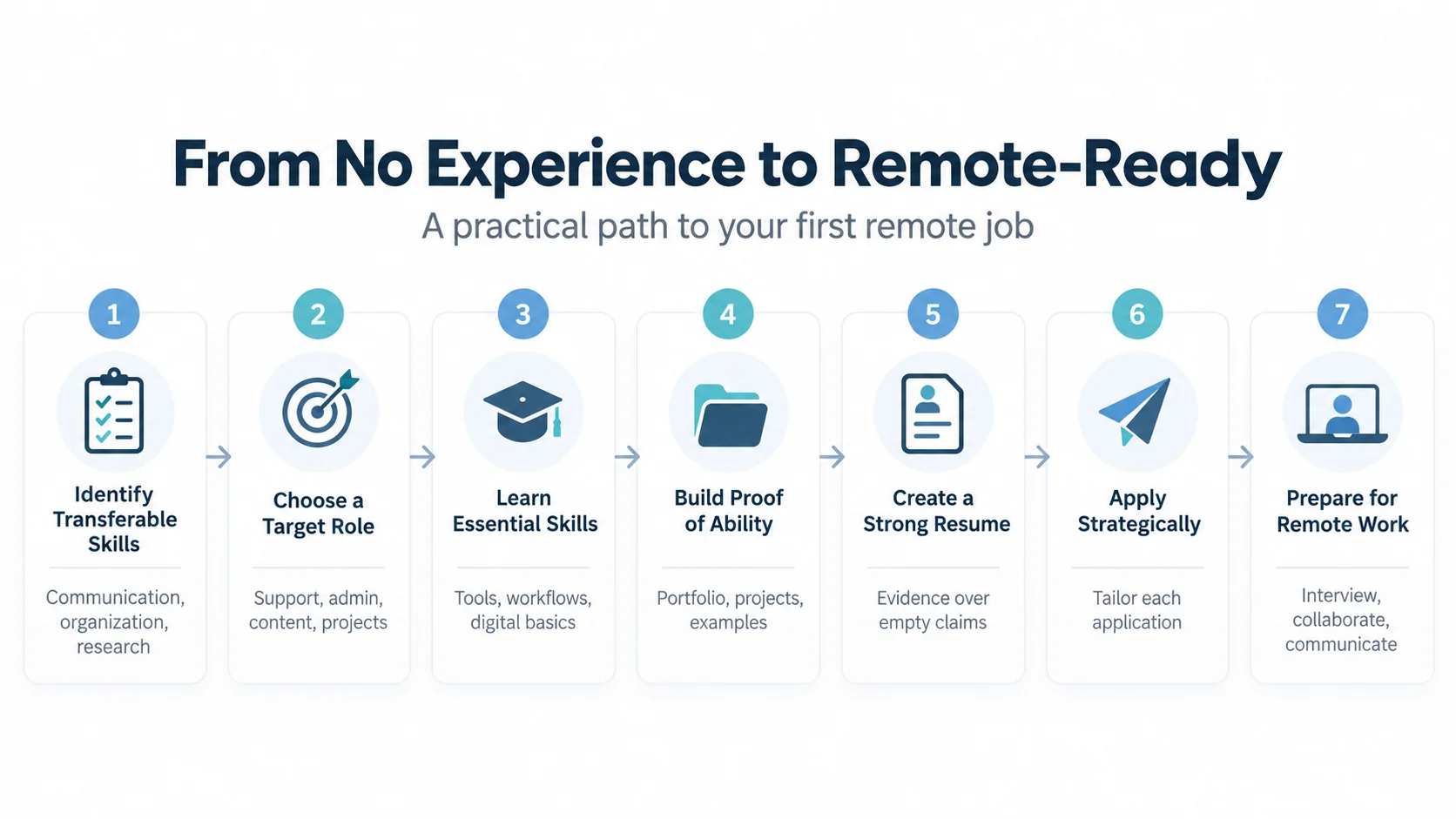
This guide explains how to work from home with no experience without relying on unrealistic promises about easy money or instant remote careers. You will learn how to identify transferable skills, choose realistic entry-level roles, build a small portfolio, improve your resume, evaluate job opportunities, avoid remote-job scams and prepare for remote interviews.
Can You Really Work From Home With No Experience?
First, it is important to understand what “no experience” actually means.
For example, in many cases, someone who says they have no experience really means:
“I do not yet have direct professional experience in the role I want.”
However, that is different from having no useful skills.
In addition, you may already have developed relevant abilities through:
- Education
- School or personal projects
- Volunteering
- Community activities
- Clubs or associations
- Personal interests
- Previous non-remote work
- Independent learning
Therefore, the objective is to identify those abilities and connect them with the requirements of a realistic remote role.
What Does Working From Home Actually Require?
In practice, remote work changes where work happens, but it does not remove the need for professional skills.
Remote work is also an established part of the labor market rather than a niche arrangement. In the United States, the U.S. Bureau of Labor Statistics reported that 35.5 million people teleworked or worked at home for pay in the first quarter of 2024, representing 22.9% of people at work. Availability still varies significantly by occupation, employer and location.
For example, employers may still expect people working remotely to:
- Communicate clearly
- Meet deadlines
- Follow instructions
- Organize their work
- Use digital tools
- Ask questions when necessary
- Collaborate with colleagues
- Protect company information
- Work independently when appropriate
For someone trying to work from home with no experience, demonstrating these capabilities can sometimes be more useful than simply writing “seeking a remote position” on a resume.
Step 1: Identify Your Transferable Skills
First, start with what you can already do.
More specifically, transferable skills are abilities that can be useful across different jobs, industries or working environments.
Examples include:
- Written communication
- Verbal communication
- Organization
- Time management
- Research
- Problem-solving
- Customer service
- Data organization
- Presentation skills
- Basic spreadsheet skills
- Writing and editing
- Teamwork
Look Beyond Formal Employment
You do not need to have developed every skill through a previous job.
For example, organizing a school or community project may demonstrate:
- Planning
- Communication
- Coordination
- Scheduling
- Problem-solving
Similarly, creating a personal website could demonstrate:
- Writing
- Basic web skills
- Content organization
- Independent learning
Ultimately, the important question is:
What can I demonstrate that is relevant to the role I want?
Step 2: Choose a Specific Remote-Work Direction
One of the biggest mistakes beginners make is searching only for:
“work from home jobs”
In other words, remote work is a working arrangement, not a profession.
Instead, a better strategy is to choose a type of work first.
For example:
- Customer support
- Administrative support
- Content assistance
- Marketing support
- Sales support
- Research assistance
- Project coordination
- Technical support
- Junior data-related work
Entry-Level Remote Roles to Explore
| Remote role | Skills to demonstrate | Proof you can build |
|---|---|---|
| Customer support | Communication, patience, problem-solving | Sample support responses or FAQ |
| Administrative support | Organization, email, spreadsheets | Calendar, meeting notes and tracker |
| Project coordinator | Planning, follow-up, reporting | Mini project plan, status report and RACI |
| Content assistant | Writing, research, CMS basics | Article sample and content calendar |
| Technical support | Troubleshooting, communication, documentation | Simple troubleshooting guide |
| Research or data assistant | Accuracy, research, spreadsheets | Small dataset, analysis or report |
For example, use this table as a starting point, not as a guarantee that every employer will offer these roles remotely or hire without direct experience.
However, the availability and requirements of these roles vary considerably between employers, countries and industries.
At the same time, do not assume that every role in these categories will be available remotely or accept applicants without direct experience.
Work From Home With No Experience: Start With a Target Role
Instead of trying to qualify for every possible remote job, choose one or two realistic target roles.
Next, research what those roles actually require.
Then, create a simple table:
| Employer Requirement | What I Already Have | What I Need to Learn |
|---|---|---|
| Written communication | School/project writing | Professional email style |
| Spreadsheets | Basic knowledge | Functions and data organization |
| Customer communication | Volunteer experience | Ticketing workflow |
| Project coordination | Organized group projects | Project-management tools |
As a result, this converts a vague career goal into a skills-gap plan.
Step 3: Build Skills to Work From Home With No Experience
Once you know the gaps, focus your learning. If your goal is to work from home with no experience, prioritize the skills that appear repeatedly in real job descriptions for your target role.
However, a common mistake is collecting courses without connecting them to a specific job.
A better model is:
Target Role → Required Skills → Skills Gap → Learn → Practice → Demonstrate
For example, someone interested in junior project coordination might focus on:
- Task tracking
- Meeting notes
- Basic project planning
- Spreadsheets
- Professional communication
- Status reporting
If project coordination is your target direction, our How to Become an IT Project Manager guide explains how project-management skills, experience and responsibilities develop over time.
By contrast, someone interested in content support might focus on:
- Writing
- Editing
- Research
- Content management
- Basic SEO concepts
Therefore, learn what is relevant rather than trying to learn everything.
Step 4: Build Proof of Your Skills
If you do not yet have direct professional experience, evidence becomes especially important.
For example, you can create small projects that demonstrate what you know.
However, these are not fake client projects.
Instead, they should be clearly presented as personal, educational or portfolio projects.
Example: Administrative Support Portfolio
You might create:
- Sample weekly schedule
- Meeting agenda
- Meeting-notes template
- Simple spreadsheet tracker
- Professional email example
Example: Content Portfolio
For a content portfolio, consider creating:
- Short article
- Newsletter draft
- Content calendar
- Social-media content plan
- Simple editorial checklist
Example: Project Coordination Portfolio
For project coordination, you might create:
- Small project plan
- Task board
- Risk log
- Project-status template
- Responsibility matrix
Our RACI Matrix guide explains one useful technique for clarifying project responsibilities.
Example: Spreadsheet Portfolio
You could create:
- An expense tracker
- A simple project tracker
- A task-management sheet
- A small reporting dashboard
If spreadsheets are relevant to your target role, our Excel for Beginners guide provides a starting point for developing practical Excel skills.
Step 5: Create a Resume for Remote Work With No Experience
A resume should make it easy for an employer to understand why your skills are relevant.
For candidates changing direction or relying on transferable skills, the CareerOneStop Resume Guide, sponsored by the U.S. Department of Labor, notes that a combination resume can help highlight transferable skills from paid and unpaid work while still showing work history clearly.
Therefore, if you lack direct experience, focus on:
- Relevant skills
- Projects
- Education
- Training
- Volunteer activities
- Previous transferable experience
Use Evidence Instead of Empty Claims
For example, avoid relying on statements such as:
“Hardworking and highly motivated person with excellent communication skills.”
Instead, provide evidence where you genuinely have it.
For example:
Weak: Good organizational skills.
Better: Coordinated schedules, task ownership and presentation materials for a multi-person academic project.
The second version gives the employer something concrete to evaluate.
Never Invent Experience or Results
Do not create fake clients, employers, job titles or performance results to make your resume look stronger.
If something was a personal project, describe it as a personal project.
Academic work should be described clearly as an academic project.
Similarly, volunteer work should be labeled as volunteer work.
A small amount of genuine evidence is better than impressive-looking information that cannot be verified.
Step 6: Create a Simple Portfolio
Not every remote role requires a portfolio.
But when you have limited direct experience, a small portfolio can help demonstrate your abilities.
In fact, your portfolio does not need to be complicated.
For instance, depending on your target role, it could contain three to five examples of your work.
In addition, each example can explain:
- What the project was
- Why you created it
- What tools you used
- What skills it demonstrates
Quality matters more than quantity.
Step 7: Find Opportunities to Work From Home With No Experience
Once your resume and evidence are ready, begin searching for specific roles rather than generic “make money from home” opportunities. Learning how to work from home with no experience also means knowing where to look and how to verify that an opportunity is legitimate.
For example, useful search combinations include:
Target Role + Remote
Target Role + Entry Level + Remote
Junior + Target Role + Remote
Target Role + Remote + Your Location
Location still matters because remote employers may limit hiring based on country, time zone, employment law, payroll arrangements or business needs.
Check the Employer’s Official Careers Page
If you discover a vacancy somewhere else, check whether the position also appears on the employer’s official website when possible.
This is particularly important for remote opportunities because scammers sometimes impersonate legitimate organizations.
The U.S. Federal Trade Commission recommends verifying job openings before applying and researching the organization independently.
For more guidance, see the FTC guidance on job scams.
How to Avoid Work-From-Home Job Scams
Anyone learning how to work from home with no experience should also learn how to recognize suspicious opportunities.
However, remote-job scams can appear in advertisements, emails, messages, social media and even job-search platforms.
For example, scammers may impersonate real employers or recruiters and use professional-looking messages.
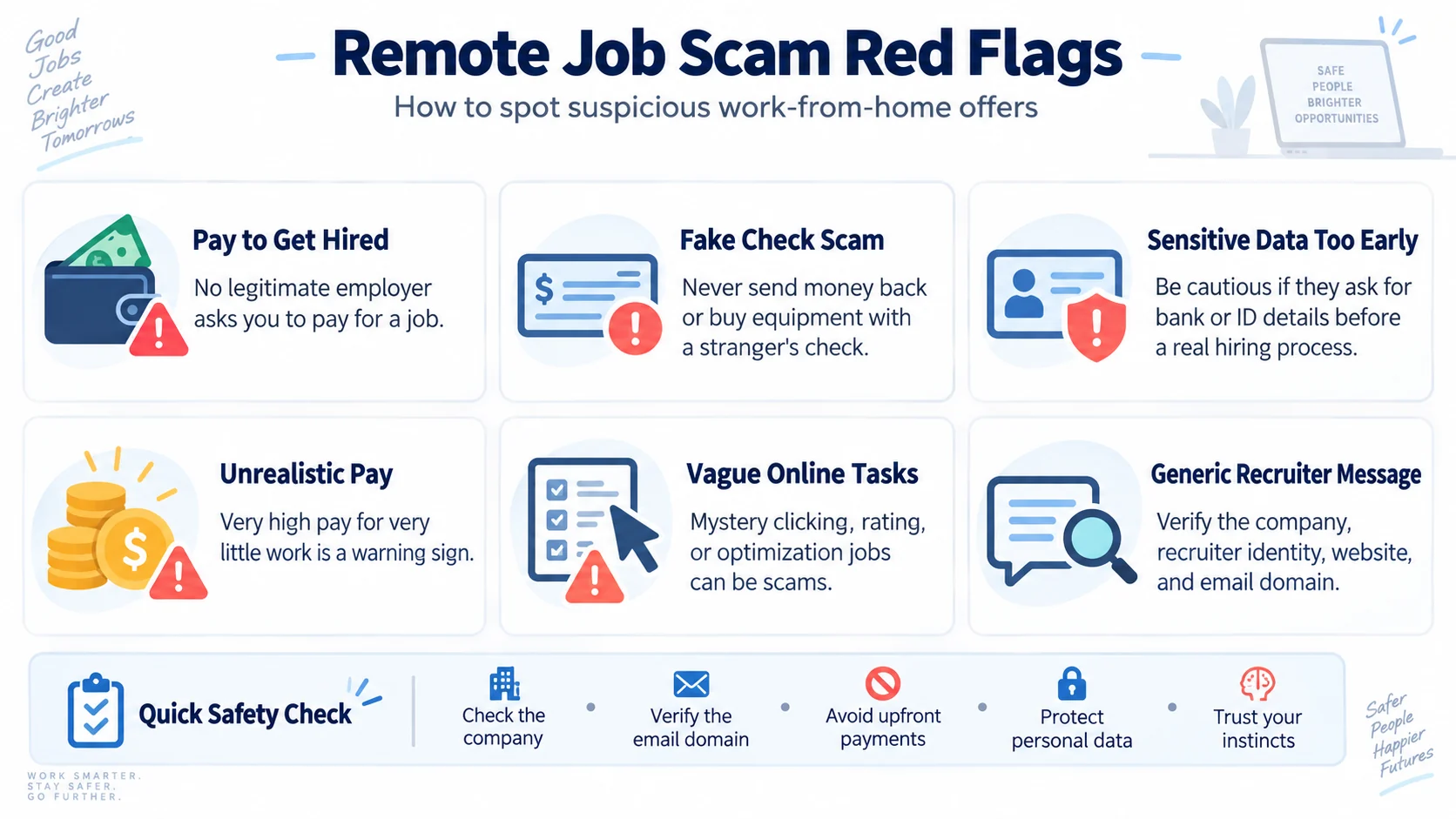
Red Flag 1: You Must Pay to Get the Job
Be extremely cautious if someone says you need to pay for access to a job, required recruitment processing or a guaranteed position.
The Federal Trade Commission (FTC) advises job seekers not to pay for the promise of a job and warns that fake employers may also use counterfeit checks or requests for money as part of work-from-home scams.
Red Flag 2: A Recruiter Sends You Money and Asks You to Send Some Back
A fake employer may send a check and ask you to use part of the money for equipment or send some of it elsewhere.
This can be a fake-check scam.
Do not assume that a check is legitimate simply because money temporarily appears in an account.
Red Flag 3: They Want Sensitive Information Too Early
Be cautious if a supposed recruiter immediately requests sensitive financial or identity information before a legitimate hiring process has taken place.
Verify the organization and the person you are communicating with independently.
Red Flag 4: Unrealistic Pay for Very Little Work
Promises of unusually high earnings for extremely simple work should be treated cautiously.
Legitimate jobs normally have:
- Defined responsibilities
- Required skills
- A recognizable employer
- A normal recruitment process
Red Flag 5: Vague Online “Tasks”
Be cautious about unexpected messages offering money for simple online tasks such as clicking, rating, “optimizing” products or boosting content.
The FTC has specifically warned about task scams in which apparent earnings are displayed before victims are asked to deposit their own money.
Red Flag 6: Unexpected Generic Recruitment Messages
An unexpected message saying simply that someone has a remote opportunity is not enough to establish that the recruiter or job is legitimate.
Verify:
- Employer identity
- Recruiter identity
- Job description
- Official employer website
- Email domain
A Simple Remote-Job Verification Checklist
Before continuing with an unfamiliar opportunity, ask:
- Can I identify the real organization?
- Does the organization have an established official website?
- Can I verify the vacancy independently?
- Does the recruiter’s identity make sense?
- Does the email address match the organization?
- Are the responsibilities clearly explained?
- Is the compensation plausible for the role?
- Am I being asked to pay money?
- Is there pressure to act immediately?
- Have I been asked for sensitive information unusually early?
Therefore, if something does not make sense, stop and verify it before providing information or taking further action.
Step 8: Tailor Each Application
However, sending the same generic application everywhere may be less effective than focusing on suitable opportunities.
For each vacancy:
- Read the job description carefully.
- Identify the most important requirements.
- Compare them with your actual skills.
- Highlight relevant evidence.
- Adjust your resume where appropriate.
- Check the application for errors.
However, you do not necessarily need to match every preferred qualification.
At the same time, you should be able to explain why your current skills make you a plausible candidate.
Quality Applications vs Mass Applications
Applying for hundreds of unrelated remote jobs can make it difficult to tailor your applications effectively.
Instead, a more focused strategy is:
Relevant Role → Understand Requirements → Match Evidence → Tailor → Apply → Track
Keep a simple record containing:
- Company
- Role
- Date applied
- Source
- Status
- Follow-up notes
Step 9: Prepare for a Remote Job Interview
Similarly, remote interviews often assess the same professional capabilities as in-person interviews, but the format also demonstrates how you communicate digitally.
Before the interview:
- Test your device
- Test your internet connection
- Check your microphone
- Choose an appropriate environment
- Read the job description again
- Research the employer
- Prepare examples of your skills
How to Answer “You Don’t Have Experience”
However, do not pretend the experience gap does not exist.
Instead, a stronger answer acknowledges it and redirects attention toward relevant evidence.
A useful structure is:
Acknowledge → Transferable Skill → Evidence → Learning → Relevance
For example, explain that while you have not yet held that exact position, you have used relevant skills in projects or other settings and have deliberately developed the capabilities needed for the role.
Keep the answer truthful and specific.
Prepare Examples Before the Interview
Think about situations where you have:
- Solved a problem
- Organized work
- Worked with other people
- Learned something quickly
- Managed a deadline
- Communicated an important message
Examples can come from education, projects, volunteering or previous work when relevant.
Step 10: Develop the Skills Needed to Succeed Remotely
However, getting a remote job is only the beginning.
For that reason, remote employees need working practices that help teams collaborate without always being in the same location.
For example, important capabilities include:
- Written communication
- Time management
- Task organization
- Documentation
- Digital collaboration
- Reliability
- Asking for clarification
- Managing priorities
Communication Skills for Remote Work
In practice, remote teams rely heavily on digital communication.
More specifically, good written communication should make it clear:
What Happened → What It Means → What Is Needed → Who Owns the Next Step → When
As a result, this is especially valuable when colleagues work at different times or locations.
Learn to Document Your Work
In addition, documentation helps remote teams maintain shared context.
Depending on the job, this might include:
- Task updates
- Meeting notes
- Decisions
- Instructions
- Project status
- Customer information
However, documentation does not mean writing down everything.
Instead, it means preserving information that other people genuinely need.
Remote Work and Teamwork
However, working from home does not mean working alone.
In addition, remote employees still depend on colleagues, managers, customers and shared processes.
Therefore, effective digital teams combine technology with communication, trust, clear responsibilities and shared objectives.
Our Technology and Teamwork guide explores how technology, people and team practices work together in modern organizations. For a broader view of how roles, skills and operating models are changing, see our Workforce Transformation guide.
How to Manage Your Time When Working From Home
Although working remotely can provide flexibility, it also requires structure.
For example, a simple approach is:
Plan → Prioritize → Focus → Communicate → Review
Plan
Know what you need to accomplish.
Prioritize
Separate important work from tasks that can wait.
Focus
Create periods for concentrated work when your role allows it.
Communicate
Tell the appropriate people when blockers or changing priorities affect delivery.
Review
Check progress and adjust the plan when circumstances change.
Create a Sustainable Work-From-Home Routine
Remote work can blur the boundary between professional and personal time.
For instance, useful working practices can include:
- Having a defined start to the workday
- Planning priorities
- Taking reasonable breaks
- Following agreed working hours
- Clarifying availability expectations
- Creating an end-of-day routine
Ultimately, the goal is not to create a perfect routine.
It is to make working arrangements sustainable.
Do Not Try to Prove Yourself by Being Online All the Time
Someone entering their first remote role may feel pressure to demonstrate commitment by responding immediately to every message or remaining online constantly.
However, that is not necessarily a sustainable approach.
Instead, focus on understanding:
- Your expected working hours
- Response-time expectations
- What counts as urgent
- How your team communicates
- How performance is evaluated
Our How to Manage Stress at Work guide explains how workload, priorities, boundaries, support and work design interact.
Remote Work and Employee Wellbeing
Although remote work can offer flexibility, it can also create challenges such as digital overload, communication gaps or blurred work boundaries.
However, the impact depends on how the work is designed and managed.
Our Employee Wellbeing and Mental Health at Work guide explores the broader relationship between work design, leadership, support and sustainable employee wellbeing.
How AI Can Help When Starting Remote Work
Similarly, AI tools can support some aspects of learning and knowledge work.
For example, depending on the tools permitted by an employer, AI may help with:
- Brainstorming
- Explaining unfamiliar concepts
- Improving drafts
- Summarizing your own notes
- Practicing interview questions
- Learning spreadsheet concepts
- Organizing ideas
However, AI should not be used to fabricate professional experience, qualifications, references or achievements.
Using AI Responsibly in a Job Application
Although AI can help improve clarity, your application should remain accurate and genuinely represent you.
Therefore, a useful principle is:
Your Experience + AI Assistance ≠ Invented Experience
Finally, before submitting AI-assisted content:
- Check every factual statement
- Remove exaggerated claims
- Make the language sound natural
- Ensure examples are genuinely yours
- Follow employer instructions regarding AI where applicable
Your First 30 Days in a Remote Job
Once you get your first remote opportunity, focus on understanding how the organization works.
Days 1–7: Understand
- Learn your responsibilities
- Understand the tools
- Meet relevant colleagues
- Clarify expectations
- Understand communication norms
Then Days 8–14: Practice
- Complete initial tasks
- Ask questions
- Use documentation
- Practice team workflows
Days 15–21: Improve
- Use feedback
- Improve organization
- Identify recurring questions
- Strengthen relevant skills
Days 22–30: Review
- Review progress with your manager when appropriate
- Clarify future priorities
- Identify development areas
- Agree on next steps
Therefore, the objective during the first month is not to know everything immediately.
It is to become progressively more capable and reliable.
Common Mistakes When Trying to Work From Home With No Experience
1. Applying to Every Remote Job
Remote is a location arrangement, not a profession. Choose a target role.
2. Saying You Have No Skills
You may have transferable skills even without direct professional experience.
3. Taking Courses Without Building Evidence
Combine learning with practical projects.
4. Inventing Experience
Keep your resume and portfolio truthful.
5. Using One Generic Resume for Everything
Highlight the skills most relevant to each suitable opportunity.
6. Ignoring Job Scams
Remote-job searches can attract fake recruiters and fraudulent opportunities.
7. Paying Someone for the Promise of a Job
Do not pay a supposed employer or recruiter to guarantee employment.
8. Sharing Sensitive Information Too Early
Verify the organization and hiring process before providing sensitive information.
9. Assuming Remote Work Requires No Teamwork
Remote employees still need communication, collaboration and accountability.
10. Trying to Be Available Every Minute
Understand actual working expectations rather than assuming constant availability is required.
A 30-Day Plan to Prepare for Entry-Level Remote Work
Days 1–7: Choose Your Direction
- Choose one or two target roles
- Read real job descriptions
- List recurring requirements
- Identify transferable skills
- Identify skill gaps
Then Days 8–14: Learn and Practice
- Study the most important missing skills
- Practice relevant digital tools
- Create one small project
Days 15–21: Build Your Evidence
- Create two or three portfolio examples
- Update your resume
- Write clear descriptions of your projects
- Prepare examples for interviews
Days 22–30: Search and Apply
- Identify suitable opportunities
- Verify unfamiliar employers
- Tailor applications
- Track applications
- Practice remote interviews
Of course, thirty days does not guarantee employment.
Instead, the purpose of the plan is to move from a vague objective toward becoming a stronger candidate.
Frequently Asked Questions About Working From Home With No Experience
Can I Work From Home With No Experience?
Yes, some roles may be accessible without direct professional experience, depending on the employer and position. Transferable skills, relevant projects, education and demonstrated ability can help show that you are prepared for entry-level work.
What Remote Jobs Can Beginners Consider?
Depending on skills, location and employer requirements, beginners may explore areas such as customer support, administrative support, content assistance, sales support, project coordination, research assistance or junior technical support. Not every role in these categories is entry level or remote.
What Skills Do I Need to Work From Home?
Commonly useful skills include written communication, organization, time management, digital collaboration, reliability, problem-solving and the role-specific skills required by the employer.
How Do I Get Experience Before My First Remote Job?
You can build relevant evidence through personal projects, academic work, volunteering, training and other genuine activities that demonstrate the skills required for your target role.
Do I Need a Portfolio for Remote Work?
Not every job requires one. However, a small portfolio can be useful when you lack direct experience because it gives employers examples of your abilities.
Should I Pay to Get a Remote Job?
Be extremely cautious if someone asks you to pay for the promise of employment. The FTC advises that honest employers do not ask candidates to pay to get a job.
How Can I Tell Whether a Remote Job Is Real?
Research the organization independently, verify the vacancy through official channels when possible, examine the recruiter’s identity and email domain, and be cautious about requests for money or sensitive information.
Can AI Help Me Get a Remote Job?
AI can help with learning, brainstorming, interview practice and improving drafts, but it should not be used to fabricate experience, qualifications or achievements.
Do I Need Advanced Computer Skills to Work Remotely?
That depends on the role. Most remote knowledge-work roles require some ability to use digital communication and collaboration tools, while technical positions may require substantially more specialized skills.
Is Remote Work Easier Than Office Work?
Not necessarily. Remote work changes the working environment, but employees still need to manage responsibilities, deadlines, communication, teamwork and performance expectations.
How Long Does It Take to Get a Work-From-Home Job With No Experience?
However, there is no reliable universal timeline. It depends on the role, location, skills, labor market, quality of applications and employer requirements. Therefore, avoid anyone promising guaranteed employment within a specific period.
Conclusion: Turn “No Experience” Into Evidence of Ability
Learning how to work from home with no experience is not about finding a shortcut around skills or experience.
Instead, it is about recognizing what you already know, developing what you still need and creating credible evidence of your ability.
The path is:
Identify Your Skills → Choose a Target Role → Build Evidence → Prepare Your Resume → Find Legitimate Opportunities → Apply → Interview → Succeed Remotely
First, start with a specific role rather than searching for anything that happens to be remote.
Next, identify the skills employers actually request.
Then, build small, genuine projects that demonstrate those skills.
Finally, make your resume evidence-based and truthful.
In addition, when searching for opportunities, verify unfamiliar employers and be cautious about offers involving money, fake checks, unexpected requests for sensitive information or unrealistic promises.
Most importantly, replace the idea:
“I have no experience.”
with a more useful question:
“What evidence can I build to show that I am ready for this role?”
That shift turns a broad desire to work from home into a practical career-development plan.
Continue Learning
Continue building practical career, digital-work and teamwork skills with these related TechTeamSynergy guides: