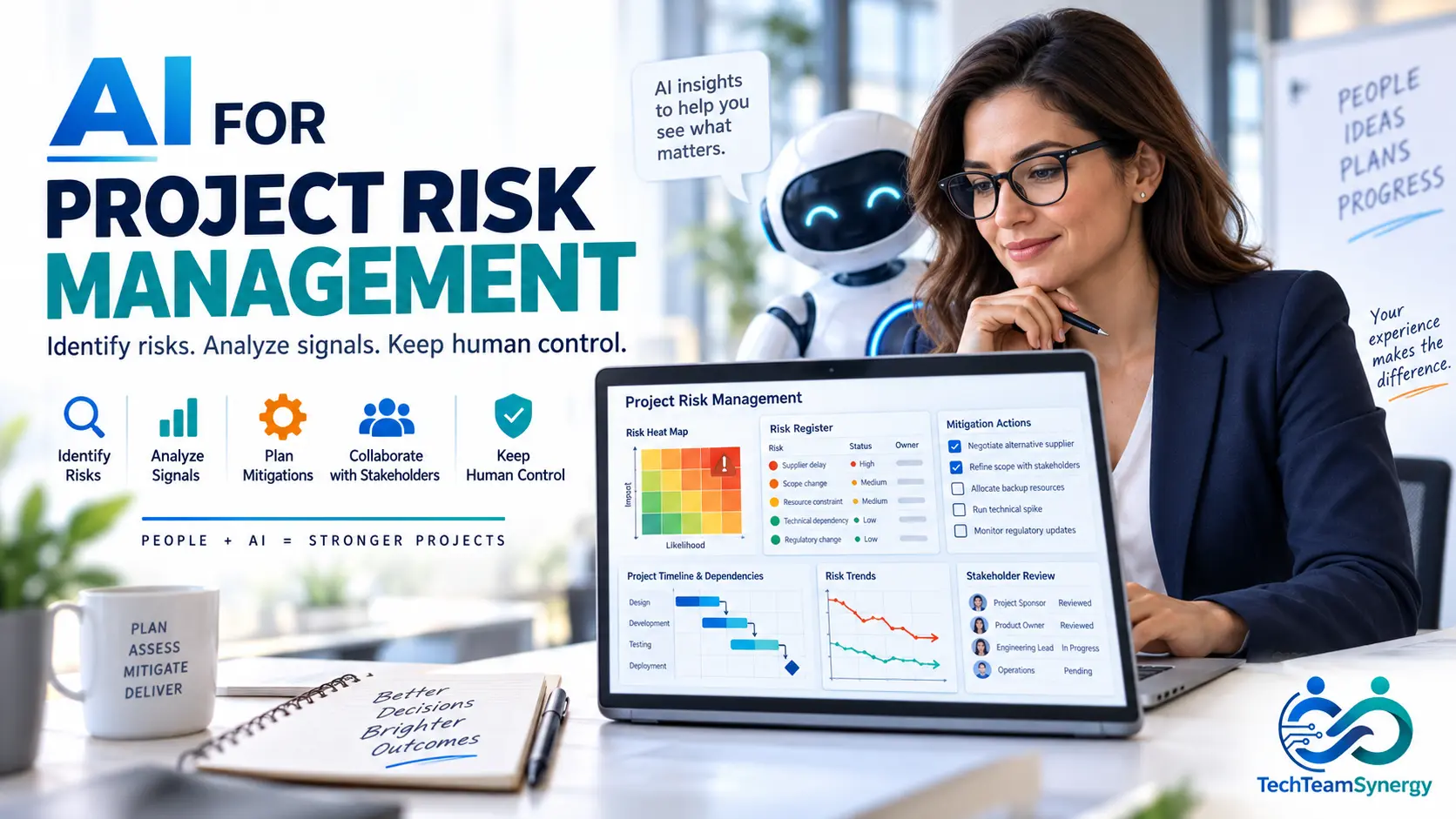
AI for project risk management can help project managers identify weak signals, structure uncertainty, challenge assumptions and monitor changing conditions across complex projects. More importantly, the opportunity is not simply to automate a risk register. It is to help project teams see more information, connect more signals and review potential risks faster without giving up human judgment or accountability.
In practice, project risks rarely appear first in a perfectly formatted risk register. Instead, they often emerge as fragmented signals across schedules, meeting notes, issue logs, supplier updates, change requests, resource plans, budgets, quality reports and technical incidents. A project manager may understand each signal individually but still miss the pattern connecting them.
In this context, artificial intelligence can help organize and analyze that information. However, it should remain a support layer. The AI in project management model used throughout TechTeamSynergy is simple: AI can assist with analysis, drafting and pattern detection; project professionals remain responsible for validation, decisions, governance and outcomes. A practical project AI governance framework can make those oversight and accountability boundaries explicit.
AI is a risk copilot, not a risk owner. For a broader framework on human oversight and responsible AI use, see the PMI AI Standard for project management. To strengthen the underlying skills of evidence verification and scenario analysis, follow our AI competency roadmap for project managers.
Free: 50 AI Prompts for Project Managers
Put AI into practice with ready-to-use prompts for project planning, risk analysis, stakeholder communication, reporting, meetings and governance.
Table of Contents
Jump directly to the section you need.
What Is AI for Project Risk Management?
AI for project risk management means using generative AI, machine learning, analytical systems or AI-enabled project tools to support activities such as risk identification, analysis, prioritization, response planning, monitoring and AI-supported project status reporting.
It is useful to distinguish two different topics:
- Using AI to manage project risks: analyzing project information, improving risk statements, identifying dependencies, generating response options and monitoring changes.
- Managing risks created by AI: addressing hallucination, privacy, bias, security, explainability, automation bias and accountability when AI itself is part of the workflow.
Therefore, this guide focuses primarily on the first topic, while also covering the controls needed to use AI responsibly. The distinction matters because frameworks such as the NIST AI Risk Management Framework are designed to help organizations manage risks associated with AI systems and their use. NIST describes the AI RMF as a voluntary framework intended to support trustworthy and responsible AI across design, development, deployment and use.
Where AI Fits in the Project Risk Management Lifecycle
Importantly, AI does not create a new risk-management lifecycle. Rather, it can support activities that project teams already perform. PMI’s Risk Management in Portfolios, Programs, and Projects: A Practice Guide focuses on practical risk-management techniques and the risk-management lifecycle across project environments.
| Risk Activity | Traditional Approach | AI-Assisted Approach | Human Role |
|---|---|---|---|
| Identify | Workshops, interviews, lessons learned | Scan approved project information for potential signals | Validate relevance |
| Analyze | Expert assessment | Structure causes, events, impacts and scenarios | Assess context |
| Prioritize | Probability × impact | Suggest ranking, assumptions and missing considerations | Confirm scoring |
| Respond | Team workshops | Generate response alternatives | Select response |
| Assign | Project-team decision | Suggest possible roles based on context | Assign accountability |
| Monitor | Periodic reviews | Compare periods and flag changing signals | Decide action |
| Report | Manual summaries | Draft risk updates, trends and executive summaries | Approve communication |
As a result, the operating principle is straightforward: AI can accelerate the workflow, but authority and accountability remain with the project team.
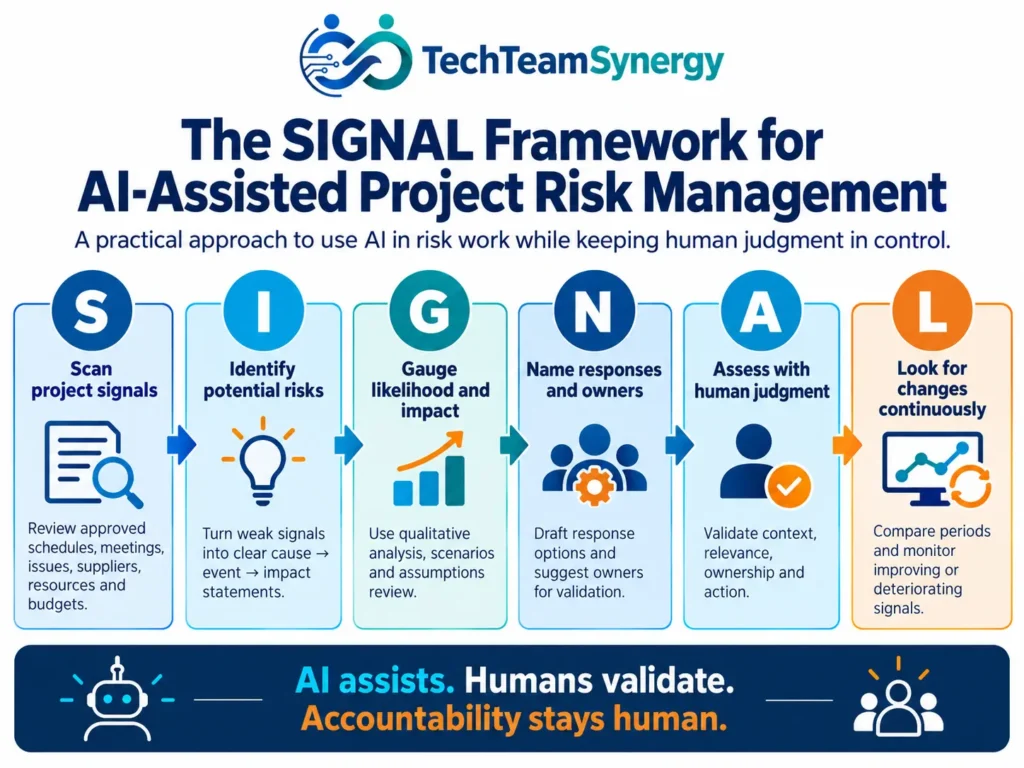
The TechTeamSynergy SIGNAL Framework for AI-Assisted Risk Management
The SIGNAL Framework provides a practical way to structure AI-assisted project risk management:
S — Scan project signals
I — Identify potential risks
G — Gauge likelihood and impact
N — Name responses and owners
A — Assess with human judgment
L — Look for changes continuously
S — Scan Project Signals
First, risk identification starts with evidence. AI can help review approved project information across multiple sources, including schedules and milestone updates, meeting notes and action logs, RAID registers, change requests, supplier updates, resource plans, budgets, incident reports and operational-readiness information.
However, the important word is approved. Project information may contain commercial, financial, employee, customer, security or contractual data. Only use information that your organization permits you to process with the AI system in question.
Consider three separate project signals: integration testing is already one week late, the same supplier action has been overdue twice, and a critical engineer will be unavailable during the next test window. Individually, each may look manageable. Together, they may indicate a growing schedule and dependency risk. AI can help surface that pattern for review.
I — Identify Potential Risks
For example, AI is particularly useful for converting vague observations into clearer risk hypotheses. One practical structure is Cause → Risk Event → Impact.
For example, a weak statement such as “supplier risk” provides little information. A stronger statement would be:
Because hardware approval remains delayed, equipment delivery may miss the planned site-readiness window, potentially delaying migration.
The project team still needs to verify that the cause is real, the event is uncertain rather than already occurring, and the impact is relevant.
G — Gauge Likelihood and Impact
AI can support qualitative analysis by suggesting factors that may affect likelihood or impact, comparing scenarios and identifying missing evidence. It can also help challenge the assumptions behind an existing score.
However, what it should not do is create unsupported certainty. An AI-generated statement such as “this risk has a 72.6% probability” may look scientific while having no credible statistical basis.
N — Name Responses and Owners
For a validated risk, AI can generate alternatives such as avoid, mitigate, transfer/share, accept or escalate. In addition, AI can help structure the expected benefit, effort, dependency, trigger, owner and residual risk for each response.
But the final owner should reflect real authority. Our RACI matrix examples show how responsibility and accountability differ across IT, network, Agile, cloud, vendor and AI-enabled project environments.
A — Assess With Human Judgment
Most importantly, human review is where AI output becomes project judgment. The project manager and relevant stakeholders should ask whether the item is actually a risk, whether the context is correct, whether the impact is credible, whether key stakeholders are missing, whether information is current, whether the risk is already an issue, whether the response is realistic and whether the proposed owner has real authority.
Human validation converts AI output into project judgment. This emphasis on professional judgment also aligns with the leadership principles explained in our 2026 PMP certification guide.
L — Look for Changes Continuously
Over time, risks evolve. AI can help compare approved information from one reporting period with another and highlight changes that deserve review.
During Week 1: Supplier action overdue by two days.
By Week 2: Approval still pending; testing contingency reduced.
By Week 3: Migration window is now at risk.
For example, useful labels may include stable, improving, deteriorating, triggered, converted to issue, mitigation overdue and ready for closure review.
15-Minute AI Risk Review Workflow
Use this short workflow during a weekly risk review. The goal is not to let AI make decisions; it is to turn scattered project signals into a structured conversation that ends with a human-owned action.
- Minutes 0–3 — Scan the new signals. Review only approved updates from the schedule, RAID log, supplier actions, change requests, incidents and meeting notes. Ask AI to identify changes, contradictions and emerging patterns without inventing missing facts.
- Minutes 3–6 — Convert signals into risk hypotheses. Rewrite each candidate using Cause → Risk Event → Impact. Separate confirmed evidence from assumptions and flag items that may already be issues rather than risks.
- Minutes 6–9 — Challenge likelihood, impact and dependencies. Ask what evidence supports the current rating, what could worsen the exposure, and which downstream milestones, suppliers or teams could be affected. Keep unsupported precision out of the analysis.
- Minutes 9–12 — Decide the human response. The project team chooses whether to avoid, mitigate, transfer/share, accept or escalate. AI may suggest options, but the decision remains with the people who understand project context and authority.
- Minutes 12–15 — Assign owner, trigger and next review. Record the risk owner, response owner, trigger or threshold, due date and next review point. If there is no accountable owner and no follow-up date, the review is incomplete.
End every review with one of four outcomes: keep monitoring, update the response, escalate for a decision, or convert the item to an issue because the uncertain event has already occurred.
7 Practical Ways to Use AI for Project Risk Management
1. Generate an Initial Risk Register
For example, one of the fastest ways to use AI is to create an initial set of candidate risks from project context. Provide information such as objectives, scope, milestones, dependencies, constraints, suppliers, resources, assumptions and technical environment.
| Risk | Cause | Event | Impact | Category | Trigger |
|---|---|---|---|---|---|
| Candidate risk | Observed condition | What may happen | Potential effect | Schedule / cost / resource / etc. | Evidence to monitor |
Treat the first AI-generated register as a hypothesis set—not the approved risk register. The project team should remove irrelevant items, add missing context and validate each entry.
2. Improve Weak Risk Statements
Weak: Resource risk.
Better: There may be insufficient specialist resources.
Stronger: Because two critical specialists are shared with another program, design activities may not complete on schedule, potentially delaying integration testing.
3. Detect Risks Hidden Across Project Information
Meeting Notes
Issue Log
Schedule
Supplier Update
Change Requests
      ↓
AI Pattern Analysis
      ↓
Potential Risk Signal
      ↓
Project Manager Review
However, the value is not that AI automatically knows the risk. Instead, it can help reduce the manual effort required to bring related signals together.
4. Challenge the Existing Risk Register
AI can act as an independent challenger rather than the author of the register. Ask it to review for missing risks, duplicates, items that are already issues, unclear impacts, unsupported assumptions, missing triggers, unclear ownership and response actions that do not address the cause.
5. Generate Risk Response Alternatives
For a validated risk such as “security approval may delay production deployment”, AI could help generate alternatives:
- Avoid: redesign the dependency so approval is no longer on the critical path;
- Mitigate: start the security review earlier and provide required evidence in stages;
- Transfer/share: use an approved external specialist for part of the review;
- Accept: retain schedule contingency if the exposure is within tolerance;
- Escalate: request a governance decision if the project team lacks authority.
6. Identify Risk Dependencies and Cascades
Supplier delay
      ↓
Equipment delivery delay
      ↓
Testing delay
      ↓
Migration window missed
      ↓
Customer / business impact
A useful AI question is: “What secondary or downstream risks could be triggered or amplified by this risk?”
7. Monitor Risk Signals Over Time
| Risk | Previous Status | New Signal | Trend | Recommended Review |
|---|---|---|---|---|
| Supplier delay | Medium | Approval still pending | Deteriorating | Escalate for review |
| Resource capacity | High | Additional engineer onboarded | Improving | Re-score |
| Security approval | Medium | Review complete | Improving | Consider closure |
In other words, AI identifies change. The project team decides what the change means. More advanced monitoring workflows may eventually use agentic AI to collect approved updates and prepare a risk review, but greater automation should come with stronger permissions, monitoring and human oversight.
10 Practical AI Prompts for Project Risk Management
Importantly, prompt quality strongly affects the usefulness of AI-assisted risk work. Our AI prompting guide uses a practical structure built around role, context, input, task, constraints, output format and human validation.
1st Prompt — Initial Risk Discovery
Act as a project risk analyst.

Review the project context below and identify potential risks.

For each risk, provide:
- Cause
- Risk event
- Potential impact
- Trigger
- Missing information

Do not invent probabilities, dates or facts.
Flag assumptions separately.
The output is a draft for project-team validation.
2nd Prompt — Improve Risk Statements
Rewrite the following project risks using a Cause → Risk Event → Impact structure.

Keep each statement specific, concise and testable.

Do not add facts that are not present in the source information.
3rd Prompt — Challenge Assumptions
Review this project plan and list assumptions that could become risks if they prove false.

For each assumption:
- Explain the potential impact
- Identify evidence to monitor
- State what information is missing

Do not treat assumptions as confirmed risks without evidence.
4th Prompt — Risk Register Audit
Audit this risk register.

Identify:
- Duplicates
- Vague risk statements
- Risks with unclear impact
- Items that are already issues
- Missing triggers
- Unsupported scoring
- Unclear ownership

Explain each finding without changing the register automatically.
5th Prompt — Missing Risk Challenge
Act as an independent risk reviewer.

What project risks might this register be missing across:
- Scope
- Schedule
- Cost
- Resources
- Suppliers
- Technology
- Security
- Stakeholders
- Operations

Separate evidence-based observations from assumptions.
6th Prompt — Risk Response Alternatives
For each validated risk below, propose response alternatives using:
- Avoid
- Mitigate
- Transfer/share
- Accept
- Escalate

For each option include:
- Expected benefit
- Effort
- Dependency
- Residual risk

Do not choose the final response.
7th Prompt — Risk Dependency Analysis
Analyze the following risks and project dependencies.

Identify where one risk could trigger or amplify another risk.

Present the result as:
Cause → Event → Downstream Effect → Potential Business Impact

Flag any relationship that is only an assumption.
8th Prompt — Weekly Risk Review
Compare this week's approved project information with last week's risk register.

Identify:
- New risk signals
- Deteriorating risks
- Improving risks
- Triggered risks
- Overdue mitigations
- Risks that may now be issues
- Risks that may be ready for closure review

Do not close, escalate or re-score risks automatically.
9th Prompt — Executive Risk Summary
Summarize the five most important validated project risks for an executive audience.

For each include:
- Potential impact
- Trend
- Owner
- Response status
- Decision needed

Use only the supplied project data.
Keep uncertainty explicit.
Prompt 10 — Lessons-Learned Risk Review
Review these lessons learned from previous projects.

Identify recurring risk patterns that should be considered when planning a similar future project.

Separate:
1. Historical evidence
2. Possible future risks
3. Assumptions requiring validation
Want More Ready-to-Use Project Management Prompts?
Download the free TechTeamSynergy pack with 50 practical prompts for planning, risks, reporting, meetings, stakeholders, Agile and governance.
Worked Example: AI-Assisted Risk Management for a Network Migration
For example, consider a company preparing to migrate 20 sites to a new network architecture. The project includes an external connectivity provider, security approval, fixed weekend migration windows and a limited operations team.
| Element | Situation |
|---|---|
| Sites | 20 |
| Supplier | External connectivity provider |
| Security | Approval required before production |
| Operations | Limited engineering capacity |
| Migration | Fixed weekend windows |
| Testing | Required before each cutover |
| Dependencies | Circuits, equipment, security and site readiness |
Step 1 — Provide Approved Context
The project will migrate 20 sites over eight weeks. Five circuits are still pending carrier confirmation. Security approval is required before production. Two operations engineers support both the migration and business-as-usual incidents. Migration windows are fixed to weekends.
Step 2 — Ask AI for Candidate Risks
Possible candidates may include circuit delivery delay, security approval delay, operations resource conflict, site-readiness failure, compressed testing and provider escalation delay.
Step 3 — Validate With the Team
Next, suppose the AI also suggests “user adoption risk.” The team determines that this is not material for the infrastructure migration in question and removes it.
Therefore, this is an important example: AI output can be plausible and still be irrelevant.
Step 4 — Structure the Validated Risks
Because five circuits are awaiting carrier confirmation, some sites may not be ready for their assigned migration window, potentially extending the rollout schedule.
Step 5 — Score With the Team
| Risk | Likelihood | Impact | Trend |
|---|---|---|---|
| Circuit delay | High | High | Deteriorating |
| Security approval | Medium | High | Stable |
| Operations capacity | Medium | Medium | Deteriorating |
| Site readiness | Medium | Medium | Stable |
Importantly, these qualitative scores come from project-team judgment. They are not unexplained AI-generated percentages.
Step 6 — Generate Response Alternatives
For the circuit-delay risk, AI might help structure options such as early carrier escalation, prioritizing high-risk sites, alternate sequencing, an approved temporary-connectivity option or schedule contingency.
Step 7 — Assign Ownership
| Risk | Risk Owner | Response Owner |
|---|---|---|
| Circuit delivery | Network PM | Provider manager |
| Security approval | Security lead | Security architect |
| Operations capacity | Operations manager | Project manager |
| Site readiness | Site/business owner | Local coordinator |
Finally, the assignment should reflect actual authority, not an AI guess. For additional worked responsibility models, see our 10 practical RACI matrix examples. In SAFe environments, teams can also use the PI Planning readiness checklist to review dependencies, capacity, risks and ownership before the Planning Interval begins.
What AI Should Not Do in Project Risk Management
| AI Should Not Automatically… | Why |
|---|---|
| Accept a major risk | Risk acceptance requires appropriate authority |
| Close a risk | Evidence and current conditions must be reviewed |
| Assign accountability | Authority and governance must be real |
| Invent probabilities | False precision can distort decisions |
| Process unauthorized data | Project data may be sensitive or restricted |
| Replace stakeholder workshops | Context, negotiation and lived experience can be lost |
| Make escalation decisions | Escalation is a governance responsibility |
| Hide uncertainty | Decision-makers need to understand limits and assumptions |
Therefore, the more consequential the decision, the stronger the human review should be.
Risks of Using AI for Project Risk Management
However, AI can improve risk workflows while introducing new risks of its own. PMI’s Standard for Artificial Intelligence in Portfolio, Program and Project Management, published in June 2026, includes human-in-the-loop practices, ethical and legal guardrails, governance considerations and applied use cases for AI-enabled project work.
Hallucination
For example, generative AI may produce statements that are plausible but unsupported. Candidate risks, explanations and recommendations should be checked against project evidence.
Missing Context
Moreover, an AI system does not automatically understand stakeholder history, organizational politics, informal commitments, contractual nuances or local operating constraints.
Automation Bias
In addition, polished output can encourage users to trust a recommendation too quickly. A well-formatted table is not evidence that the underlying analysis is correct.
Sensitive Project Data
Similarly, risk information may contain contracts, vendor performance details, employee information, financial data, technical vulnerabilities or customer information. Data handling must follow organizational rules and approved-tool policies.
Biased Historical Data
Likewise, historical projects may reflect outdated processes, incomplete records or systemic bias. Historical patterns should not automatically determine future decisions.
False Precision
However, AI may express uncertainty using specific numbers even when there is no validated statistical model behind them. Challenge unsupported percentages.
Weak Explainability
Therefore, project leaders should be able to explain why a risk is being prioritized, escalated or accepted. If a recommendation cannot be traced to understandable evidence and assumptions, it should receive additional review.
Accountability Gaps
Ultimately, “the AI recommended it” is not a governance model. Someone still needs the authority to validate, decide, approve and own the outcome.
The NIST AI RMF reinforces the broader need to incorporate trustworthiness considerations into the design, development, use and evaluation of AI systems.
Human-in-the-Loop AI Risk Management
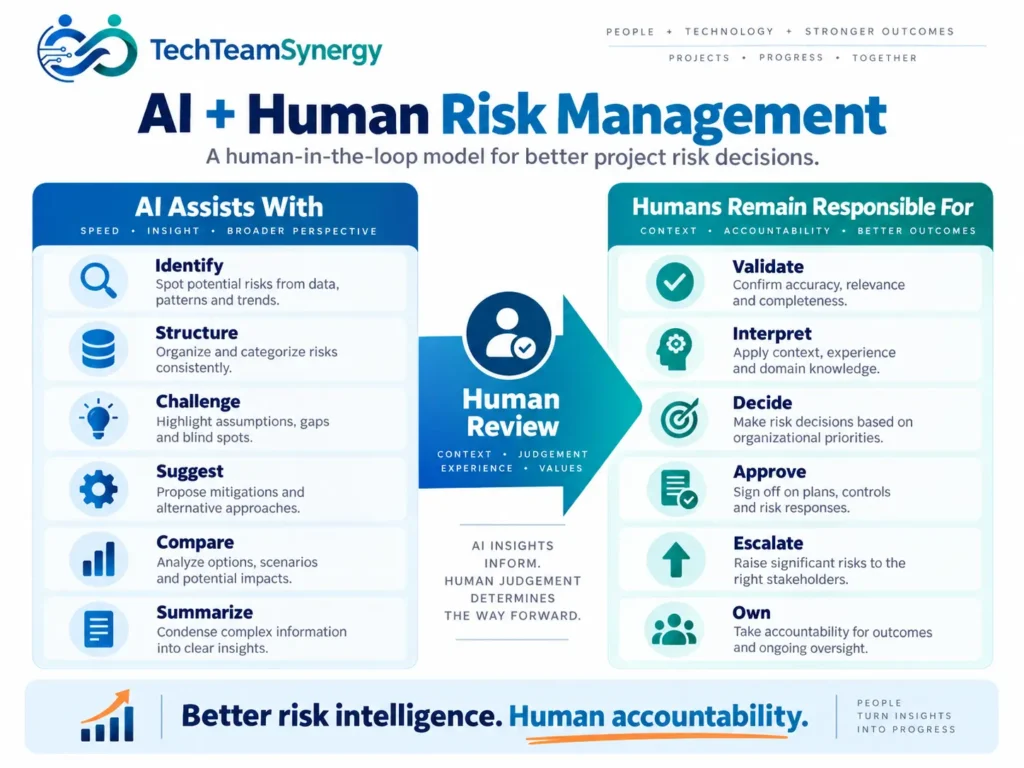
In practice, a useful AI risk process separates machine assistance from human authority.
This human-in-the-loop model also reflects the wider relationship between AI and the future of the project manager role, where more analysis may be automated while validation, escalation and accountability remain human responsibilities.
| AI Assists With | Humans Remain Responsible For |
|---|---|
| Identify | Validate |
| Structure | Interpret |
| Challenge | Decide |
| Suggest | Approve |
| Compare | Escalate |
| Summarize | Own |
AI identifies. Then humans validate and decide. Ultimately, humans own the outcome.
How to Start Using AI for Project Risk Management
Step 1 — Choose One Workflow
First, do not automate the entire risk process on day one. Start with one bounded use case such as a weekly risk review, risk-statement improvement, risk-register audit or executive risk-summary draft.
Step 2 — Define Approved Data
Next, clarify what information can be used, which tools are approved, what data must remain excluded and what retention or security requirements apply.
Step 3 — Establish Human Review
Then, define who validates candidate risks, who approves scoring, who owns response decisions and who can accept or escalate exposure.
Step 4 — Pilot on an Existing Project
After that, a known project is useful because the team already understands its context and can compare AI output with established project knowledge.
Step 5 — Compare AI Output With Team Judgment
Evaluate useful new signals, false positives, time saved, missed context, quality of risk statements and stakeholder usefulness.
Step 6 — Improve the Workflow
Finally, refine prompts, input quality, governance, validation checkpoints and reporting formats. Effective AI adoption is usually iterative rather than one large technology implementation.
The modern IT project manager increasingly needs to combine delivery fundamentals with data literacy, AI fluency, stakeholder judgment and governance awareness.
Generative AI vs Predictive Analytics for Project Risk
| Capability | Generative AI | Predictive Analytics | Human Judgment |
|---|---|---|---|
| Meeting-note analysis | Strong | Limited | Strong |
| Unstructured text analysis | Strong | Limited | Strong |
| Historical probability modeling | Limited without validated data/model | Strong with suitable data | Interprets |
| Scenario generation | Strong | Moderate | Validates |
| Forecasting | Limited without suitable data | Strong when model and data are appropriate | Interprets |
| Stakeholder context | Partial | Weak | Strong |
| Final decision | No | No | Yes |
Generative AI is particularly useful for unstructured information, drafting and reasoning support. Predictive analytics is stronger where validated historical data and suitable models exist. Project professionals remain responsible for context and decisions.
Frequently Asked Questions About AI for Project Risk Management
How can AI be used in project risk management?
AI can support project risk identification, improve risk statements, analyze dependencies, challenge a risk register, generate response alternatives, compare reporting periods and draft risk summaries. Project teams should validate the output before making decisions.
Can AI create a project risk register?
Yes. AI can create a useful first draft when given appropriate project context, but the output should be treated as candidate risks rather than the final approved register.
Can AI predict project risks?
AI can identify patterns and signals that may indicate future risk. Reliable probability prediction requires suitable historical data, validated models and clear assumptions. Generative AI should not be treated as a statistical forecasting model simply because it can produce a number.
Can ChatGPT identify project risks?
ChatGPT and similar generative AI systems can identify candidate risks from information you provide, structure risk statements and challenge assumptions. Their outputs can still be incomplete or incorrect and require project-team validation.
How accurate is AI for project risk assessment?
Accuracy depends on the quality and completeness of the data, the type of AI system, the prompt or workflow, project context and the quality of human review. There is no universal accuracy level that applies to every project or AI tool.
Can AI calculate project risk probability?
It can support probability analysis when connected to appropriate data and validated analytical methods. Unsupported percentages generated from narrative context alone should not be treated as evidence.
What project data can AI analyze for risks?
Potential inputs include schedules, issue logs, meeting notes, risk registers, change requests, resource plans and supplier updates—but only when organizational policy allows that information to be processed by the chosen AI system. Choosing appropriate AI project management tools also depends on how well they fit these data sources and governance requirements.
What are the risks of using AI in project management?
Key risks include hallucination, missing context, privacy and security concerns, automation bias, biased historical data, false precision, weak explainability and unclear accountability.
Will AI replace project managers in risk management?
AI can automate or accelerate parts of risk analysis, but risk management also requires stakeholder engagement, organizational context, governance, authority, negotiation and accountability. Those remain fundamentally human responsibilities.
How should project managers validate AI-generated risks?
Check the supporting evidence, project context, cause-event-impact structure, likelihood, impact, assumptions, triggers, ownership and stakeholder agreement. Remove irrelevant outputs and challenge any recommendation that cannot be explained from the available information.
Conclusion
Overall, AI can help project managers see more signals, process more information and challenge assumptions faster. It can improve the starting point for risk identification, make risk statements clearer, generate response alternatives and help teams monitor changing conditions across a project.
However, more analysis does not automatically mean better decisions. The quality of AI-assisted risk management depends on approved data, clear prompts, appropriate tools, transparent assumptions and strong human review.
AI identifies. It structures and challenges.
Then project managers validate, teams decide and humans remain accountable.
For additional exercises covering risk, planning, reporting, automation, and responsible AI use, see the practical AI workbook for project managers.
Continue Learning
Continue exploring the TechTeamSynergy AI and project management cluster with these related guides:
Get Practical Insights from TechTeamSynergy
Join TechTeamSynergy Weekly for practical insights, frameworks, templates and resources covering Technology, Team and Transformation.