
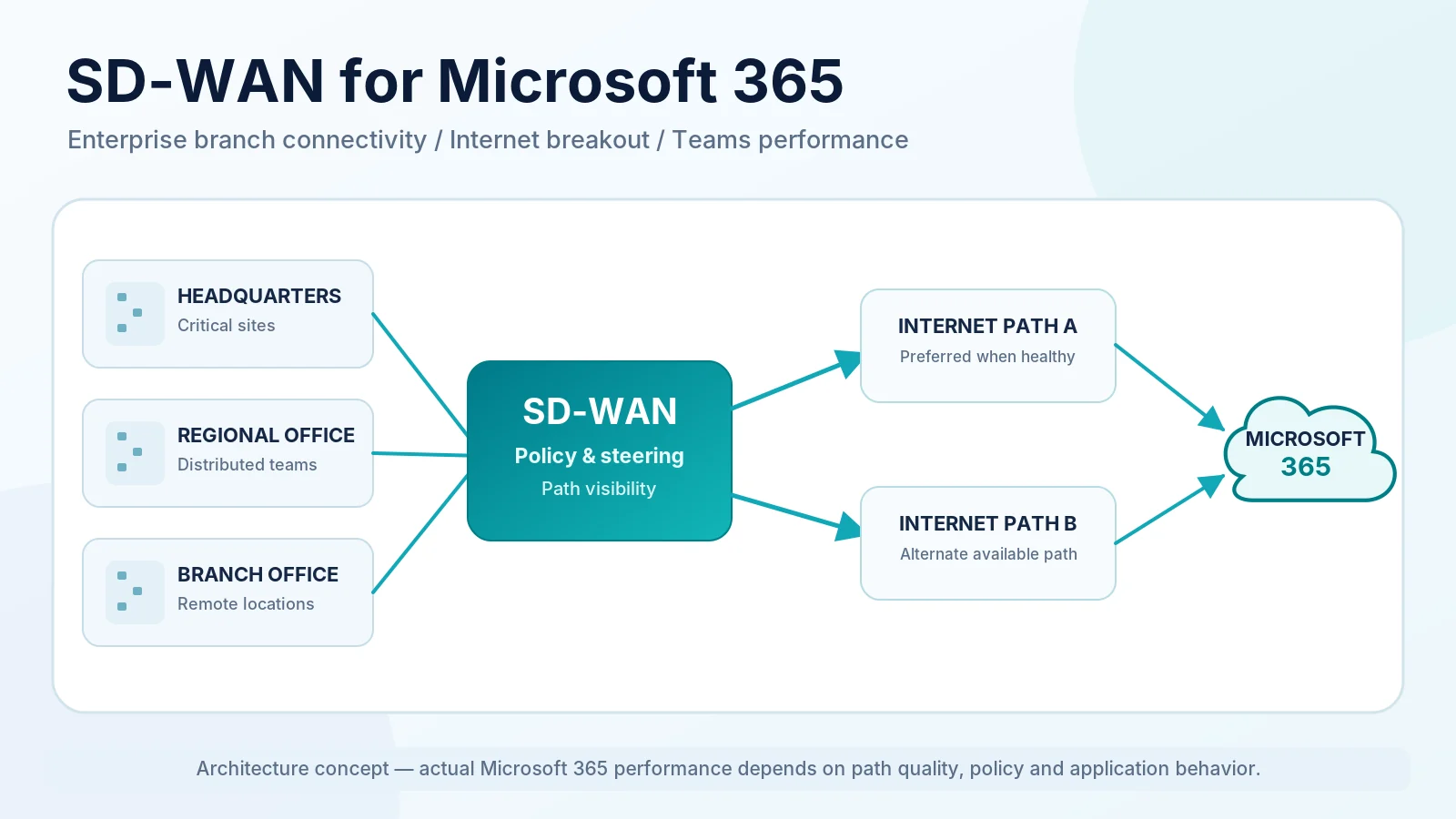
SD-WAN for Microsoft 365 helps enterprises control how branch-office traffic reaches Microsoft 365 services across available Internet and WAN connections. Rather than sending every request through a central data center, an enterprise can use SD-WAN policies to direct eligible traffic toward suitable local or regional Internet egress points.
This matters because Microsoft 365 is delivered through distributed, Internet-facing services. Unnecessary backhaul, poorly aligned DNS resolution, congested Internet paths, or additional security processing can affect application responsiveness and Microsoft Teams media quality.
SD-WAN is not an automatic Microsoft 365 performance accelerator. Its value depends on available transports, application identification, routing policies, security architecture, and measured network conditions. The objective is to design the right path for each workload, verify Microsoft’s connectivity guidance, and validate the result through application and network telemetry.
SD-WAN for Microsoft 365 at a Glance
| Design Area | Traditional Approach | SD-WAN Option | What to Validate |
|---|---|---|---|
| Internet egress | Centralized backhaul | Selected local or regional breakout | Egress and service entry points |
| Teams media | Shared central route | Policy-driven eligible path | Media quality and routing |
| Resilience | Fixed primary path | Multiple WAN transports | Actual path diversity |
| Application steering | Broad destination routing | Microsoft 365-aware policy | Endpoint identification |
| Security | Central inspection stack | Approved local or SSE path | Protection and path impact |
| Monitoring | Circuit availability | Path and application telemetry | User-experience outcomes |
The best design is not necessarily the one with the most Internet circuits or sophisticated SD-WAN features. It is the one that matches Microsoft 365 requirements to real network conditions while preserving security and operational control.
For foundational concepts, see our complete guide to SD-WAN.
Why Microsoft 365 Changes Enterprise WAN Design
SaaS Access vs Private Data-Center Access
Traditional enterprise WANs were often designed around private applications hosted in central data centers. Branches used private services such as MPLS to reach those applications through a controlled corporate network.
Microsoft 365 changes the traffic destination. Exchange Online, SharePoint Online, OneDrive, and Teams are delivered through Microsoft’s distributed service infrastructure. Users in different offices may connect to Microsoft service entry points that are geographically and topologically closer than the enterprise’s data center.
Sending a branch user toward headquarters before allowing the traffic onto the Internet may add network segments without bringing that user closer to Microsoft 365. This does not make centralized connectivity inherently wrong: private applications, security requirements, and operational constraints may justify backhaul for selected flows.
The design question is which Microsoft 365 flows benefit from a more direct Internet path and how to provide that path safely.
Microsoft Global Network and Service Entry Points
Microsoft’s network connectivity principles explain that Microsoft 365 uses distributed service front doors connected through the Microsoft Global Network. Microsoft recommends minimizing network round-trip time between users and suitable service entry points.
An efficient connection to a nearby Microsoft service entry point may be preferable to a longer route through the enterprise WAN. However, geographic proximity alone is not a performance guarantee: ISP routing, peering, DNS behavior, and application characteristics also matter.
Microsoft 365 Local Internet Breakout vs Traditional Backhaul
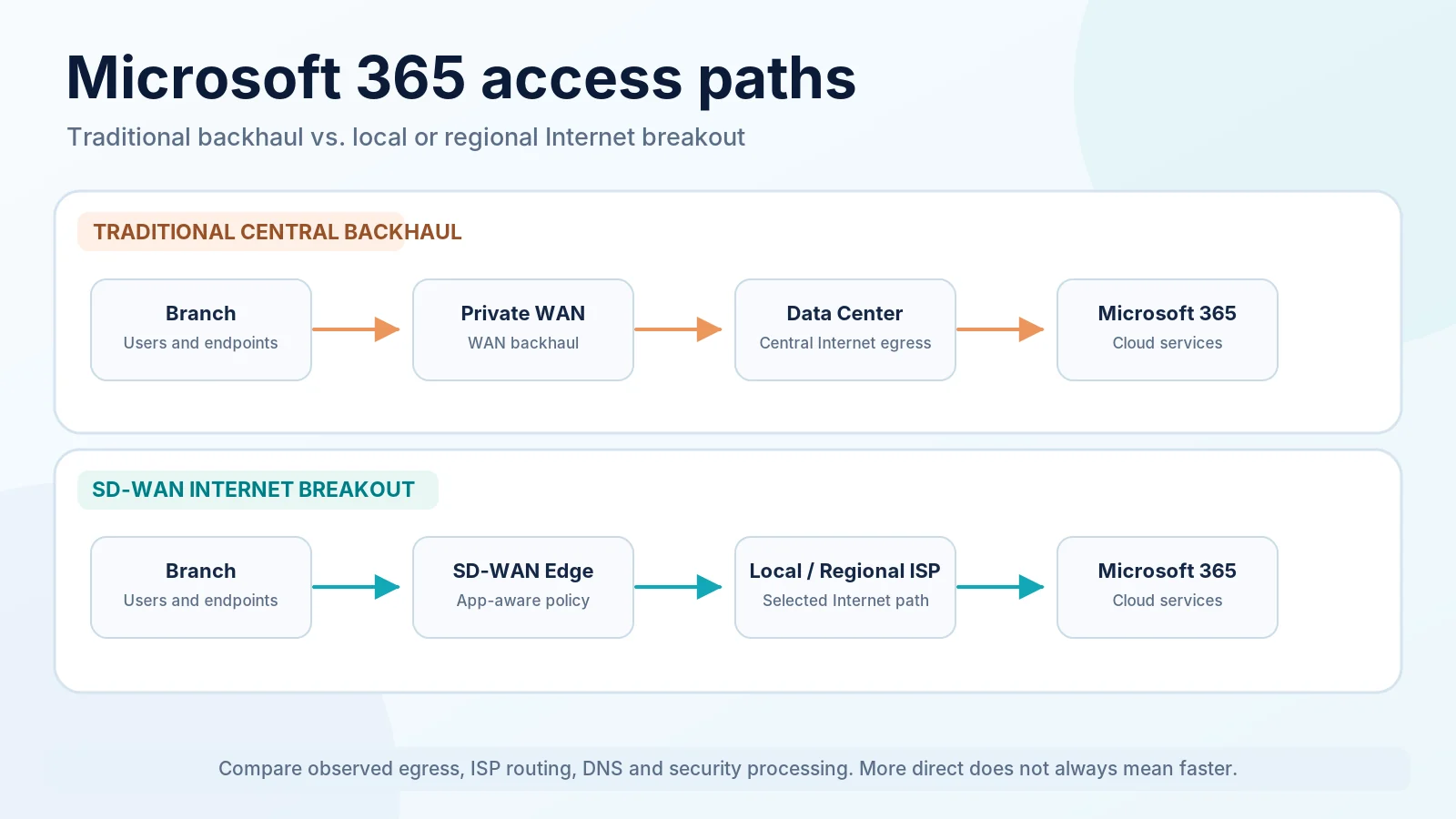
Consider two ways a regional branch could reach Microsoft 365.
Traditional centralized backhaul: Branch → Private WAN/MPLS → Central Data Center → Internet → Microsoft 365.
Local or regional Internet breakout: Branch → SD-WAN Edge → Selected Internet Egress → Microsoft 365.
In the first model, traffic travels toward a data center before leaving the enterprise network. This arrangement may simplify centralized security enforcement, but it can also increase WAN utilization, add processing points, and create unnecessary detours.
In the second model, eligible Microsoft 365 traffic reaches the Internet through a branch or regional egress point. SD-WAN can apply centrally defined policies to select among available paths.
Local breakout introduces considerations that must be validated: approved security controls, ISP connectivity to Microsoft services, DNS alignment, branch and edge capacity, monitoring, and availability of alternate paths.
Local breakout is a design choice that requires evidence, not a guarantee of lower latency. Regional breakout may remain appropriate where branches share suitable security and Internet infrastructure. Microsoft’s guidance recognizes regional egress as an option while generally preferring user-local egress.
Microsoft’s Network Connectivity Recommendations
Microsoft’s published connectivity principles provide the foundation for Microsoft 365 WAN design. The recommendations below come from Microsoft; implementation choices depend on the enterprise architecture.
Local Internet Egress and Microsoft Network Entry Points
Microsoft recommends identifying Microsoft 365 traffic and reducing unnecessary distance between users and its distributed service entry points. Suitable local Internet egress is preferred, with regional egress also possible when a fully local design is impractical.
For an SD-WAN design, this means: Architects can evaluate direct Internet access for eligible Microsoft 365 traffic at individual branches or regional aggregation points, rather than assuming all traffic must traverse headquarters. Select paths using observed network behavior, provider connectivity, capacity, and approved security controls.
DNS Resolution and Egress Alignment
DNS can influence which Microsoft 365 service endpoint a client reaches. Microsoft recommends considering DNS resolution location together with Internet egress; service selection may be less suitable if these locations are poorly aligned.
Verify the recursive resolver, resolver location, effective public egress IP, expected Microsoft service entry point, and DNS and routing behavior during failover. Locality does not necessarily require a separate physical DNS server in every branch.
Hairpins, Proxies, and Inspection
A network hairpin is an unnecessary detour through an intermediate network location. For Microsoft 365 it may involve a central proxy, distant inspection service, or inefficient Internet path.
Microsoft’s connectivity guidance recommends reducing unnecessary intermediation and explains handling of selected inspection functions for Microsoft 365 traffic. Enterprise network teams must reconcile this guidance with security policy.
The goal is not to bypass approved security controls. Document how traffic remains protected, which flows receive direct treatment, and whether an inspection architecture introduces avoidable processing or path distance.
Branch SD-WAN Is Not Remote-User VPN Split Tunneling
Branch SD-WAN applies routing and connectivity policy at an enterprise site, selecting approved paths for office users.
Remote-user VPN split tunneling allows selected traffic on a remote user’s device to avoid the corporate VPN tunnel. Microsoft documents both approaches, but their policy enforcement points and operating models differ.
This guide focuses on branch SD-WAN. See Microsoft’s VPN split-tunneling guidance for the adjacent scenario.
Microsoft 365 Endpoint Categories and SD-WAN Policy
Microsoft publishes Microsoft 365 endpoints and uses three categories to distinguish optimization requirements.
| Category | General Meaning | SD-WAN Design Consideration |
|---|---|---|
| Optimize | High-priority endpoints where optimization provides particular value | Candidate for appropriate direct connectivity |
| Allow | Endpoints requiring access and potentially benefiting from reduced inspection | Evaluate direct access and supported inspection |
| Default | Other Microsoft 365 endpoints, generally treated through standard Internet access | Ensure required connectivity and compatible security |
The categories do not mean that Default endpoints can be ignored or blocked. Required/optional attributes also matter, and some published endpoints do not have fixed IP ranges.
Microsoft’s Managing Microsoft 365 Endpoints documents branch SD-WAN configurations that directly route Optimize, or Optimize and Allow, traffic. Its illustration permits other traffic to follow a different enterprise-perimeter path.
This is a documented option, not a requirement that all Default traffic be backhauled.
Mapping Endpoint Categories to WAN Policy
An architect may translate Microsoft endpoint data into routing and security policy supported by the SD-WAN platform. An eligible group could use a preferred local egress while its measured path quality remains acceptable; other traffic may retain standard routing provided Microsoft 365 services remain reachable.
Distinguish endpoint connectivity requirements from routing preferences. Prioritizing some endpoints must not disrupt others. For implementation fundamentals, see SD-WAN architecture and traffic steering.
Keeping Microsoft 365 Policies Current
Microsoft 365 endpoints change. Static IP lists copied into documents can therefore become outdated. Microsoft’s IP Address and URL Web Service supplies current endpoint data and changes.
Identify the service instance, retrieve supported endpoint information, review policy updates, use platform automation where appropriate, and validate routing, firewall permissions and application connectivity after changes.
Do not assume every Microsoft 365 destination has a stable IP address suitable for classification solely by prefix.
Microsoft Teams Performance with SD-WAN
Microsoft Teams deserves particular attention because interactive audio and video react differently to network impairment than ordinary web transactions. A delayed document transfer may take longer; a real-time conversation can become difficult to follow when packets are delayed, lost, or arrive irregularly.
Important factors include latency (communication delay), jitter (variation in packet timing), packet loss, congestion, and path stability. These are not exclusively WAN problems. Poor Wi-Fi, faulty local switching, overloaded endpoints, or peripheral problems may affect Teams even when the Internet connection is healthy.
Microsoft’s Teams network preparation guidance addresses network readiness, Wi-Fi, quality of service, routing, and administrative monitoring.
Teams Media vs Signaling
Microsoft’s Teams call-flow documentation distinguishes signaling, which controls communication activities, from real-time media carrying audio and video.
Media may travel directly between participants where supported, use Microsoft Teams Transport Relay, or involve Microsoft media processing services. The route depends on the call scenario, connectivity and application requirements.
For SD-WAN design, routing a particular Teams web-service destination does not necessarily control every media session. Endpoint identification, media protocols, direct or relayed paths, NAT and firewall behavior all require validation.
Application-Aware Path Selection for Teams
Depending on platform capabilities, an SD-WAN design may identify eligible traffic, choose a preferred Internet path, measure path conditions, use a permitted alternate path, and correlate WAN telemetry with Teams quality.
For example, a branch with two suitable Internet connections may prefer one path for eligible media while keeping the other as a fallback. Yet SD-WAN platforms differ in traffic recognition, measurement granularity, path steering and established-flow behavior.
Thresholds must therefore be selected using Microsoft guidance where applicable, vendor capabilities, and measured enterprise conditions—not arbitrary universal numbers.
What Happens When the Preferred Path Degrades?
A path may remain technically operational yet exhibit unacceptable loss, jitter or congestion. An SD-WAN platform may detect that condition and select an alternative path, depending on its measurement methods and configured behavior.
An established Teams call may still be disrupted by changes in NAT state, public IP address, transport connection, or application adaptation. Recovery depends on the alternate path’s capacity, quality and permission for the relevant media traffic.
Network failover does not automatically mean uninterrupted call continuity. Test active calls, new calls, and post-failure recovery separately. A successful routing change is not sufficient evidence of uninterrupted user experience.
Exchange Online, SharePoint, and OneDrive
Exchange Online supports interactive email and related cloud service operations. Stable connectivity and responsiveness matter, but its network behavior differs from Teams real-time media.
SharePoint Online supports document access, collaboration, and web transactions. Performance may be affected by responsiveness, file transfers, bandwidth and client behavior.
OneDrive often carries synchronization activity and large transfers. Sustained traffic can consume branch bandwidth and compete with more latency-sensitive services.
An SD-WAN policy can distinguish relevant workload characteristics when the platform and endpoint guidance support it, without assigning a separate architecture to every Microsoft 365 application.
Choosing Internet Underlays for Microsoft 365
SD-WAN can help control available network paths. It cannot compensate for inadequate access capacity or consistently poor Internet routes when no acceptable alternative exists.
DIA and Business Internet
Dedicated Internet Access and business broadband can both support Microsoft 365. Suitability depends on capacity, contention, repair terms, operational support, upload performance and observed path quality.
A dedicated service may provide useful contractual characteristics at a critical office; business broadband may perform well at another site. Avoid selecting circuits solely by advertised download speed.
For broader enterprise transport comparisons, see MPLS, Internet, and SD-WAN design options.
ISP Routing and Microsoft Network Proximity
Two ISPs serving the same branch can offer different Internet routes to Microsoft services because of peering, upstream providers, congestion and service entry points.
Compare providers using representative tests from intended branch locations at realistic times. The physically closest ISP equipment does not always produce the best end-to-end application experience.
Optional Cellular Backup
LTE or 5G connectivity may support essential access during a fixed-line outage. Coverage, radio quality, congestion, capacity, variability and carrier NAT behavior can constrain its usefulness.
A backup connection that preserves basic Microsoft 365 access may not sustain the same number of simultaneous Teams calls or file synchronization workloads. Validate its intended recovery function.
Multi-ISP Resilience for Microsoft 365 Branches
More than one Internet link can improve resilience, but two subscriptions do not automatically establish independent connectivity.
Consider provider diversity, physical access paths, building entry, ducts, shared equipment, power, regional exchanges, and other common failure domains. Different commercial providers can still share part of the same access infrastructure.
Active-Active vs Active-Standby
In an active-active design, eligible traffic may use multiple connections according to supported SD-WAN policy. In an active-standby design, the secondary path is primarily used when the first becomes unsuitable or unavailable.
Neither is universally better. The choice depends on application behavior, access quality, product capabilities, and operating complexity.
Validate Failure and Recovery
Test degraded quality, partial packet loss, provider outage, edge-device problems and recovery after the original path returns—not only physical cable disconnection.
Observe new and established sessions separately, particularly Teams media. Network path recovery does not automatically preserve an active application’s session.
What SD-WAN Can and Cannot Optimize
| SD-WAN Can Help With | SD-WAN Cannot Fix by Itself |
|---|---|
| Selecting eligible application paths | Microsoft service-side outages |
| Applying consistent routing policy | Endpoint CPU or application problems |
| Using diverse available transports | Faulty LAN or Wi-Fi connectivity |
| Measuring WAN path quality | Insufficient bandwidth on every available link |
| Detecting failure and triggering supported recovery | Every Internet transit or peering problem |
| Classifying supported endpoint traffic | All security-stack bottlenecks |
| Providing centralized path visibility | Guaranteed active-call continuity |
A successful lab demonstration establishes a particular platform behavior under the tested conditions. It does not prove that every Microsoft 365 workload will perform better in production.
Security Inspection Without Unnecessary Network Detours
Direct breakout must remain part of an approved enterprise security architecture. Protection may involve branch firewalls, endpoints, Microsoft 365 controls, or cloud-delivered security services.
Microsoft’s connectivity principles recommend avoiding unnecessary intermediation and certain disruptive inspection functions for relevant Microsoft 365 traffic. Enterprise architects must reconcile this guidance with security policy and compliance requirements.
When SSE or SASE processes traffic, evaluate where enforcement occurs and whether that path introduces unnecessary distance or processing. The objective is effective protection without interfering with supported application connectivity.
For detailed guidance, see SD-WAN security best practices and SD-WAN vs SASE.
Measuring Microsoft 365 Experience Before and After SD-WAN
A routing change should be justified with observable results. Without a baseline, a healthier circuit dashboard can be mistaken for improved Microsoft 365 experience even when users notice little change.
Establish a Baseline
| Baseline Dimension | Example Evidence |
|---|---|
| Location | Branch, region, user group |
| Workload | Teams, Exchange, SharePoint, OneDrive |
| Access path | ISP, Internet egress, public IP |
| Network quality | RTT, loss, jitter where relevant |
| Utilization | WAN load at representative times |
| User experience | Teams call quality and reported symptoms |
| Configuration | DNS, proxy, inspection and SD-WAN policy |
Measure both normal periods and conditions when problems occur. Use Microsoft-supported metrics, enterprise requirements and observed workload behavior rather than made-up universal thresholds.
Combine Microsoft Telemetry With SD-WAN Telemetry
The Microsoft 365 Admin Center network connectivity experience provides tenant and location insights when supported and configured. Microsoft’s network connectivity test can help identify Internet egress and potential network configuration problems.
For Teams, the Call Quality Dashboard provides organization-wide quality information. Teams administrative tools also support investigation of individual calls.
Correlate these data sources with SD-WAN information about active links, observed loss and delay, path changes, application classification, utilization and policy. A Teams problem becomes more actionable when the team knows which ISP carried the relevant traffic and whether other users had similar symptoms.
Measure User Experience, Not Just Link Health
A WAN interface with no errors does not prove that Microsoft 365 performs well. Conversely, a short-lived path impairment does not automatically mean that users experienced an incident.
Ask whether Teams quality improved, complaints decreased, the intended service entry point was used, alternative paths introduced other problems, and the results persisted over representative periods.
A valid SD-WAN optimization outcome connects a technical change to observable application experience.
Troubleshooting Microsoft 365 Performance with SD-WAN
- Identify the affected workload. Is the problem Teams media, Outlook, SharePoint, OneDrive, or several services?
- Identify affected users and sites. Determine whether it is one device, one branch, a region, or multiple locations.
- Check endpoint, LAN and Wi-Fi. Review client resources, wireless conditions and local errors.
- Identify actual Internet egress. Confirm public egress address, location and Microsoft service entry point.
- Identify active ISP and WAN path. Compare forwarding with the configured SD-WAN policy.
- Review path quality. Inspect RTT, loss, jitter when applicable, utilization and recent changes.
- Verify Microsoft endpoint policy. Compare classification and steering against current published endpoints.
- Check DNS and inspection. Review resolution, NAT, proxy, firewall and potential security detours.
- Check Microsoft telemetry and service health. Correlate Teams call-quality data and M365 connectivity insights.
- Compare against baseline. Document the evidence before changing policy or escalating.
A Teams problem that affects only Wi-Fi users should not immediately prompt an ISP change. A problem isolated to one path deserves path-specific investigation before modifying the application.
SD-WAN for Microsoft 365: Enterprise Branch Design Example
Consider a fictional company with headquarters, three regional offices and 25 smaller branches. Teams supports daily meetings and calls; Exchange Online, SharePoint and OneDrive support routine collaboration.
An illustrative design could provide two suitably diverse DIA services at critical sites, fixed Internet access plus an independent second ISP at standard branches, and optional cellular backup for small branches.
Central SD-WAN policy would apply verified Microsoft 365 endpoint handling and select available paths according to measured conditions. Local or regional Internet egress would be used where justified, with approved firewall or SSE processing and operational monitoring.
Before rollout, the project team would baseline current experience, test representative branches, verify DNS and endpoint routing, evaluate new and ongoing Teams calls during failure scenarios, and compare Microsoft quality telemetry with SD-WAN path measurements.
This is an illustrative design, not a universal Microsoft reference architecture. Another organization may need different paths, underlays, inspection locations or policies.
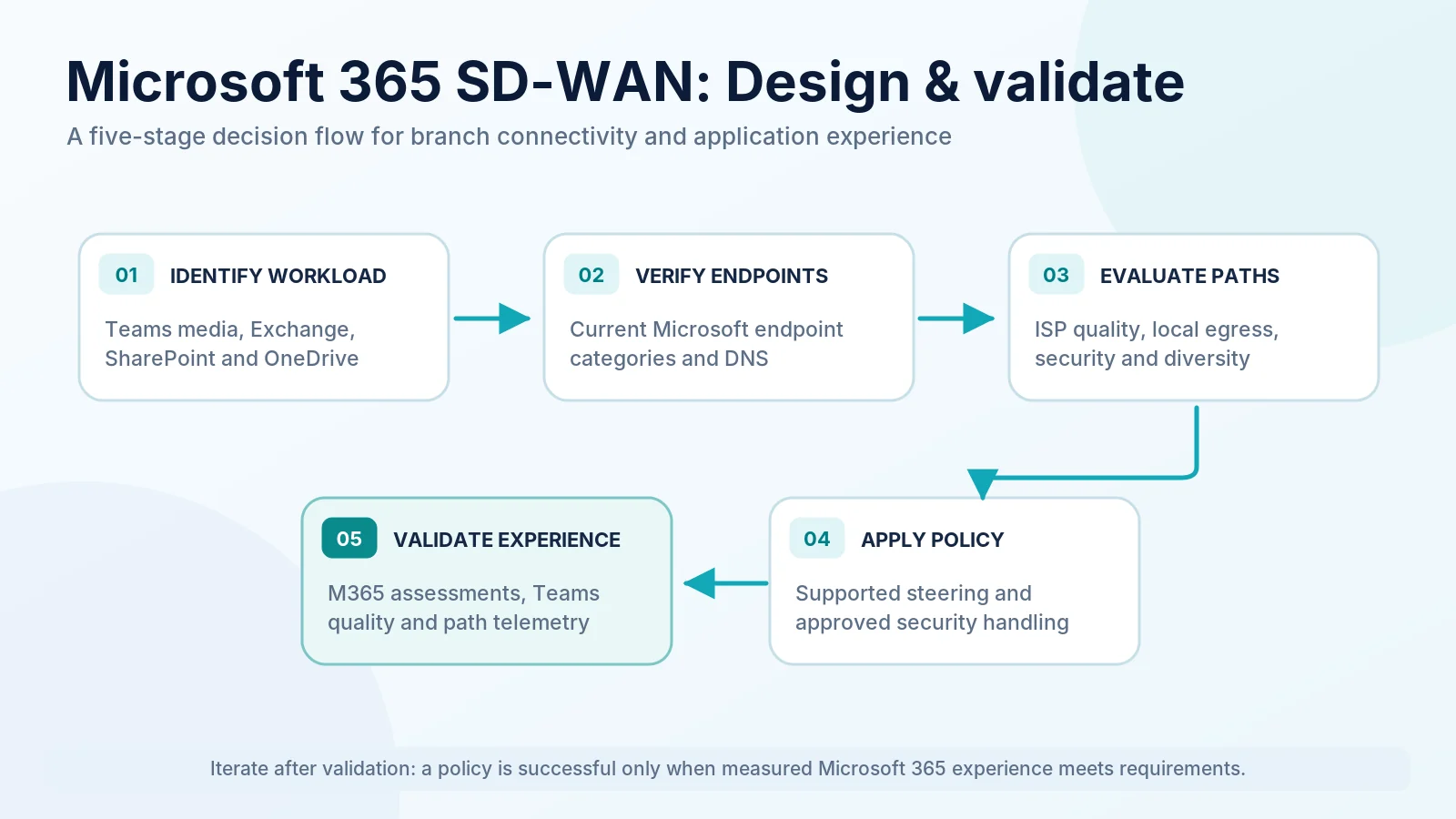
SD-WAN for Microsoft 365 Design Checklist
- Identify Microsoft 365 workloads and users. Document services, locations and user groups.
- Inventory branch connectivity paths. Record circuits, routes, devices and dependencies.
- Measure current application experience. Establish representative baselines.
- Review current Microsoft endpoint guidance. Use appropriate endpoint information and service instance.
- Identify intended Internet egress. Record local or regional choices.
- Validate DNS and egress alignment. Confirm name resolution and actual traffic path.
- Review regional Microsoft network access. Assess ISP routing and suitable entry points.
- Verify Teams media connectivity. Test relevant media and firewall paths.
- Define application-aware routing policy. Document traffic groups and platform limitations.
- Validate ISP and access diversity. Identify common failure domains.
- Document approved security and inspection handling. Preserve required application access.
- Configure Microsoft and SD-WAN monitoring. Assign operational ownership.
- Test failure and recovery behavior. Evaluate new and active sessions separately.
- Define acceptance criteria and ownership. Document sign-off and escalation.
For the wider cutover and rollback process, see the SD-WAN migration checklist.
Common Microsoft 365 SD-WAN Design Mistakes
- Backhauling all traffic by default: Extra detours may be unnecessary.
- Keeping static endpoint classifications: Microsoft 365 destination information can change.
- Ignoring DNS and egress alignment: Users may reach less suitable service entry points.
- Assuming two circuits mean independence: Last-mile paths may share infrastructure.
- Blaming WAN for every Teams issue: LAN, Wi-Fi and endpoint conditions matter.
- Creating excessive inspection detours: Processing may disrupt supported connectivity.
- Changing policy without a baseline: Improvement cannot be demonstrated.
- Assuming guaranteed acceleration: SD-WAN cannot fix every Internet or service limitation.
Frequently Asked Questions
Does SD-WAN improve Microsoft 365 performance?
It can when more suitable paths, useful transport diversity or fewer unnecessary detours are available. The benefit depends on the original problem and must be validated.
Does Microsoft recommend local Internet egress?
Yes. Microsoft’s connectivity principles recommend suitable local egress and DNS alignment, with regional egress also described as an option for some enterprise architectures.
How should SD-WAN handle Microsoft 365 endpoints?
Use current Microsoft endpoint information and distinguish Optimize, Allow and Default. Microsoft documents direct routing for Optimize or Optimize + Allow traffic at branches, without requiring that every Default endpoint be backhauled.
Can SD-WAN improve Microsoft Teams call quality?
Potentially, through suitable path selection. Teams quality also depends on endpoint, LAN, Wi-Fi, media routing and service conditions.
Is local breakout always better than central backhaul?
No. Results depend on DNS, ISP peering, capacity, security handling and the actual service path.
Can Microsoft 365 use multiple Internet providers?
Yes. Enterprises can connect branches through multiple ISPs and apply supported SD-WAN policies. Genuine resilience depends on independence and tested recovery.
Does SD-WAN guarantee uninterrupted Teams calls during failover?
No. WAN path recovery and active-session continuity differ. NAT and application media handling can affect ongoing calls.
Which tools help measure Microsoft 365 network experience?
Microsoft 365 Admin Center connectivity insights, Microsoft’s connectivity test, Teams Call Quality Dashboard, Teams admin tools and SD-WAN telemetry provide complementary evidence.
Conclusion
Microsoft 365 performance is a network-path design and validation problem before it is an SD-WAN feature problem.
Understand the workload → Establish a baseline → Design Internet egress → Select diverse underlays → Apply SD-WAN policy → Validate security → Measure user experience.
SD-WAN can provide control, visibility and resilience. Its success is demonstrated through reliable Microsoft 365 access and observable user outcomes, not by the number of features enabled.
Continue Learning
Explore the SD-WAN fundamentals, architecture, enterprise transport decisions and security considerations behind Microsoft 365 connectivity.