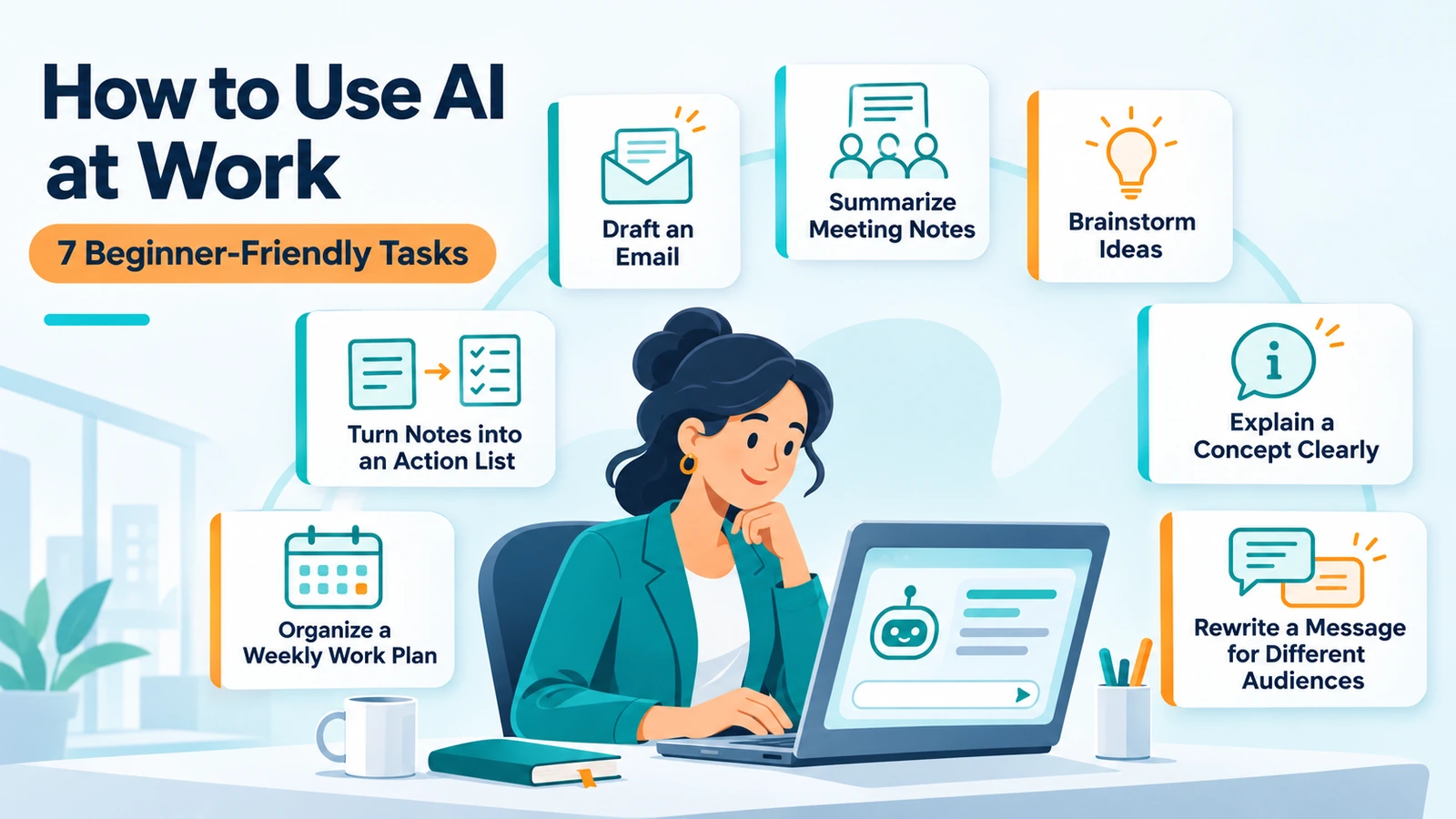
Learn how to use AI at work with seven practical tasks, ready-to-use prompts, realistic examples, and simple steps to review the results.
You have an email to write, meeting notes to organize, and several tasks competing for your attention. Could artificial intelligence make your day easier?
Yes. However, using AI effectively does not mean giving a chatbot complete control over your work.
For beginners, learning how to use AI at work starts with familiar, low-risk tasks. An AI assistant can help draft a message, summarize notes, suggest ideas, or organize a simple plan.
Above all, the important part is knowing what to ask, what to check, and when to make the final decision yourself.
In this guide, you will discover seven practical ways to use AI at work. Each example includes a prompt you can copy, an illustrative result, and a short human-review checklist.
Fortunately, you do not need programming skills or a paid subscription to understand the exercises.
By the end, you will be able to try a simple AI workflow and evaluate whether the result is accurate, useful, and appropriate for your task.
To keep your practice safe, all examples use fictional information to help you practice without exposing workplace data.
How Can Beginners Use AI at Work?
In practice, generative AI assistants can produce text, organize information, explain concepts, and suggest possible approaches based on the instructions they receive.
For example, imagine you need to write a meeting reminder. Instead of spending several minutes deciding how to begin, you could ask AI to suggest a first draft.
Next, you would check the details, adjust the wording, and decide whether the message is ready.
This is AI-assisted work rather than fully automated work.
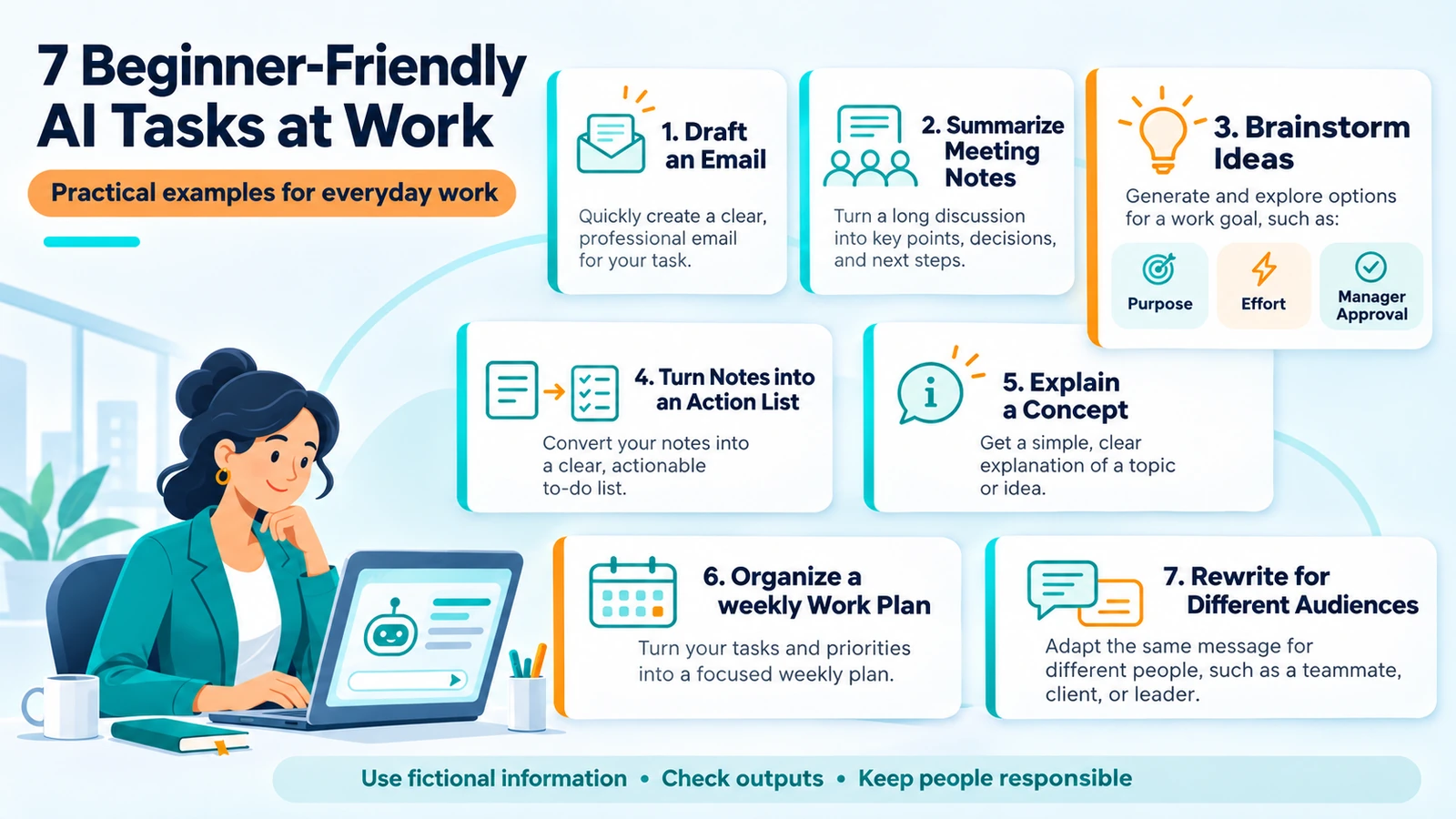
AI at Work: Seven Tasks at a Glance
| Everyday task | What AI can help with | What you need to verify |
|---|---|---|
| Draft an email | Suggest wording and structure | Recipient, dates, commitments and tone |
| Summarize meeting notes | Separate decisions and open questions | Accuracy and missing information |
| Brainstorm ideas | Generate possible solutions | Feasibility, cost and assumptions |
| Create an action list | Organize notes into tasks | Owners, deadlines and approvals |
| Explain a concept | Simplify unfamiliar terminology | Technical accuracy |
| Plan a working week | Suggest task order and time allocation | Arithmetic, capacity and priorities |
| Adapt a message | Change wording for different audiences | Original meaning and factual claims |
Although these tasks are different, they follow the same basic workflow:
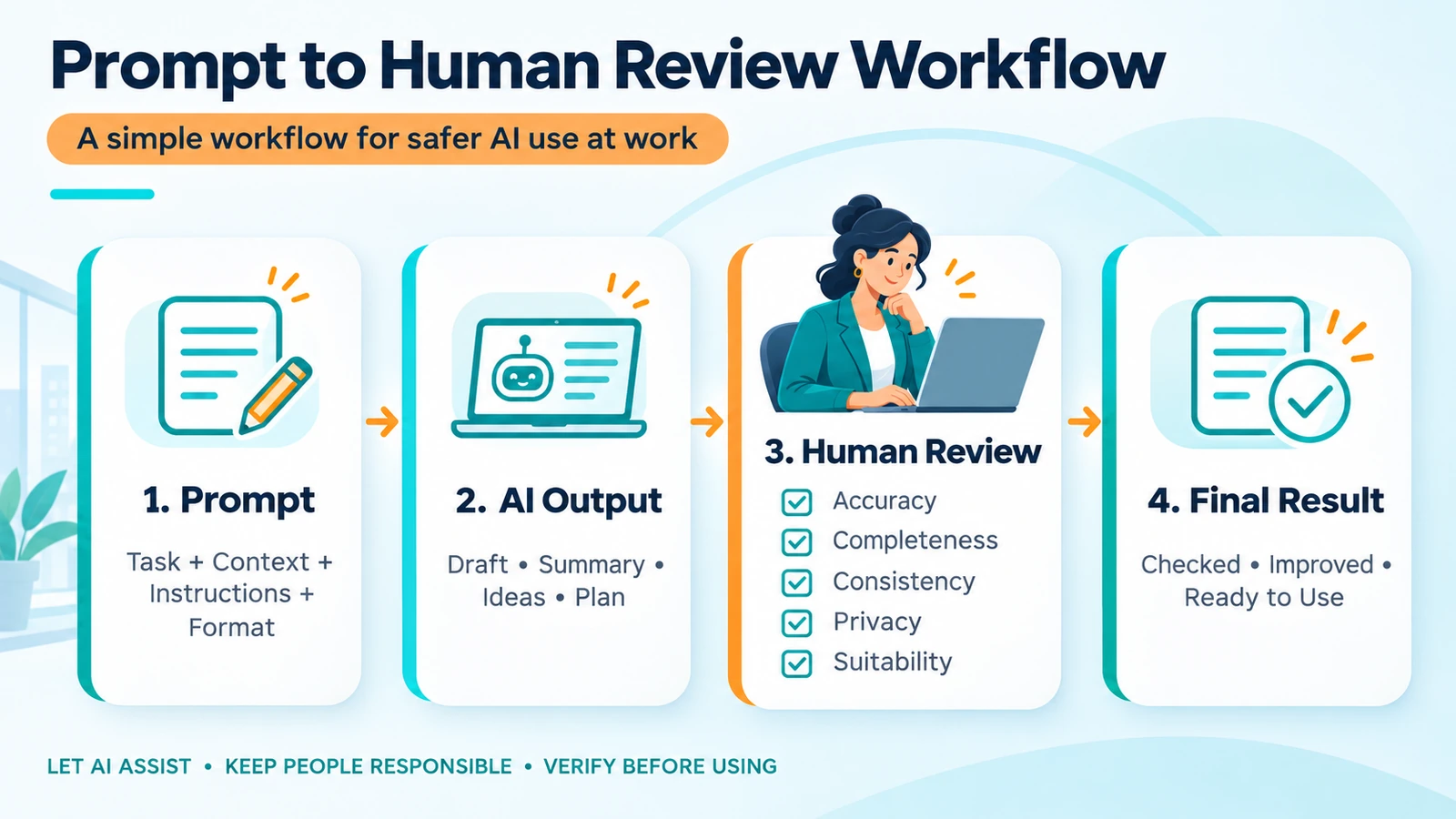
Define the task → Give instructions → Review the AI output → Verify important details → Finalize the result.
If you are building your basic technology confidence, start with Digital Skills for Beginners: A Practical Roadmap.
For a broader introduction to the technology, explore What Is Artificial Intelligence?.
Before You Start: How to Use AI Safely at Work
Before trying the seven tasks, it is important to understand a few boundaries.
Although AI assistants can be useful, they may misunderstand instructions, invent details, or produce answers that look more reliable than they are.
In addition, workplace information may be subject to security, confidentiality, contractual, or regulatory requirements.
Choose an Approved Tool
If you work for an organization, use AI services approved for the information and activities involved.
For example, public consumer tools and organization-managed enterprise services can have different privacy settings, permissions, and data-handling arrangements.
Therefore, do not assume that a personal AI account is suitable for processing company information.
Protect Confidential Information
For practice, replace real names, customer data, financial figures, and internal documents with fictional examples.
Do not enter passwords, sensitive employee records, customer files, or proprietary information into an unauthorized AI tool.
Even when a service offers privacy controls, your organization’s policies still apply.
Verify Important Results
Remember that an AI-generated answer is not necessarily a verified answer.
For instance, a summary may omit a critical point, while a proposed work plan may contain arithmetic errors or unrealistic assumptions.
Always compare important results with trusted source information.
Keep Human Accountability
Ultimately, you remain responsible for what you accept, approve, share, or send.
AI should not independently make sensitive decisions, create binding commitments, or take consequential actions without the appropriate authorization and review.
The NIST Generative AI Profile provides broader guidance on generative AI risks, while OWASP explains the risks associated with sensitive-information disclosure.
Beginner rule: Start with fictional information, keep tasks low-risk, and review every result before using it.
How to Use AI at Work: 7 Practical Tasks
With these safeguards in mind, the following examples use common workplace situations. You can try them with an AI assistant approved for your environment.
Importantly, the illustrated outputs are examples of suitable responses, not exact or guaranteed results from any particular product.
Task 1 — Draft and Improve a Professional Email
Situation: You need to remind a colleague about a meeting and ask them to prepare two ideas.
To make the reminder useful, a clear email should contain the purpose, expected action, and relevant meeting details. Instead of starting from a blank page, you can ask AI to prepare a short first draft.
Copy this prompt:
Draft a friendly, professional email reminding a fictional colleague about a team meeting on Thursday at 10:00 a.m. Ask them to bring two ideas for improving customer communication. Keep the email under 100 words. Include a subject line. Do not invent the recipient’s name, meeting location, calendar date, or additional commitments.
Illustrative result
Subject: Reminder — Customer Communication Meeting — Hi, Just a reminder about our team meeting on Thursday at 10:00 a.m. Please bring two ideas for improving how we communicate with customers. Thank you, and I look forward to hearing your suggestions. Best regards
Human review checklist
- ☐ Is the recipient correct?
- ☐ Has the calendar date and time zone been confirmed?
- ☐ Does the message request the intended action?
- ☐ Is the tone appropriate?
- ☐ Did AI add any unsupported information?
Before sending a real email, replace the fictional details with verified information and personalize the message before sending it.
Practical takeaway: AI can help you write a useful first draft. However, you remain responsible for the accuracy and final wording.
Task 2 — Summarize Meeting Notes
Situation: You have a short collection of notes and want a clearer summary.
For that purpose, AI can organize the notes into categories, making it easier to distinguish what was discussed from what was decided.
Copy this prompt:
Summarize these fictional meeting notes using four headings: Discussion Points, Confirmed Decisions, Action Items, and Open Questions. Use only the information provided. Do not invent missing owners or dates. Notes: The team discussed updating the customer FAQ; Alex will prepare a draft by Friday; everyone agreed to use plain language; the design review date has not been decided.
Illustrative result
| Category | Summary |
|---|---|
| Discussion points | Customer FAQ update |
| Confirmed decision | Use plain language |
| Action item | Alex to prepare the FAQ draft by Friday |
| Open question | Design review date remains unconfirmed |
Human review checklist
- ☐ Does every item appear in the source notes?
- ☐ Is the agreement about plain language represented correctly?
- ☐ Is Alex the only explicitly named task owner?
- ☐ Is Friday a relative date that needs confirmation?
- ☐ Was the undecided design review correctly left open?
Importantly, AI should not turn a suggestion into an approved decision or assign an owner without evidence.
For more guidance on recording decisions and coordinating teams, see Team Communication Strategies.
Practical takeaway: AI can improve the structure of meeting notes, but the original information remains the source of truth.
Task 3 — Brainstorm Ideas for a Work Problem
Situation: A small business wants to improve onboarding for new employees.
You know the objective but need ideas for getting started. In that case, AI can help generate alternatives. However, an idea is not automatically a proven solution.
Copy this prompt:
Suggest eight practical, low-cost ideas to improve onboarding for a fictional small business with six employees. Group the ideas by estimated implementation effort. For each idea, provide its purpose and indicate whether manager approval may be required. Do not claim that any idea guarantees improved productivity or retention. Present the result in a table.
Illustrative result
| Idea | Purpose | Estimated effort | Manager Approval |
|---|---|---|---|
| First-day checklist | Clarify essential tasks | Low | Confirm local process |
| Welcome email | Explain what to expect | Low | Confirm local process |
| Shared FAQ | Answer recurring questions | Low | Content owner review likely |
| Team introductions | Build familiarity | Low | Confirm with team lead |
| Peer buddy | Provide informal support | Medium | Likely for staff allocation |
| Short training guide | Explain basic processes | Medium | Content owner review likely |
| First-week check-in | Identify early difficulties | Low | Confirm local process |
| Onboarding feedback form | Collect improvement ideas | Medium | Privacy and manager review likely |
These are candidate ideas. In particular, their effort and approval needs are illustrative estimates, not actual organizational authorization decisions.
Human review checklist
- ☐ Are the ideas relevant to the actual onboarding problems?
- ☐ Are the estimated effort levels reasonable?
- ☐ Does the organization have the people and resources required?
- ☐ Are the suggestions accessible and appropriate?
- ☐ Which ideas need management approval?
As a next step, select two possibilities and discuss them with the appropriate people.
Practical takeaway: AI can expand your list of options. Still, people must assess feasibility, cost, organizational fit, and actual outcomes.
Task 4 — Turn Notes Into an Action List
Situation: You need to extract actions from an informal update.
As a result, a structured list makes responsibilities and missing information easier to see.
Copy this prompt:
Convert these fictional notes into an action tracker. Use four columns: Task, Owner, Due Date, and Missing Information. Notes: Alex drafts the FAQ by Friday; the team needs to review website navigation; Maya checks three broken links by Monday. Do not guess missing owners or deadlines. Write TBD when information is missing.
Illustrative result
| Task | Owner | Due date | Missing information |
|---|---|---|---|
| Draft customer FAQ | Alex | Friday | Exact calendar date |
| Review website navigation | TBD | TBD | Owner and due date |
| Check three broken links | Maya | Monday | Exact calendar date |
Human review checklist
- ☐ Are all three tasks represented?
- ☐ Are Alex and Maya assigned only to their documented tasks?
- ☐ Is the unassigned navigation review marked TBD?
- ☐ Do the relative deadlines require calendar confirmation?
- ☐ Has AI invented any commitments?
Once reviewed, you can use the table as the starting point for a simple task tracker.
Practical takeaway: AI can organize actions quickly. Nevertheless, responsibilities and deadlines must be confirmed by people.
Task 5 — Explain a Difficult Concept in Plain English
Situation: A colleague asks what multifactor authentication means.
The challenge is to provide a simple explanation without introducing misleading claims.
Copy this prompt:
Explain multifactor authentication, or MFA, to a non-technical office employee. Keep the explanation under 120 words. Use one everyday analogy. Explain how MFA helps protect accounts. Do not claim that MFA guarantees complete security.
Illustrative result
Multifactor authentication adds another verification step when you sign in to an account. Think of it like entering a building with a key and then showing a separate access pass at another door. Even if someone obtains your password, the additional verification may prevent unauthorized access. However, MFA does not eliminate every security risk, so you should still be cautious about suspicious login requests.
Human review checklist
- ☐ Is the definition understandable?
- ☐ Does the analogy preserve the essential meaning?
- ☐ Does the explanation avoid promising perfect protection?
- ☐ Does it agree with a trustworthy security source?
Before using important workplace explanations, compare AI-generated wording with official guidance or your organization’s policies.
Practical takeaway: AI can make unfamiliar concepts easier to understand. Even so, technical facts still need verification.
Task 6 — Organize a Weekly Work Plan
Situation: You have six tasks or time allocations to fit into three working days.
As a starting point, AI can help suggest a practical sequence. However, you should not assume that its calculations are correct.
Copy this prompt:
Create a three-day work plan for a fictional office assistant. Available time: four hours per day, for a total of 12 hours. Tasks: prepare an invoice summary (2 hours), update FAQs (3 hours), organize files (2 hours), draft an email (1 hour), review customer feedback (3 hours), and reserve 1 hour for unexpected requests. Show the result in a table. Do not exceed four hours per day. Do not invent additional tasks. Verify the total time.
Illustrative result
| Day | Planned activities | Total |
|---|---|---|
| Day 1 | Invoice summary (2h), FAQ update (2h) | 4h |
| Day 2 | Complete FAQ update (1h), review customer feedback (3h) | 4h |
| Day 3 | Organize files (2h), draft email (1h), reserve time (1h) | 4h |
| Total | All activities accounted for | 12h |
Human review checklist
- ☐ Do the time allocations add up to 12 hours?
- ☐ Are all tasks included?
- ☐ Is the four-hour daily limit respected?
- ☐ Does the plan account for known deadlines and dependencies?
- ☐ Is the reserved time still available for unexpected work?
Although the schedule is mathematically consistent, real-world priorities may require a different order.
For advanced applications involving project planning and resource management, explore AI in Project Management.
Practical takeaway: AI can suggest a schedule. However, capacity, deadlines, priorities, and calculations require human validation.
Task 7 — Rewrite Text for Different Audiences
Situation: You need to communicate the same project update to a customer and a manager.
Even so, the facts should remain unchanged, although the wording and detail may differ.
Copy this prompt:
Rewrite the fictional update below for two audiences: (1) a non-technical customer, using friendly plain English; (2) a manager, using a concise professional tone. Original update: “The new portal is being tested. We found two navigation issues. The release date is not confirmed.” Preserve all three facts. Do not minimize the issues, invent a resolution, or promise a release date.
Illustrative result
Customer version
We are currently testing the new portal. During testing, we identified two navigation issues that still need attention. The release date has not yet been confirmed.
Manager version
Portal testing is underway. Two navigation issues have been identified. The release date remains unconfirmed.
Human review checklist
- ☐ Do both versions say that testing is underway?
- ☐ Are the two navigation issues mentioned?
- ☐ Is the release date still explicitly unconfirmed?
- ☐ Is the tone suitable for each audience?
- ☐ Does either version imply approval or readiness that has not been established?
Practical takeaway: AI can adapt communication to an audience. However, the facts and commitments must remain consistent.
A Simple AI Prompt Formula for Beginners
After working through the examples, you may notice that good prompts follow a straightforward pattern.
Task + Context + Instructions + Output Format
| Component | What to provide | Example |
|---|---|---|
| Task | The action you need | Draft an email |
| Context | The relevant background | A fictional meeting reminder |
| Instructions | Boundaries and required details | Do not invent information |
| Output format | How the answer should appear | Subject line and under 100 words |
For example:
Draft a friendly professional email for a fictional colleague about a meeting. Ask them to prepare two suggestions. Include a subject line, use fewer than 100 words, and do not invent missing details.
If the result is too long, ask for a shorter version. Likewise, if the wording sounds too formal, request a more natural tone.
Together, these refinements form a process called iterative prompting: reviewing the output and improving your instructions.
For further guidance, OpenAI’s prompting best practices emphasize clear requests, useful context, and refinement.
For more advanced techniques, including prompt structure and working with source material, read AI Prompting: How to Write Better Prompts.
How to Check AI Outputs Before Using Them
Even when AI responses are fluent, organized, and convincing, they may contain errors. Therefore, use a consistent review checklist before relying on them.
The Five-Point AI Output Check
- ☐ Accuracy: Are factual statements supported by the original information or a reliable source?
- ☐ Completeness: Is anything important missing or taken out of context?
- ☐ Consistency: Do names, dates, numbers, decisions, and commitments match the source?
- ☐ Privacy: Does the response contain information that should not be shared?
- ☐ Suitability: Is the result appropriate for the audience, purpose, and level of risk?
For example, when reviewing an AI-generated task table, check every owner and deadline.
When assessing a weekly plan, recalculate the hours. To validate a technical explanation, consult a reliable reference. Before sharing a customer message, confirm that the text does not create an unauthorized commitment.
When you cannot verify a critical detail, mark it as unconfirmed rather than inventing an answer.
A useful output is not necessarily a verified output.
When Should You Avoid Using AI at Work?
Despite these useful applications, some workplace activities require more control than a basic AI assistant provides.
In particular, avoid entering sensitive information into unapproved tools, including private employee records, customer data, security credentials, and confidential contracts.
Similarly, do not use unverified AI recommendations as the sole basis for legal, financial, health, employment, or other consequential decisions.
In addition, be especially careful with AI tools that can interact with external systems.
For instance, drafting a fictional email is different from granting an application permission to send real emails, update records, or change access rights.
Before enabling those capabilities, confirm that the activity is authorized and that appropriate permissions, monitoring, and approval processes are in place.
The Institute of Digital Government’s guidance on responsible AI use emphasizes protecting sensitive information, evaluating outputs, and maintaining accountability.
The rule is simple: use AI to support responsible work, not to bypass professional judgment or organizational controls.
Your First 15-Minute AI Practice Exercise
Now that you have explored seven possible tasks, it is time to choose one. Next, choose one and try it yourself.
For your first exercise, start with a fictional email because it is easy to review and does not require specialist software or real workplace data.
| Time | Action | Result |
|---|---|---|
| Minutes 1–3 | Write a basic fictional email without AI | Original draft |
| Minutes 4–7 | Use the Task 1 prompt | AI-generated draft |
| Minutes 8–11 | Compare the drafts and check facts | Review notes |
| Minutes 12–15 | Improve the final message yourself | Verified draft |
Afterward, answer three questions:
- What did AI improve?
- What did you have to correct?
- Would the final result actually help you complete the task?
Once you can answer all three, you have completed your first practical AI exercise. Then, try another task when you feel comfortable.
Common Beginner Mistakes When Using AI at Work
1. Writing Vague Prompts
“Write something about a meeting” leaves too much room for interpretation.
Instead, explain the purpose, audience, facts, constraints, and preferred format.
2. Sharing Too Much Information
However, more context is not always better when it includes confidential or unnecessary data.
Instead, provide only the information required for the task and respect your organization’s approved data-handling procedures.
3. Trusting the First Output
Even a grammatically polished AI-generated answer may contain incorrect facts.
Therefore, compare important details against trusted information before using the result.
4. Letting AI Make Unapproved Decisions
For example, an assistant may suggest a deadline, action, or recommendation without knowing all the circumstances.
Instead, treat its suggestions as options requiring appropriate human review and approval.
5. Trying to Automate Everything
Similarly, starting with a complex workflow can introduce unnecessary risks and confusion.
A better approach is to master one low-risk task before expanding to more advanced applications.
Frequently Asked Questions
Can beginners use AI at work without technical skills?
Yes. Many basic tasks, such as drafting emails, summarizing notes, and brainstorming ideas, do not require coding. However, beginners still need to understand privacy, accuracy, and human review.
What are the easiest AI tasks for office workers?
For most beginners, drafting short emails, organizing meeting notes, turning information into task lists, rewriting messages, and explaining unfamiliar concepts are approachable starting points.
Is it safe to use AI with workplace documents?
It depends on the specific tool, the information involved, and your organization’s policies. Therefore, use only authorized services for workplace data and apply the required privacy, confidentiality, and security controls.
Can AI replace human review?
No. AI can support routine work, but its output can contain errors or unsupported assumptions. Therefore, the degree of human review should increase with the importance and consequences of the task.
Do I need a paid AI subscription to get started?
Not necessarily. You may be able to practice simple tasks using suitable free or already available services. Nevertheless, features, usage limits, privacy controls, and subscription terms vary. Verify the current conditions before choosing a tool.
Conclusion: Start With One Practical AI Task
In short, learning how to use AI at work does not require handing your responsibilities to a machine.
Instead, begin with one familiar task and use AI to help prepare a first version. Then check the facts, improve the result, and decide whether it is useful.
Together, the seven tasks in this guide illustrate how AI can assist with writing, summarizing, brainstorming, organizing, explaining, planning, and adapting messages.
Although the applications differ, the central principle remains the same:
Let AI assist. Keep people responsible. Verify before using.
To begin, try one prompt today. Once you understand the benefits and limitations, move on to another practical task.
Make AI More Useful in Your Everyday Work
For continued learning, small practical exercises are a good way to develop confidence with AI.
Want more guidance on AI, digital productivity, technology, and teamwork? Explore TechTeamSynergy Weekly for practical insights and learning resources.
Explore TechTeamSynergy Weekly
References and Further Reading
These sources support the article’s recommendations on prompting, responsible AI use, data protection, and human oversight:
- OpenAI — Prompt Engineering Best Practices for ChatGPT. Guidance on clear instructions, relevant context, and iterative refinement.
- NIST — AI Risk Management Framework: Generative AI Profile. A cross-sector reference for managing generative AI risks.
- OWASP — LLM02:2025 Sensitive Information Disclosure. Risks associated with exposure of private or confidential information in AI systems.
- Institute of Digital Government — Using AI Responsibly. Practical safeguards for information protection and accountability.
Editorial note: All workplace scenarios, prompts, and illustrative outputs in this guide are fictional. AI-generated results can vary by model, product, configuration, and input. The examples do not constitute professional legal, financial, or security advice.
Continue Learning
Extend your AI-at-work skills with practical guides on prompting, tools, responsible use and team collaboration.