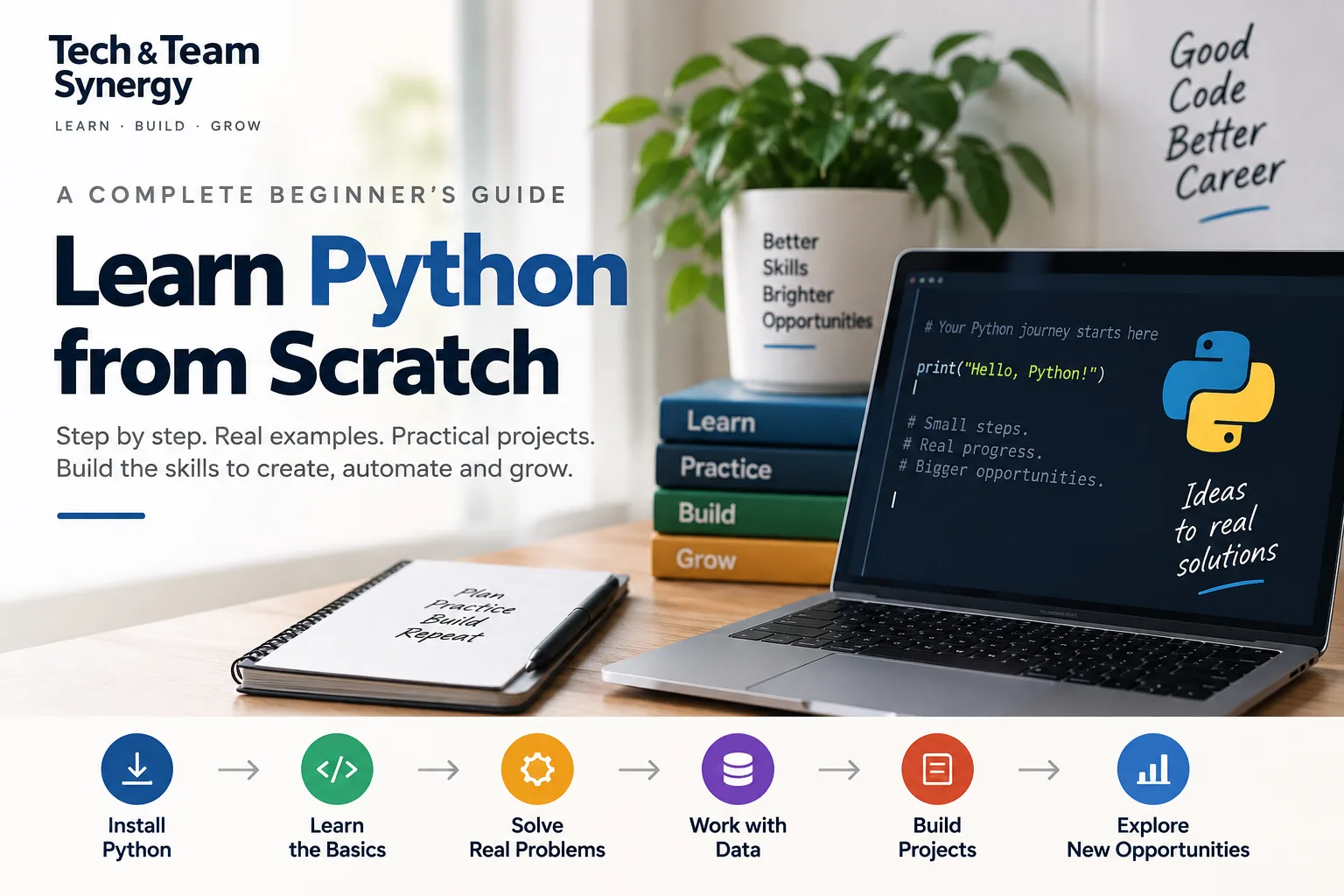
Want to learn Python from scratch but have little or no programming experience? This guide will take you from your first line of Python code through the core concepts every beginner should understand: variables, data types, conditions, loops, functions, collections, files, errors, modules, packages and object-oriented programming.
You do not need a computer science degree, advanced mathematics or previous coding experience to begin.
What you do need is practice.
Programming is not learned by reading alone. Throughout this guide, you will see small examples that you can type, change and run yourself.
By the end, you should understand the foundations well enough to start building small Python projects and choose your next specialization—whether that is automation, data analysis, artificial intelligence, web development or another field.
If you are still deciding whether Python is the right language for you, first read our guide to why you should learn Python. If you are ready to start coding, continue below.
What Is Python?
Python is a general-purpose programming language designed to make programs relatively clear and readable.
It supports several programming styles and is used for applications ranging from small automation scripts to web services, data analysis, artificial intelligence and larger software systems.
Python’s official documentation describes it as an interpreted language with dynamic typing, high-level data structures and support for object-oriented, procedural and functional programming.
For a beginner, however, the most important point is simpler:
Python allows you to start writing useful programs without needing to understand every detail of how a computer works internally.
Why Python Is a Good Language for Beginners
Python is commonly recommended to beginners because much of its syntax is relatively concise.
For example, displaying some text requires only:
print("Hello, Python!")You do not need to understand classes, compilation or complex project structures before writing your first program.
Python.org specifically describes Python as easy for beginners to use and learn. It also provides beginner resources, documentation and tutorials for different experience levels.
That does not mean programming itself is effortless.
You will still need to develop skills such as:
- Breaking problems into smaller steps
- Thinking logically
- Reading error messages
- Testing ideas
- Finding mistakes
- Practicing regularly
Those skills matter more than memorizing every Python command.
Python Quick Start
Want to start coding immediately? Follow these six steps, then continue with the full beginner guide below.
- Install Python 3 from the official Python website.
- Choose an editor such as VS Code or another editor you are comfortable using.
- Create a file named
hello.py. - Add your first line:
print("Hello, Python!") - Run the program from your editor or terminal.
- Continue with variables, conditions and loops to start solving simple problems.
Your goal is not to memorize Python. Your goal is to write, run, change and understand code.
What You Will Learn in This Python Beginner Guide
This guide follows a progressive path:
- Set up Python
- Write your first program
- Understand variables
- Learn basic data types
- Work with operators
- Make decisions with
if - Repeat actions with loops
- Create functions
- Work with lists, tuples, sets and dictionaries
- Handle errors
- Read and write files
- Use modules
- Understand packages and virtual environments
- Learn the basics of classes and objects
- Build small projects
Do not rush through these topics.
The goal is not to finish the article as quickly as possible. The goal is to be able to use each concept yourself.
Step 1: Install Python
Before writing Python programs, you need access to a Python interpreter.
The official Python website provides Python for major operating systems.
Install a currently supported Python 3 release from Python.org. Unless you have a specific compatibility requirement, beginners should avoid outdated Python 2 tutorials.
For beginners, always learn modern Python 3 rather than following old tutorials written for Python 2.
Check Whether Python Is Already Installed
Open a terminal or command prompt and try:
python --versionDepending on your operating system, you may instead need:
python3 --versionIf Python is available, you should see a version number.
If it is not installed, use the installation instructions from the official Python website.
Step 2: Choose a Code Editor
You can write Python code in a simple text editor, but a programming editor makes the experience easier.
Useful editor features include:
- Syntax highlighting
- Automatic indentation
- Code completion
- Error highlighting
- Integrated terminal access
As a beginner, do not spend too much time searching for the “perfect” editor.
Your editor matters far less than the amount of code you actually write.
Step 3: Write Your First Python Program
Create a new file called:
hello.pyAdd:
print("Hello, world!")Save the file and run it.
You should see:
Hello, world!Congratulations—you have written a Python program.
Understanding the print() Function
print() displays information.
You can print text:
print("I am learning Python")You can also print numbers:
print(42)Or calculations:
print(10 + 5)The result is:
15This simple function is useful while learning because it lets you see what your program is doing.
Python Comments
A comment is text written for humans reading the program.
Python ignores comments when executing your code.
A comment begins with #:
# This is a comment

print("Hello")  # This is also a comment
Comments can explain why code exists or help you leave notes while learning.
Avoid commenting every obvious line. Good code should also be understandable through clear names and structure.
Step 4: Learn Python Variables
A variable gives a name to a value.
name = "Alex"
age = 16
Now Python remembers those values.
You can use them later:
print(name)
print(age)
You can also change a variable:
score = 10
score = 20

print(score)
The output is:
20Good Variable Names
Use names that explain what the value represents.
Better:
student_name = "Alex"
total_score = 95
Less clear:
x = "Alex"
a = 95
Short names can be appropriate in limited situations, but descriptive names usually make beginner code easier to understand.
Step 5: Understand Python Data Types
Different values represent different kinds of information.
Four fundamental Python types beginners should understand are:
Strings
Strings represent text.
language = "Python"Integers
Integers are whole numbers.
students = 25Floating-Point Numbers
Floating-point values represent numbers with decimal components.
temperature = 21.5Booleans
A Boolean value is either:
True
False
For example:
is_learning = TrueCheck a Value’s Type
You can ask Python which type a value has using type().
age = 16

print(type(age))
This helps when you are learning or debugging your code.
Step 6: Work With Strings
Strings are used constantly in Python programs.
You can combine strings:
first_name = "Alex"
last_name = "Taylor"

full_name = first_name + " " + last_name

print(full_name)
f-Strings
A convenient way to insert values into text is an f-string.
name = "Alex"
age = 16

print(f"{name} is {age} years old.")
This is generally clearer than manually joining many pieces of text.
Useful String Methods
Python provides many built-in string operations.
message = "hello python"

print(message.upper())
print(message.title())
You can also remove surrounding whitespace:
name = "  Alex  "

print(name.strip())
Step 7: Python Numbers and Arithmetic
Python can perform normal arithmetic.
print(10 + 5)
print(10 - 5)
print(10 * 5)
print(10 / 5)
Other useful operators include:
print(10 // 3)  # Floor division
print(10 % 3)   # Remainder
print(2 ** 3)   # Power
Comparison Operators
Programs frequently need to compare values.
age = 16

print(age > 12)
print(age == 16)
print(age != 18)
Common comparison operators include:
| Operator | Meaning |
|---|---|
== |
Equal to |
!= |
Not equal to |
> |
Greater than |
< |
Less than |
>= |
Greater than or equal to |
<= |
Less than or equal to |
Step 8: Get Input From the User
Programs become more interesting when users can provide information.
Use input():
name = input("What is your name? ")

print(f"Hello, {name}!")
input() returns text.
If you need a number, convert the value:
age = int(input("How old are you? "))

print(age + 1)
Type Conversion
Common conversion functions include:
int("10")
float("10.5")
str(42)
Conversion is important when working with user input, files and external data.
Step 9: Make Decisions With if Statements
A program often needs to behave differently depending on a condition.
Python uses if statements.
age = 16

if age >= 13:
    print("You are at least 13.")
if and else
temperature = 15

if temperature > 20:
    print("It is warm.")
else:
    print("It is cool.")
elif
Use elif when you need several possibilities.
score = 82

if score >= 90:
    print("Excellent")
elif score >= 70:
    print("Good")
else:
    print("Keep practicing")
Why Indentation Matters in Python
Python uses indentation to define blocks of code.
This is correct:
if score > 50:
    print("Passed")
The indented line belongs to the if statement.
Incorrect indentation can cause errors or change what the program does.
Beginners should get into the habit of using consistent indentation from the beginning.
Step 10: Combine Conditions
Python provides logical operators including:
andornot
Example:
age = 16
has_permission = True

if age >= 13 and has_permission:
    print("Access granted")
Step 11: Repeat Code With Loops
Loops allow you to execute code repeatedly.
Python has two important loop types for beginners:
forwhile
The for Loop
A for loop is often used to process a sequence of values.
names = ["Alex", "Sam", "Jordan"]

for name in names:
    print(name)
Python takes each value from the list one at a time.
Using range()
for number in range(5):
    print(number)
The output is:
0
1
2
3
4
Notice that Python starts counting from zero here.
The while Loop
A while loop repeats while a condition remains true.
count = 1

while count <= 5:
    print(count)
    count += 1
Avoid Infinite Loops
This code has a problem:
count = 1

while count <= 5:
    print(count)
count never changes, so the condition remains true.
Always understand what will eventually stop your while loop.
break and continue
break ends a loop:
for number in range(10):
    if number == 5:
        break

    print(number)
continue skips the current iteration:
for number in range(5):
    if number == 2:
        continue

    print(number)
Step 12: Learn Python Lists
A list stores multiple values in order.
languages = ["Python", "JavaScript", "Java"]You can access an item by its index:
print(languages[0])The output is:
PythonPython indexes normally begin at zero.
Add Items to a List
languages.append("Go")Remove Items
languages.remove("Java")List Length
print(len(languages))Loop Through a List
for language in languages:
    print(language)
Step 13: Understand Tuples
A tuple is another ordered collection.
coordinates = (10, 20)A major difference from a list is that tuples are immutable: their elements cannot be reassigned in the same way after creation.
Tuples are useful when a group of values should remain fixed.
Step 14: Understand Sets
A set stores unique values.
numbers = {1, 2, 2, 3}

print(numbers)
The duplicate value does not create a second identical set element.
Sets are useful for tasks such as removing duplicates and performing set operations.
Step 15: Learn Python Dictionaries
A dictionary stores information as key-value pairs.
student = {
    "name": "Alex",
    "age": 16,
    "language": "Python"
}
You can retrieve a value using its key:
print(student["name"])You can add information:
student["score"] = 95Or update an existing value:
student["age"] = 17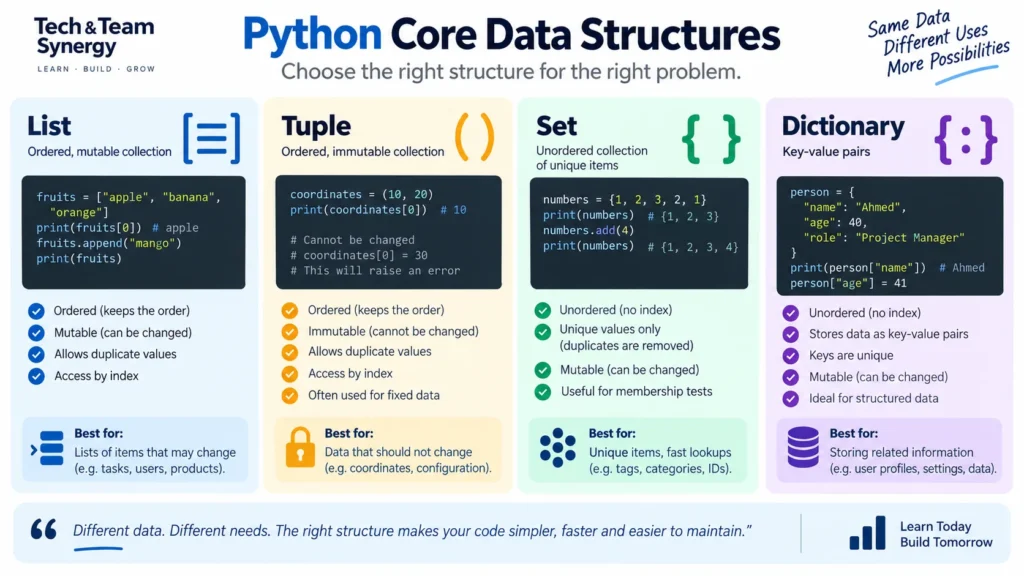
Lists vs Tuples vs Sets vs Dictionaries
| Collection | Main Characteristic | Example |
|---|---|---|
| List | Ordered, mutable collection | ["Python", "Java"] |
| Tuple | Ordered, immutable sequence | (10, 20) |
| Set | Collection of unique elements | {1, 2, 3} |
| Dictionary | Key-value mapping | {"name": "Alex"} |
Step 16: Create Functions
A function packages reusable logic.
def greet():
    print("Hello!")

greet()
Function Parameters
Functions can receive information.
def greet(name):
    print(f"Hello, {name}!")

greet("Alex")
Return Values
A function can return a result.
def add(a, b):
    return a + b

result = add(5, 3)

print(result)
The result is:
8Why Functions Matter
Functions help:
- Avoid repeating code
- Break programs into smaller pieces
- Make code easier to test
- Make programs easier to understand
Learning to divide a problem into functions is an important step from writing individual commands toward designing programs.
Step 17: Understand Variable Scope
A variable created inside a function normally has local scope.
def greet():
    message = "Hello"
    print(message)

greet()
message belongs to that function’s local context.
Beginners do not need to master every scope rule immediately, but understanding that variables exist in different contexts will prevent confusion later.
Step 18: Handle Errors and Exceptions
Errors are a normal part of programming.
You should expect them.
For example:
number = int("hello")Python cannot convert the word hello into an integer, so it raises an exception.
Use try and except
try:
    number = int(input("Enter a number: "))
    print(number)
except ValueError:
    print("That was not a valid number.")
The program can now respond to the problem instead of simply stopping.
Learn to Read Error Messages
Beginners sometimes treat every error message as a failure.
Instead, think of it as information.
When an error occurs:
- Read the last part of the message.
- Identify the error type.
- Check the indicated line.
- Compare what Python expected with what your code provided.
- Change one thing at a time.
- Run the program again.
Debugging is not something you do only because you are inexperienced.
Experienced programmers debug code too.
Common Beginner Python Errors
SyntaxError
Python cannot understand the structure of your code.
NameError
You may be referring to a variable that has not been defined.
TypeError
An operation received an inappropriate type of value.
ValueError
A value has the expected general type but an inappropriate value for the requested operation.
IndexError
You attempted to access an element outside the available sequence indexes.
KeyError
You requested a dictionary key that does not exist.
Step 19: Work With Files
Programs often need to save information or read existing data.
Python provides built-in file-handling tools.
Write to a File
with open("notes.txt", "w", encoding="utf-8") as file:
    file.write("Learning Python")
Read a File
with open("notes.txt", "r", encoding="utf-8") as file:
    content = file.read()

print(content)
The with statement helps ensure the file is properly closed when you finish using it.
Step 20: Understand Python Modules
You do not need to place an entire program in one file.
Python modules allow code to be organized and reused.
Python also includes many standard-library modules.
For example:
import math

print(math.sqrt(25))
Output:
5.0Import Specific Names
from math import sqrt

print(sqrt(25))
The Python Standard Library
One of Python’s strengths is its extensive standard library.
It provides modules for many common programming tasks, including:
- Files and directories
- Dates and times
- JSON
- Regular expressions
- Networking
- Databases
- Logging
- Testing
- Concurrency
Do not try to memorize the entire library.
Professional programmers regularly consult documentation.
Step 21: Understand Third-Party Packages
The standard library is only part of the Python ecosystem.
Developers can install third-party packages for specialized tasks.
Examples include packages used for:
- Data analysis
- Web development
- Machine learning
- Testing
- Automation
Python commonly uses pip to install packages.
For example, a package may be installed from a terminal using:
python -m pip install package_nameOnly install packages you actually need, and use trusted package sources.
Step 22: Learn Virtual Environments
Different projects can require different package versions.
A virtual environment creates an isolated Python environment for a project.
Python includes the venv module for this purpose.
A common command is:
python -m venv .venvThe exact activation command depends on your operating system and shell.
You do not need virtual environments for your very first ten-line exercise, but start using them when you begin building real projects with third-party dependencies.
The official Python tutorial also includes dedicated sections on virtual environments with venv and package management, reflecting how important these practices become as projects grow.
Step 23: Introduction to Object-Oriented Programming
Python supports object-oriented programming.
You do not need to master it before learning basic Python, but understanding the core idea is useful.
A class describes a type of object.
class Student:
    def __init__(self, name):
        self.name = name

    def greet(self):
        print(f"Hello, I am {self.name}")
Create an object:
student = Student("Alex")

student.greet()
What Is self?
self refers to the particular object being used.
In this example:
self.namestores a name belonging to that individual Student object.
Do Beginners Need Object-Oriented Programming Immediately?
No.
Focus first on:
Variables → Conditions → Loops → Collections → Functions → Errors → Files → Modules
Once those concepts feel comfortable, classes will make much more sense.
Step 24: Learn List Comprehensions
As your Python skills improve, you will encounter list comprehensions.
A normal loop might look like:
squares = []

for number in range(5):
    squares.append(number ** 2)
A list comprehension can express the same idea more concisely:
squares = [number ** 2 for number in range(5)]Concise code is useful only when it remains understandable.
Do not try to make every line as short as possible.
Step 25: Start Building Python Projects
At some point, you need to stop doing isolated exercises and start combining concepts.
Projects teach you how programming pieces fit together.
Beginner Project 1: Simple Calculator
Use:
- Input
- Numbers
- Conditions
- Functions
Your program can ask for two numbers and an operation, then display the result.
Beginner Project 2: Number Guessing Game
Practice:
- Loops
- Conditions
- Variables
- Random values
Beginner Project 3: To-Do List
Start with a list stored in memory.
Then improve it by saving tasks to a file.
This introduces:
- Lists
- Functions
- Loops
- File handling
Beginner Project 4: Quiz Program
Store questions and answers, ask the user each question and track the score.
This is good practice for dictionaries, loops, conditions and functions.
Beginner Project 5: File Organizer
Once you are more confident, build a script that reads filenames and organizes information according to rules you define.
This introduces practical automation without requiring a complex user interface.
How to Practice Python Effectively
The fastest way to become comfortable with programming is not to read hundreds of pages before coding.
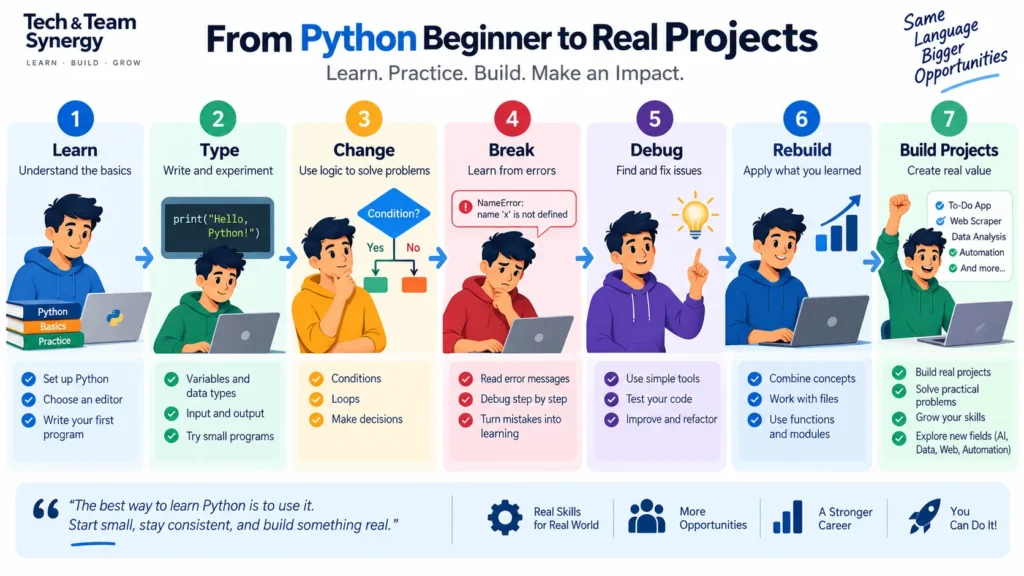
Use a cycle like this:
Learn → Type → Change → Break → Debug → Rebuild
For every example:
- Type it yourself.
- Run it.
- Change a value.
- Predict the result.
- Add another feature.
- Intentionally break something.
- Read the error.
- Fix it.
This creates active understanding rather than passive recognition.
Do Not Just Copy and Paste Code
Copying examples can save time, but too much copying can hide whether you actually understand the code.
After reading an example, try recreating it without looking.
Then explain each line to yourself.
If you cannot explain why a line exists, investigate it before moving on.
How to Use AI While Learning Python
AI coding assistants can be useful learning tools when used carefully.
You can ask AI to:
- Explain an error message
- Explain a concept in simpler language
- Create practice exercises
- Review code you wrote
- Suggest improvements
- Explain why two solutions behave differently
But avoid asking AI to build every exercise for you.
If the tool solves every problem, you may recognize Python code without developing the ability to create it yourself.
A better pattern is:
Try first → Get stuck → Ask for a hint → Try again → Compare solutions.
Learn How to Read Python Documentation
Learning to use documentation is an important programming skill.
You are not expected to memorize Python.
Python’s official documentation includes:
- A beginner resource section
- The Python tutorial
- The standard-library reference
- The language reference
- HOWTO guides
- Frequently asked questions
The official tutorial currently covers core topics including basic syntax, control flow, functions, data structures, modules, exceptions, classes, the standard library, virtual environments and packages.
As you progress, documentation will gradually replace beginner tutorials as one of your main learning tools.
Common Python Beginner Mistakes
Trying to Memorize Everything
You do not need to memorize every method or library.
Understand concepts and learn how to find details when needed.
Watching Tutorials Without Coding
Programming requires active practice.
Jumping Into Advanced Topics Too Quickly
Machine learning and web frameworks can be exciting, but weak fundamentals make advanced topics much harder.
Building Projects That Are Too Large
Your first project should probably not be a social network or a complete AI platform.
Build small programs that you can actually finish.
Being Afraid of Errors
Errors are part of programming.
Comparing Your Progress With Experienced Developers
Someone who has been programming for years will naturally solve problems differently.
Measure your progress against what you could build previously.
Changing Learning Resources Constantly
Constantly switching courses can create the feeling of learning without developing depth.
Choose one structured path, complete projects and use other resources when you need clarification.
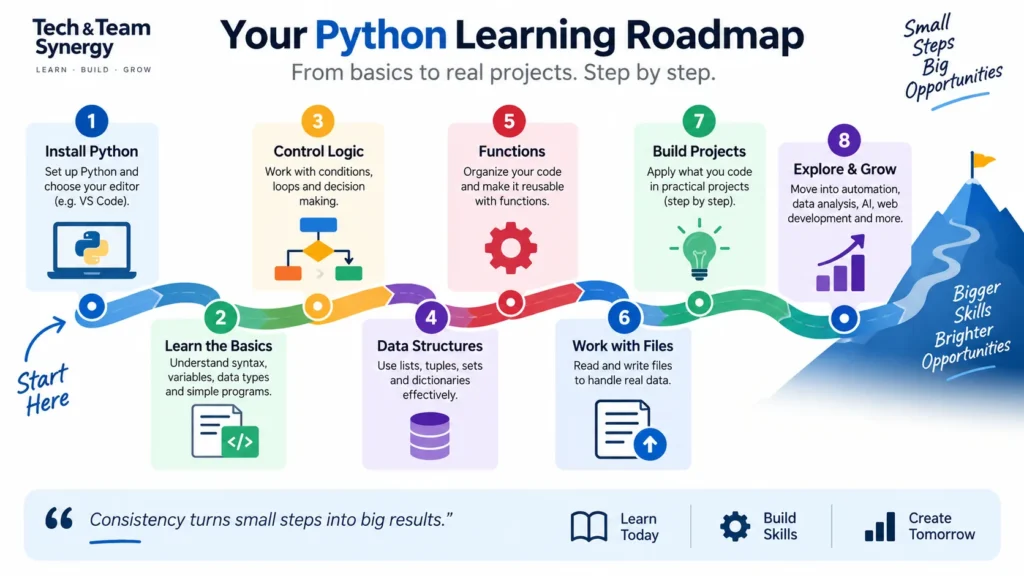
A Practical Python Learning Roadmap
| Stage | Learn | Practice |
|---|---|---|
| 1. Foundations | Syntax, variables, types, input/output | Small calculations and text programs |
| 2. Logic | Conditions and loops | Games and decision-based programs |
| 3. Data Structures | Lists, tuples, sets, dictionaries | Store and process collections |
| 4. Functions | Parameters, returns, scope | Break programs into reusable pieces |
| 5. Reliability | Exceptions and debugging | Handle invalid input |
| 6. Data | Files and common formats | Save and load information |
| 7. Organization | Modules and packages | Split programs into files |
| 8. Project Skills | Virtual environments and dependencies | Create isolated projects |
| 9. OOP | Classes and objects | Model simple concepts |
| 10. Specialization | Choose your field | Build relevant projects |
What Should You Learn After Python?
There is no universal next step.
Choose according to what you want to build.
Python for Automation
Python is especially useful for automating repetitive workflows, file processing and routine operational tasks. For a broader business perspective on automation, see our guide to Robotic Process Automation (RPA).
Continue with:
- File systems
- APIs
- JSON
- Regular expressions
- Command-line programs
- Task-specific libraries
Python for Data Analysis
Data analysis is one of Python’s most practical learning paths because it combines programming fundamentals with real datasets, visualization and decision support. If you are still comparing possible directions, our guide on why learning Python is valuable explains the main use cases and career opportunities.
Continue with:
- SQL
- NumPy
- pandas
- Statistics
- Data visualization
Python for Artificial Intelligence
Python is also a major language for AI experimentation, machine learning workflows and intelligent applications. For the broader concepts, use cases and terminology behind this field, continue with our complete guide to artificial intelligence.
Build foundations in:
- Data structures
- NumPy
- pandas
- Statistics
- Machine-learning principles
- Model evaluation
Then explore relevant machine-learning frameworks.
Python for Web Development
Learn:
- HTML
- CSS
- HTTP
- APIs
- Databases
- A Python web framework
- Testing
Python for Network Automation
In networking, Python is often used to automate configuration, collect operational data and integrate infrastructure workflows. To connect those skills with modern programmable network architectures, explore our guide to Network Functions Virtualization (NFV).
Combine Python with:
- Networking fundamentals
- REST APIs
- JSON and YAML
- Git
- Testing
- Automation platforms
Do You Need Git While Learning Python?
You do not need Git before writing your first Python program.
But once you start building projects, learning basic version control becomes worthwhile. It also fits naturally with the practices covered in our DevOps guide.
At minimum, learn how to:
- Create a repository
- Track changes
- Commit versions
- View previous changes
- Use branches at a basic level
This develops professional habits while protecting your work.
How Long Does It Take to Learn Python?
There is no meaningful universal answer.
Someone practicing consistently may understand basic syntax relatively quickly, but understanding syntax is different from becoming capable of solving new problems independently.
Your progress depends on:
- Previous programming experience
- Practice frequency
- Project complexity
- Your learning goals
- How much debugging you do yourself
A better metric than time is capability.
Ask:
What can I build now that I could not build before?
How Do You Know When You Know Python Basics?
You have a useful beginner foundation when you can build small programs without following every step of a tutorial.
You should be reasonably comfortable with:
- Variables
- Strings and numbers
- Conditions
- Loops
- Functions
- Lists
- Dictionaries
- Basic exceptions
- Files
- Modules
More importantly, you should be able to encounter a small unfamiliar problem and work toward a solution using documentation and experimentation.
Beginner Python Exercises
Try these without looking for complete solutions immediately.
Exercise 1: Greeting
Ask the user for their name and display a personalized greeting.
Exercise 2: Age Calculator
Ask for the user’s current age and calculate an age for a future year interval that you choose.
Exercise 3: Even or Odd
Ask for an integer and determine whether it is even or odd.
Exercise 4: Largest Number
Ask for three numbers and determine which is largest.
Exercise 5: Multiplication Table
Ask for a number and print a multiplication table for it.
Exercise 6: Word Counter
Ask the user for a sentence and count how many words it contains.
Exercise 7: Simple To-Do List
Create a list and allow the user to add and display tasks.
Exercise 8: Save Tasks
Improve the previous program so the tasks can be written to and loaded from a file.
Frequently Asked Questions About Learning Python
Can I learn Python with no programming experience?
Yes. Python is commonly used by beginners because its syntax is relatively readable. You should still expect to spend time developing programming logic, debugging skills and problem-solving ability.
Is Python difficult to learn?
The fundamentals are relatively accessible, but becoming proficient requires practice. Most learners find creating complete programs more challenging than understanding individual syntax examples.
Do I need advanced mathematics to learn Python?
No. You can learn general Python programming without advanced mathematics. Some specializations, such as certain areas of data science and machine learning, require more mathematical knowledge later.
Which Python version should a beginner learn?
Learn a current supported Python 3 release. Avoid old courses centered on Python 2, which reached end of life years ago.
Do I need an expensive computer to learn Python?
No. Basic Python exercises and beginner projects generally require modest computing resources. Specialized activities such as training large machine-learning models are a different matter.
Should I learn Python before AI?
If you want to understand and build AI applications technically, Python fundamentals can provide a strong foundation. You will also need additional knowledge depending on the kind of AI work you want to do.
Should I memorize Python syntax?
No. Repetition will make common syntax familiar naturally. Focus on understanding concepts and learning how to use documentation for details you forget.
Should I learn Python from books, videos or courses?
Any of these formats can work. The most important component is writing code yourself. A resource that includes exercises and projects is usually more useful than passive content alone.
When should I start building Python projects?
Very early. Once you understand variables, conditions, loops, collections and basic functions, you can already build small useful programs.
What should I learn after Python basics?
Choose a specialization based on your goal: automation, data analysis, AI, web development, testing, networking or another domain. Avoid learning random libraries without a practical objective.
Conclusion: The Best Way to Learn Python Is to Build With It
Learning Python is not about memorizing hundreds of commands.
It is about learning how to turn a problem into a sequence of instructions a computer can execute.
Start with the fundamentals:
Variables → Data types → Conditions → Loops → Collections → Functions → Errors → Files → Modules.
Then use those fundamentals in small projects.
As your programs become more ambitious, add virtual environments, packages, testing, version control and object-oriented programming.
After that, choose a specialization that matches the problems you want to solve.
You will still encounter errors and find concepts you do not understand immediately.
You will still need documentation.
That is normal programming.
The important habit is continuing the cycle:
Write → Run → Observe → Debug → Improve.
Start with a small program today, then make it slightly better tomorrow.
That is how Python becomes a skill rather than simply something you have read about.
Continue Learning
Keep building your technology skills with these related TechTeamSynergy guides.
Get Practical Insights from TechTeamSynergy
Join TechTeamSynergy Weekly for practical insights, frameworks, templates and resources covering Technology, Team and Transformation.