
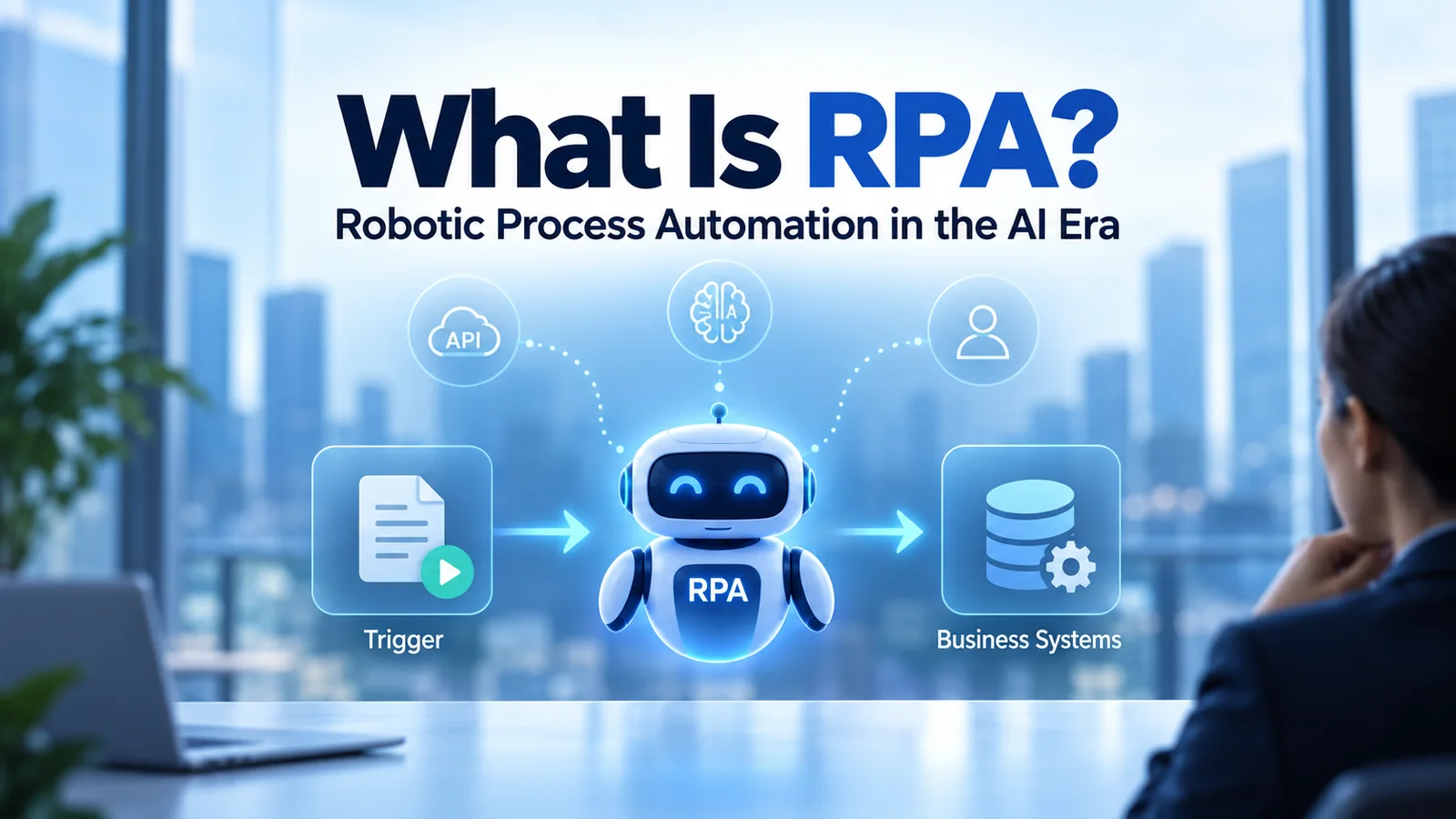
Robotic Process Automation (RPA) is a technology that automates repetitive, rules-based digital tasks by reproducing actions that people normally perform through software interfaces.
RPA software can interact with applications, enter information, move files, extract data, trigger workflows and complete other predictable tasks. It is especially useful when organizations need to automate work across existing systems without immediately redesigning or replacing those systems.
But automation is changing. Artificial intelligence, machine learning, document intelligence and AI agents are expanding what organizations can automate. As a result, RPA is increasingly becoming one component of a broader automation architecture rather than a standalone technology.
This guide explains Robotic Process Automation, how RPA works, attended and unattended automation, its benefits and limitations, implementation strategy, intelligent automation, and how RPA differs from AI agents.
What Is Robotic Process Automation (RPA)?
Robotic Process Automation uses software automation to perform structured digital tasks that would otherwise require human interaction with applications.
The “robot” in RPA is normally a software robot rather than a physical machine.
An RPA automation can reproduce actions such as:
- Opening an application
- Signing into an authorized business system
- Reading structured information
- Copying information between systems
- Entering data into forms
- Processing spreadsheets
- Generating reports
- Moving or renaming files
- Updating records
- Sending predefined notifications
- Triggering another workflow
This makes RPA particularly useful for repetitive processes that follow clearly defined rules.
What Does RPA Mean?
RPA stands for Robotic Process Automation.
Each word describes an important part of the concept:
- Robotic — software performs actions that a person might otherwise perform through a digital interface.
- Process — the automation follows a defined sequence of business steps.
- Automation — those steps are executed automatically when the required conditions are met.
RPA should not be confused with industrial robotics.
Industrial robots interact with the physical world. RPA robots interact primarily with digital applications and information.
How Does RPA Work?
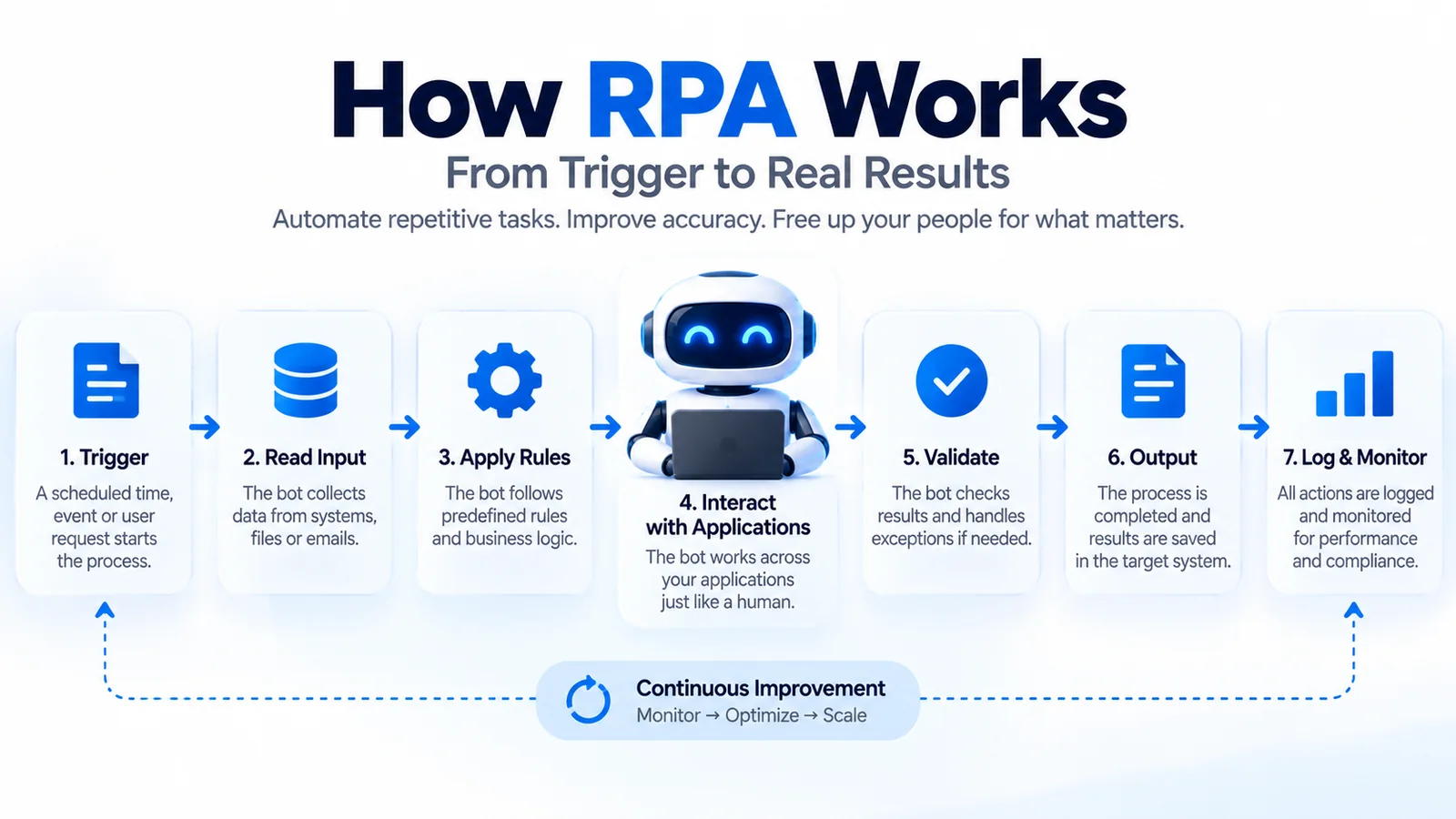
Traditional RPA works by translating a business process into a sequence of actions and rules that automation software can execute.
A simplified workflow looks like this:
Trigger → Read Input → Apply Rules → Interact With Applications → Validate → Produce Output → Log Result
Step 1: A Process Is Triggered
The automation begins when a predefined event occurs.
For example:
- A scheduled time is reached
- A new file appears
- A business event occurs
- A user starts the automation
- Another workflow sends a request
Step 2: The Robot Reads the Required Information
The automation obtains the information required to complete the task.
Depending on the process, this might come from:
- A spreadsheet
- A database
- A business application
- A document
- An approved inbox
- An API
- Another workflow
Step 3: Business Rules Are Applied
Traditional RPA works particularly well when decisions can be expressed using predictable rules.
For example:
If condition A is true → perform action B.
If information is missing → route the item for review.
Step 4: RPA Interacts With Applications
The automation can perform configured interactions with business applications.
This can include navigating interfaces, entering information, selecting options and moving data between authorized systems.
Step 5: The Result Is Validated
A robust automation should verify that expected outcomes occurred.
If something unexpected happens, the process should follow defined exception-handling rules rather than silently continuing.
Step 6: Activity Is Logged
Enterprise automation platforms typically record execution information for monitoring, troubleshooting and governance.
Logging is important, but organizations should not assume that automation automatically creates perfect auditability. Logging quality depends on the automation design, platform configuration and governance model.
Core Components of an RPA Platform
Enterprise RPA environments generally contain several capabilities working together.
RPA Designer
The designer is the environment used to create automation workflows.
Depending on the platform, automation can be created using:
- Visual workflow tools
- Low-code interfaces
- Reusable automation components
- Scripts or code
- AI-assisted development
Software Robots
Robots execute the automation logic.
They can operate with a user or run independently in appropriately configured environments.
Orchestrator
Enterprise automation often requires centralized management.
An orchestration layer can support:
- Scheduling
- Work allocation
- Robot management
- Credential management
- Monitoring
- Logging
- Exception management
Queues
Queues can distribute units of work across automation resources.
This can be useful when large numbers of similar transactions need to be processed.
Monitoring and Analytics
Organizations need visibility into automation performance.
Monitoring can help identify:
- Failed transactions
- Processing times
- Exceptions
- Capacity constraints
- Automation availability
Attended vs Unattended RPA
One of the most important distinctions in Robotic Process Automation is between attended and unattended automation.
What Is Attended RPA?
Attended RPA works alongside a person.
The automation is typically initiated by a user and assists with part of a larger task.
For example, an employee handling a customer request might trigger an automation that retrieves information from several systems and prepares it for review.
Attended RPA is useful when:
- Human judgment remains important
- Processes involve frequent user interaction
- Employees need automation assistance during their work
- Only part of the process should be automated
What Is Unattended RPA?
Unattended RPA executes without a person directly controlling each transaction.
The automation can be triggered by a schedule, event or workflow and run in an appropriately configured environment.
It is useful for predictable back-office processes that can operate according to defined rules.
Microsoft’s documentation similarly distinguishes attended scenarios, which are generally human-initiated, from unattended scenarios that execute without direct user interaction.
Attended vs Unattended RPA Comparison
| Characteristic | Attended RPA | Unattended RPA |
|---|---|---|
| Typical trigger | User | Schedule, event or workflow |
| Human involvement | Frequent | Limited during normal execution |
| Typical use | Employee assistance | Back-office processing |
| Decision model | Human and automation | Predefined automation logic |
| Example | Preparing customer information | Scheduled data reconciliation |
What Processes Are Best for RPA?
Not every business process is a good RPA candidate.
Traditional RPA works best when processes are:
- Repetitive
- Rules-based
- Predictable
- Digitally accessible
- Relatively stable
- Performed frequently enough to justify automation
Good candidates often involve significant manual interaction between applications.
Example RPA Candidates
Potential examples include:
- Moving structured information between systems
- Generating recurring reports
- Processing standardized forms
- Updating records
- Reconciling structured datasets
- Creating predefined system entries
- Performing scheduled administrative tasks
Processes That May Be Poor RPA Candidates
Some processes should be improved or redesigned before they are automated.
RPA may be a poor choice when:
- The process changes constantly
- Business rules are unclear
- The workflow is fundamentally broken
- Most steps require human judgment
- Input quality is unreliable
- A stable API or native integration provides a better solution
- The process occurs too rarely to justify automation
A common mistake is to automate an inefficient process simply because it exists.
Automating a bad process can make the bad process run faster.
10-Minute RPA Candidate Triage
Before building a bot, use a short review to decide whether RPA is actually the right automation method.
- Minutes 0–2 — Confirm the outcome: What measurable result should improve: cycle time, manual effort, error rate, throughput or service quality?
- Minutes 2–4 — Check process stability: Are the steps, rules, inputs and exceptions predictable enough to automate without constant redesign?
- Minutes 4–6 — Compare alternatives: Is there a reliable API, native workflow or simpler application change that would be more robust than interface automation?
- Minutes 6–8 — Check judgment and data needs: If the process depends on unstructured information or contextual interpretation, determine whether AI assistance or a human decision point is required.
- Minutes 8–10 — Decide the next step: Record an owner, success metric and next action before development begins.
Use one of five outcomes: USE RPA, USE AN API OR NATIVE WORKFLOW, COMBINE RPA WITH AI, REDESIGN THE PROCESS FIRST, or KEEP THE STEP HUMAN-LED.
A practical pilot should then measure the expected business result together with exception rate, maintenance effort and operational reliability.
Common RPA Use Cases
Robotic Process Automation can be applied across many business functions.
Finance and Accounting
Possible use cases include:
- Data reconciliation
- Report preparation
- Invoice-related workflows
- Data transfer between finance systems
- Standardized account updates
Human Resources
RPA can assist with structured administrative tasks such as:
- Employee record updates
- Standardized onboarding activities
- Document processing
- Recurring reporting
IT Operations
RPA can support repetitive IT administration where appropriate.
Examples include:
- Scheduled reporting
- Data collection
- Standardized service workflows
- System administration support
- Routine record updates
Customer Operations
Attended automation can help employees gather information from multiple authorized systems during customer interactions.
This can reduce repetitive navigation and allow employees to focus more attention on the customer conversation.
Supply Chain and Operations
RPA can support standardized tasks involving:
- Order information
- Inventory records
- Status updates
- Operational reporting
- Data reconciliation
Benefits of Robotic Process Automation
RPA can provide meaningful benefits when it is applied to the right process.
Reduced Manual Work
Automation can reduce the time employees spend performing repetitive digital actions.
Consistency
Software automation can execute predefined steps consistently when inputs and systems behave as expected.
Speed
Automation can often process structured tasks faster than manual execution.
Extended Operating Hours
Appropriately designed unattended automation can execute outside normal working hours.
Employee Experience
Removing repetitive administrative tasks can allow employees to spend more time on activities that require communication, creativity, analysis or judgment.
Legacy-System Automation
RPA can be particularly useful when older applications do not provide convenient modern integration options.
Instead of immediately replacing a legacy system, organizations may use RPA as an integration or automation layer for selected workflows.
Does RPA Guarantee Cost Savings?
No.
RPA can reduce manual effort and improve efficiency, but savings are not automatic.
Total cost can include:
- Software licensing
- Infrastructure
- Development
- Testing
- Monitoring
- Maintenance
- Governance
- Training
- Process redesign
Organizations should therefore build a realistic business case rather than assuming that every automated process will deliver immediate ROI.
Limitations of RPA
RPA is powerful, but it has important limitations.
Interface Dependency
Some RPA automations depend on application interfaces.
If those interfaces change, the automation may require maintenance.
Limited Traditional Decision-Making
Traditional RPA is strongest when decisions can be represented through predefined logic.
Ambiguous situations may require human judgment or additional AI capabilities.
Automation Maintenance
Automations are software assets.
They require:
- Testing
- Version management
- Monitoring
- Security updates
- Documentation
- Maintenance
Automation Sprawl
Organizations can create large numbers of bots without adequate ownership or governance.
This can lead to technical debt and operational complexity.
Process Problems Remain Process Problems
RPA cannot automatically fix unclear responsibilities, unnecessary approvals or badly designed business processes.
RPA vs APIs
APIs and RPA solve different integration problems.
An API allows systems to communicate through a defined programmatic interface.
RPA can interact with applications through interfaces in a way that resembles user actions.
| Area | RPA | API |
|---|---|---|
| Interaction | Often through application interfaces | Programmatic system interface |
| Legacy systems | Can be useful | Depends on API availability |
| Interface changes | Can affect automation | Less dependent on graphical interface |
| Best fit | User-like process automation | System-to-system integration |
If a reliable API is available and meets the business requirement, it may provide a more robust integration than interface-based automation.
However, organizations frequently operate mixed environments where APIs, workflows and RPA all play different roles.
RPA vs Business Process Automation
Business Process Automation (BPA) is broader than RPA.
BPA focuses on automating and orchestrating business processes from end to end.
RPA typically focuses more specifically on automating individual digital tasks or interactions within those processes.
A business process might therefore contain:
Workflow + APIs + RPA + Human Approvals + Business Rules
RPA can be one component of the larger automation architecture.
Artificial Intelligence vs RPA
RPA and artificial intelligence are not the same technology.
Traditional RPA is generally deterministic.
It follows predefined instructions.
AI systems can perform tasks involving pattern recognition, prediction, language understanding, content generation or more adaptive decision support.
A simplified distinction is:
RPA: “Follow these defined steps.”
AI: “Interpret this information and produce an appropriate output.”
In practice, organizations increasingly combine the two.
For a broader explanation of AI, see our complete guide to Artificial Intelligence.
What Is Intelligent Automation?
Intelligent Automation combines traditional automation with capabilities that can handle more complex information and decisions.
Depending on the architecture, this can involve:
- RPA
- Artificial intelligence
- Machine learning
- Document intelligence
- Natural-language technologies
- Workflow orchestration
- Process mining
- Business rules
Consider a document-processing workflow.
Traditional RPA might move structured information between applications.
Document intelligence could first extract information from a less structured document.
Workflow automation could coordinate approvals.
RPA could then update an application that lacks a convenient integration.
The result is broader than RPA alone.
RPA vs AI Agents
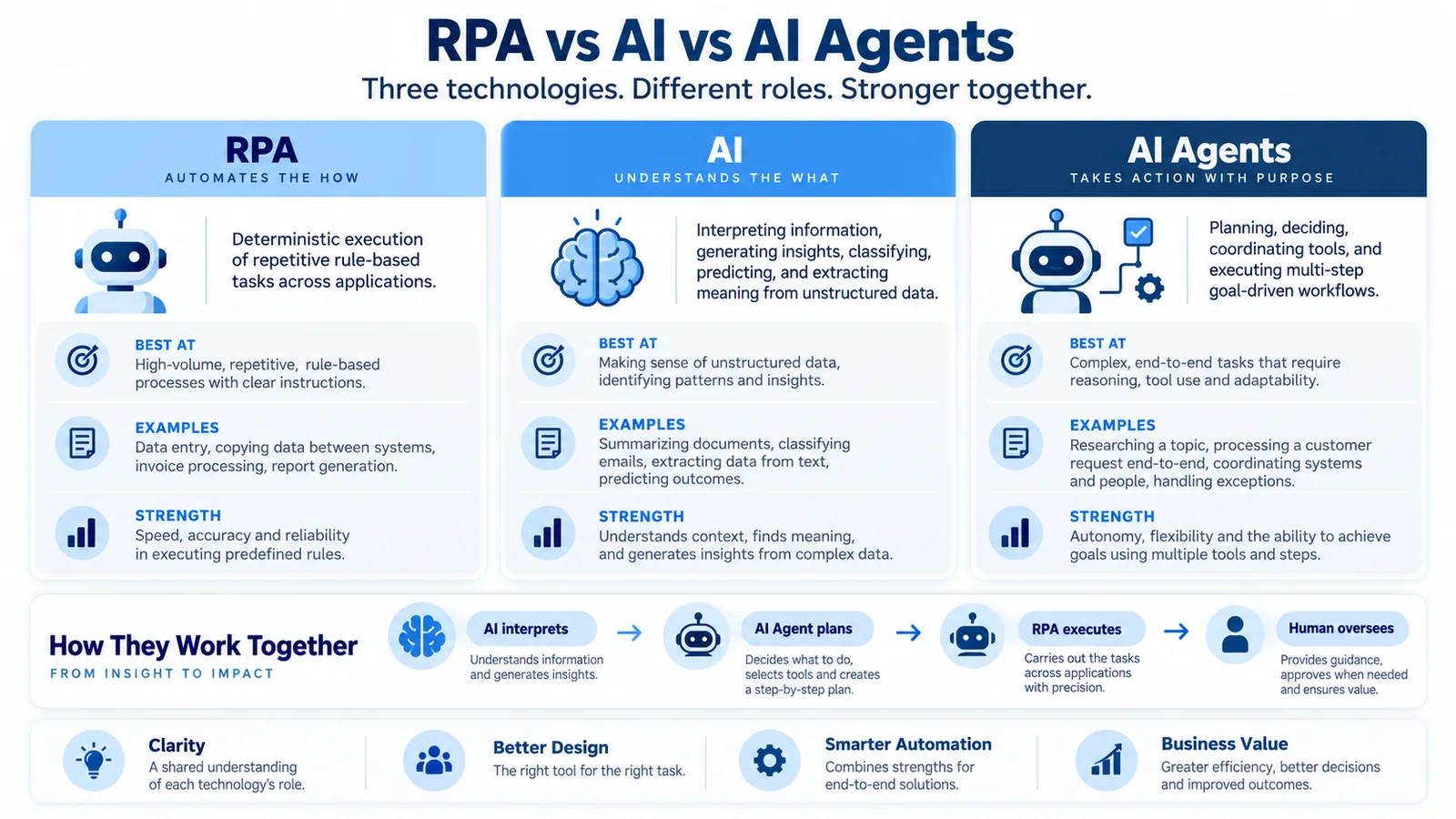
AI agents are creating another important shift in enterprise automation.
An AI agent can potentially interpret a goal, plan steps, use available tools and adapt its actions based on intermediate results.
Traditional RPA is normally much more deterministic.
A simplified comparison is:
| Characteristic | Traditional RPA | AI Agent |
|---|---|---|
| Primary approach | Predefined workflow | Goal-oriented execution |
| Decision logic | Explicit rules | Can include AI reasoning |
| Predictability | Generally high for stable processes | Can be more variable |
| Adaptability | Limited | Potentially higher |
| Best suited to | Repetitive structured tasks | More dynamic multi-step tasks |
| Governance need | Automation governance | Automation plus AI governance |
This distinction is important.
An AI agent should not automatically replace RPA simply because it is newer.
Will AI Agents Replace RPA?
AI agents are likely to change the role of RPA, but that does not mean every RPA automation should be replaced.
RPA remains useful when a process is:
- Stable
- Repetitive
- Rules-based
- High volume
- Dependent on existing application interfaces
An AI agent may be more appropriate when a workflow requires:
- Interpreting less structured information
- Planning
- Selecting between different tools
- Adapting to changing context
- Handling more dynamic tasks
In many enterprise architectures, the two can complement each other.
An AI agent could determine what needs to happen, while a deterministic automation component executes a well-defined action.
This creates a possible architecture:
User Goal → AI Agent → Workflow/Orchestration → API or RPA → Business System → Validation
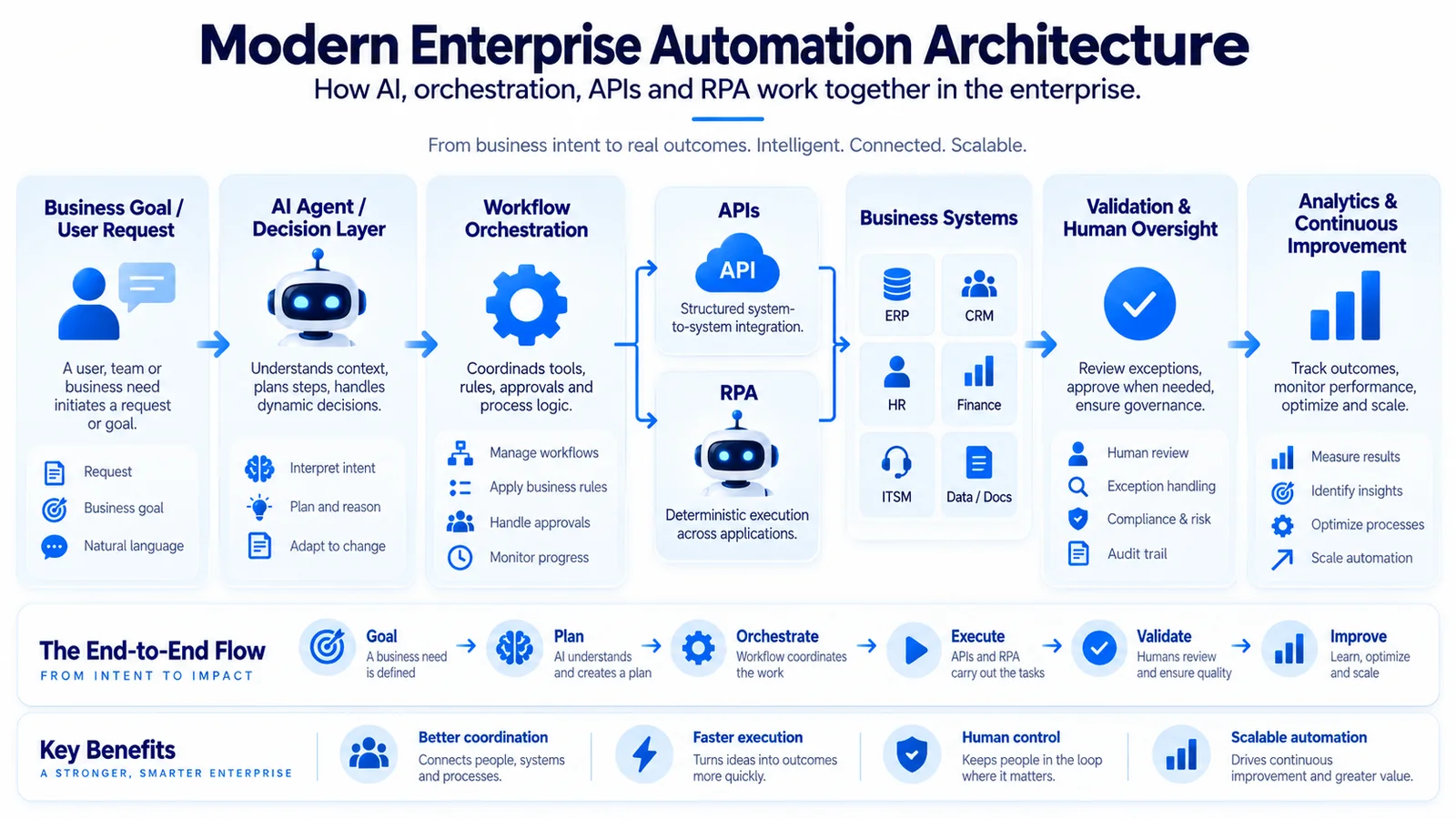
Our Agentic AI guide explains how AI agents plan, use tools and execute multi-step tasks.
RPA and Generative AI
Generative AI can also enhance automation without turning every workflow into an autonomous agent.
Possible uses include:
- Interpreting natural-language requests
- Summarizing documents
- Generating structured drafts
- Classifying information
- Helping developers create automations
- Supporting exception analysis
The key architectural question is determining which parts of a process require flexible AI capabilities and which parts should remain deterministic.
RPA Security
Automation can interact with important organizational systems and information.
Security therefore needs to be designed into the automation environment.
Important considerations include:
- Identity management
- Least-privilege access
- Credential protection
- Logging
- Segregation of duties
- Change control
- Environment separation
- Monitoring
- Data protection
Protect Robot Credentials
Automation credentials should not be embedded carelessly inside scripts or workflows.
Organizations should use appropriate credential-management mechanisms and restrict access according to operational requirements.
Apply Least Privilege
A robot should have only the permissions required to perform its authorized task.
Giving automation unnecessary access increases risk.
Monitor Automation Activity
Automation should be observable.
Organizations need sufficient logging to investigate failures, unexpected activity and operational incidents.
RPA Governance
As automation scales, governance becomes increasingly important.
An RPA governance model can define:
- Who can propose automations
- How opportunities are assessed
- Who develops automation
- Testing requirements
- Security requirements
- Production approval
- Ownership
- Monitoring
- Change management
- Retirement processes
The objective is not to create bureaucracy.
It is to prevent uncontrolled automation from becoming another source of technical debt.
RPA Governance in the AI Era
When RPA is combined with AI, governance needs to expand beyond traditional automation controls.
Organizations should consider additional questions:
- What decisions can AI make?
- What tools can it access?
- What information can it use?
- Which actions require human approval?
- How are outputs validated?
- How are failures detected?
- How is AI behavior monitored?
The NIST AI Risk Management Framework provides a voluntary framework for managing AI risks across the AI lifecycle.
Its core functions—Govern, Map, Measure and Manage—provide a useful reference when organizations introduce AI capabilities into automation.
How to Implement RPA Successfully
Successful RPA programs usually begin with process understanding rather than technology selection.
Step 1: Identify Candidate Processes
Look for processes that are:
- Repetitive
- Stable
- Rules-based
- Time-consuming
- Digitally accessible
Step 2: Understand the Current Process
Document:
- Inputs
- Outputs
- Business rules
- Applications
- Exceptions
- Dependencies
- Manual decisions
This frequently exposes unnecessary complexity before automation begins.
Step 3: Simplify Before Automating
Ask whether steps can be removed, standardized or redesigned.
Automation should not preserve unnecessary complexity simply because the old process contained it.
Step 4: Choose the Right Automation Method
Do not automatically select RPA.
Consider:
- Native application automation
- APIs
- Workflow platforms
- RPA
- AI
- AI agents
- Human processing
The best architecture may combine several approaches.
Step 5: Build and Test
Test normal scenarios as well as exceptions.
An automation that works only when everything is perfect is not production-ready.
Step 6: Deploy With Governance
Define:
- Owner
- Support model
- Access permissions
- Monitoring
- Change process
- Escalation process
Step 7: Monitor and Improve
Automation is not a one-time deployment.
Applications, rules and processes change.
RPA therefore requires lifecycle management.
RPA Center of Excellence
Organizations with larger automation programs sometimes establish an RPA or automation Center of Excellence.
A Center of Excellence can provide:
- Standards
- Architecture guidance
- Reusable components
- Security requirements
- Development practices
- Training
- Governance
- Performance measurement
However, a Center of Excellence should enable teams rather than becoming a bottleneck for every automation decision.
How to Measure RPA Success
Automation success should be measured against business outcomes rather than the number of robots deployed.
Possible KPIs include:
- Processing time
- Manual effort reduced
- Transaction volume
- Exception rate
- Automation success rate
- Availability
- Maintenance effort
- Cost per transaction
- Employee experience
- Business outcome improvement
A large bot count does not necessarily indicate a successful automation program.
How to Calculate RPA ROI
A basic RPA business case can compare expected benefits with the full cost of automation.
A simplified model is:
RPA ROI = (Benefits − Total Automation Cost) ÷ Total Automation Cost × 100
Potential benefits can include:
- Reduced manual processing time
- Increased throughput
- Reduced rework
- Operational availability
Costs should include more than licenses.
Consider:
- Platform cost
- Development
- Infrastructure
- Testing
- Training
- Governance
- Monitoring
- Maintenance
This provides a more realistic assessment than assuming automation produces immediate savings.
RPA and the Future of Work
RPA is often discussed as a replacement for human work, but that framing is too simplistic.
Most business processes contain different kinds of activities:
- Repetitive tasks
- Judgment
- Communication
- Problem solving
- Decision-making
- Creativity
Automation is strongest when organizations identify which activities should be automated and which should remain human-led.
This can shift roles away from repetitive administration toward exception management, analysis, customer interaction and process improvement.
For the broader organizational perspective, see our Workforce Transformation guide.
RPA and Digital Transformation
RPA can support digital transformation, but RPA alone is not digital transformation.
Automating an old process does not necessarily transform it.
Digital transformation may involve redesigning:
- Processes
- Customer journeys
- Applications
- Operating models
- Data flows
- Decision-making
RPA is most valuable when it supports a broader transformation strategy rather than becoming a substitute for modernization.
The Future of Robotic Process Automation
The future of RPA is likely to be defined less by standalone software robots and more by integration with broader automation platforms.
A modern automation architecture can combine:
Workflow + APIs + RPA + AI + AI Agents + Human Decisions
Different technologies can then be used for the tasks they perform best.
RPA Will Become More AI-Assisted
AI can help developers create automation, understand information and handle exceptions that were difficult to automate using rigid rules alone.
RPA Will Become Part of Larger Orchestration Platforms
Organizations increasingly need to coordinate people, applications, APIs, bots and AI systems rather than manage isolated automations.
AI Agents Will Expand the Automation Boundary
AI agents can address more dynamic tasks that require planning and tool selection.
However, predictable execution remains valuable.
This means deterministic automation and agentic AI can coexist.
Human Oversight Will Remain Important
As automation becomes more capable, organizations need appropriate controls around permissions, exceptions, monitoring and high-impact actions.
Frequently Asked Questions About RPA
What Is RPA?
RPA, or Robotic Process Automation, is technology that automates repetitive digital tasks by executing predefined actions across software applications and systems.
What Does RPA Stand For?
RPA stands for Robotic Process Automation.
Is RPA Artificial Intelligence?
Traditional RPA is not the same as artificial intelligence. RPA generally follows predefined rules, while AI can perform tasks such as interpretation, prediction, generation and adaptive decision support. The technologies can be combined.
What Is an RPA Bot?
An RPA bot is a software automation that executes configured digital tasks. It is not normally a physical robot.
What Is the Difference Between Attended and Unattended RPA?
Attended RPA generally works alongside a user and is often triggered by that user. Unattended RPA runs without direct user interaction during normal execution and can be triggered by schedules, events or workflows.
What Is Intelligent Automation?
Intelligent Automation combines automation technologies such as RPA and workflows with capabilities such as AI, machine learning, document intelligence and process orchestration.
What Is the Difference Between RPA and AI?
Traditional RPA follows defined instructions, while AI can interpret information and produce outputs that are not entirely determined by fixed rules.
What Is the Difference Between RPA and an AI Agent?
RPA normally executes a predefined workflow. An AI agent can potentially interpret a goal, plan actions, select tools and adapt based on intermediate results.
Will AI Agents Replace RPA?
Not necessarily. AI agents can expand automation into more dynamic tasks, while RPA remains useful for predictable and repetitive processes. The technologies can also work together.
Is RPA Still Relevant?
Yes. RPA remains relevant where organizations need reliable automation across structured processes, especially when existing applications lack suitable APIs or modern integration capabilities.
What Processes Are Best for RPA?
Good RPA candidates are generally repetitive, rules-based, stable, digitally accessible and sufficiently frequent to justify automation.
What Are the Main Benefits of RPA?
Potential benefits include reduced repetitive work, faster processing, consistent execution, extended operating hours and improved integration with some legacy applications.
What Are the Main Risks of RPA?
Risks can include automation failures, credential exposure, excessive permissions, interface dependencies, maintenance requirements, poor governance and automation sprawl.
Does RPA Require Coding?
Not always. Many RPA platforms provide visual or low-code development tools, although programming knowledge can be valuable for complex integrations, exception handling and enterprise-scale automation. To strengthen that foundation, follow our step-by-step Python beginner guide.
Conclusion: RPA in the Age of AI and Intelligent Automation
Robotic Process Automation remains an important enterprise automation technology, but its role is evolving.
RPA is particularly effective for structured, repetitive and predictable digital work.
Its strengths include consistent execution, interaction with existing applications and the ability to automate processes that may not have convenient modern integrations.
But RPA should no longer be viewed in isolation.
The modern automation landscape includes:
RPA + APIs + Workflow Automation + AI + Intelligent Automation + AI Agents + Human Oversight
The goal is not to select the newest technology for every problem.
It is to choose the appropriate automation method for each part of the process.
deterministic automation where predictability matters.
APIs where reliable system integration is available.
AI where information requires interpretation.
AI agents where more dynamic planning and tool use create genuine value.
And keep people involved where judgment, accountability or business context requires human oversight.
That is how RPA evolves from a collection of software robots into part of a broader intelligent automation strategy for the AI era.
Continue Learning
Continue exploring TechTeamSynergy with these related guides.
Comments are closed.