
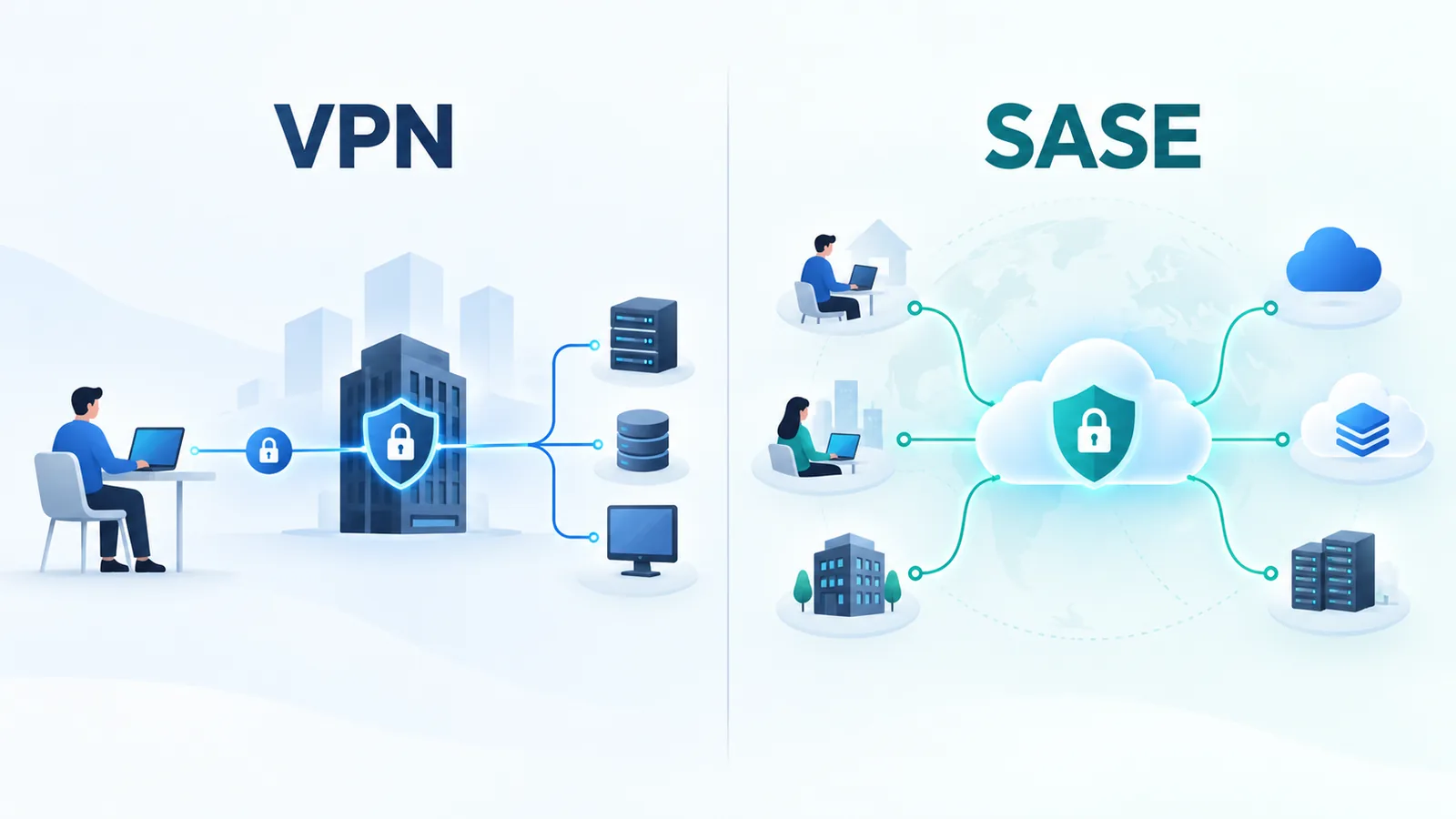
VPN and SASE can both help organizations provide secure remote access, but they solve different problems. A Virtual Private Network (VPN) primarily creates protected connectivity across an untrusted network, while Secure Access Service Edge (SASE) brings networking, security and policy-driven access together within a broader distributed architecture.
This distinction matters because the question is not simply whether SASE is “better” than VPN.
A VPN can still be appropriate for many connectivity requirements. SASE becomes particularly relevant when an organization needs to consistently secure users, devices, branches and applications distributed across SaaS, public cloud, private cloud, data centers and the internet.
This guide compares VPN vs SASE across architecture, security, remote access, cloud connectivity, performance, scalability, cost and operations. It also explains how Zero Trust Network Access (ZTNA) fits into the comparison and when organizations may use VPN and SASE together rather than choosing only one.
For the full architecture behind SASE, see our complete Secure Access Service Edge guide. For broader security fundamentals and control models, continue with our complete cybersecurity guide. To see how network and remote-access security fit into the wider responsibilities of security teams, read what cybersecurity actually does inside an organization.
VPN vs SASE: Quick Answer
The simplest distinction is:
VPN = secure connectivity
SASE = secure connectivity + policy-driven networking + distributed security services
| Area | VPN | SASE |
|---|---|---|
| Primary purpose | Create protected network connectivity | Provide integrated networking and security access |
| Architecture | Tunnel-based connectivity | Distributed service-edge architecture |
| Security scope | Primarily protects connectivity; additional controls depend on architecture | Can integrate multiple security capabilities |
| Access model | Often network-oriented | Can be identity-, context- and application-aware |
| Cloud/SaaS | Supported, but architecture may require additional controls | Designed around distributed application access |
| Remote workforce | Established use case | Major use case |
| Branch networking | Possible through site-to-site VPNs | Can integrate SD-WAN and cloud-delivered security |
| ZTNA | Not inherent | Common SASE capability |
| SWG/CASB | Separate services if required | Common integrated capabilities |
The correct solution depends on what the organization is trying to protect and connect.
What Is a VPN?
VPN stands for Virtual Private Network.
A VPN establishes protected connectivity across another network, commonly the public internet.
The tunnel can allow traffic to travel between:
- A remote user and an enterprise network
- Two office locations
- A company and a cloud environment
- Two networks
Encryption and authentication can protect traffic as it crosses an untrusted transport.
A simplified remote-access VPN looks like:
User → Internet → Encrypted VPN Tunnel → VPN Gateway → Enterprise Resources
Two Important Types of Enterprise VPN
Remote-Access VPN
A remote employee runs a VPN client or uses another supported connection mechanism to establish protected connectivity to an enterprise gateway.
This can provide access to:
- Internal applications
- Servers
- File systems
- Management systems
- Other private resources
Site-to-Site VPN
A site-to-site VPN connects networks rather than individual users.
For example:
Branch A → Encrypted Tunnel → Headquarters
or:
Enterprise Network → Encrypted Tunnel → Cloud Network
Site-to-site VPNs therefore remain useful even when organizations adopt newer security architectures for user access.
What Is SASE?
SASE stands for Secure Access Service Edge.
SASE is a broader architecture for delivering networking and security capabilities to distributed users, devices, sites and applications.
A simplified model is:
User / Device / Branch → SASE Service Edge → Policy + Security + Connectivity → Application
The application might be:
- A SaaS service
- A private application
- A public-cloud workload
- A data-center application
- The public internet
SASE commonly brings together capabilities associated with:
- SD-WAN
- Zero Trust Network Access (ZTNA)
- Secure Web Gateway (SWG)
- Cloud Access Security Broker (CASB)
- Firewall services
- Data security
- Threat protection
Exact implementations vary by provider. For a standards-based reference, MEF 117 defines a SASE service framework and service attributes covering security functions, policies and connectivity services.
The Biggest Difference: Architecture
The most important difference between VPN and SASE is architectural scope.
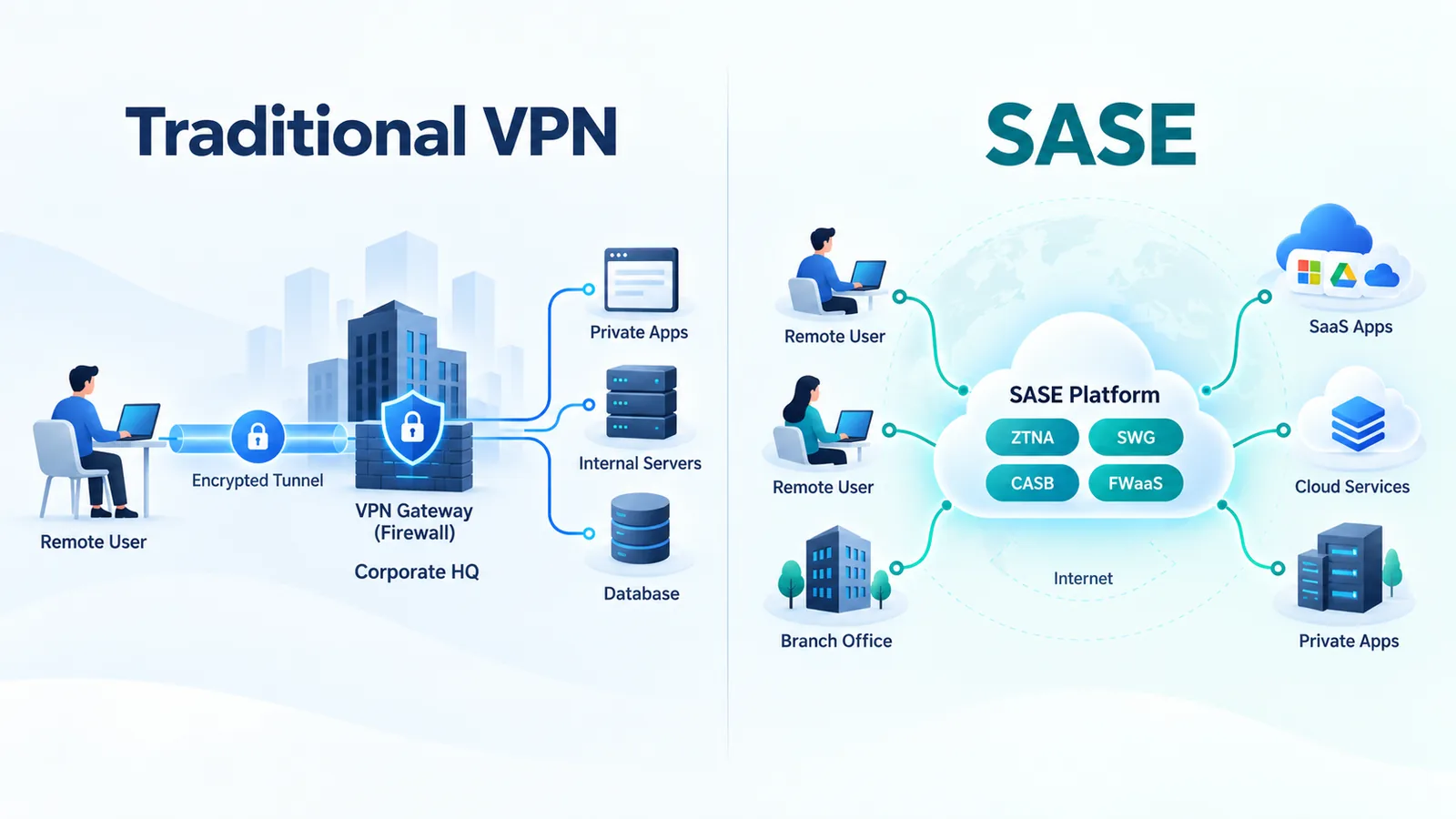
VPN Architecture
Traditional remote-access VPN designs commonly bring remote users into the enterprise network through one or more VPN gateways.
For example:
Remote User → Internet → VPN Gateway → Corporate Network → Application
This works well when many applications are located behind that corporate gateway.
SASE Architecture
Modern organizations increasingly have applications distributed everywhere.
A user may need:
- Microsoft 365
- Salesforce
- A private cloud application
- An internal application
- Public internet services
A SASE architecture can connect the user to an appropriate service edge and apply relevant security policies before traffic reaches the required resource.
The goal is not simply to bring the user “inside” a corporate network.
The goal is to provide secure access to the resource the user actually needs.
VPN vs SASE Security
A common comparison says:
VPN = less secure
SASE = more secure
That is too simplistic.
VPN security depends on factors such as:
- VPN technology
- Authentication
- Device security
- Segmentation
- Access controls
- Gateway configuration
- Patch management
- Monitoring
A properly designed VPN architecture can provide strong protection.
However, traditional remote-access VPN designs can create additional risk when they provide users with broad network connectivity after authentication or when gateways are poorly configured or maintained.
CISA guidance on modern network access security highlights risks associated with traditional remote access and VPN deployments and encourages organizations to evaluate approaches such as Zero Trust, SSE and SASE.
This is one reason modern architectures increasingly emphasize least privilege and resource-specific access.
What Are the Security Limitations of VPN?
A VPN tunnel protects traffic in transit, but encryption alone does not solve every security problem.
Organizations must still address:
- Who is connecting?
- Is the device trustworthy enough for the requested access?
- Which resources should the user reach?
- What should the user be allowed to do?
- Is the endpoint compromised?
- Should access continue if risk changes?
A VPN should therefore be considered one component of a security architecture rather than a complete security strategy.
VPN vs SASE: Access Model
Traditional VPNs often create network-level connectivity.
For example:
User → VPN → Corporate subnet → Multiple applications
Additional security controls can narrow that access.
SASE architectures commonly incorporate more granular policy mechanisms, particularly through ZTNA.
For example:
User A → Application A
User B → Applications B and C
Supplier → Supplier Portal only
This reduces reliance on network location as the main basis for trust.
VPN vs ZTNA
ZTNA is particularly important in the VPN vs SASE discussion.
Zero Trust Network Access provides policy-driven access to authorized applications or resources rather than necessarily extending broad network connectivity.
The access decision may consider:
- User identity
- Device identity
- Authentication
- Device posture
- Requested resource
- Context
- Risk signals
ZTNA is therefore frequently used to modernize remote access.
But ZTNA and SASE are not identical.
ZTNA is an access capability.
SASE is a broader networking and security architecture.
VPN, SASE and Zero Trust
Zero Trust should not be reduced to a product category.
NIST SP 800-207 describes Zero Trust as an architecture that removes implicit trust based solely on physical or network location and focuses protection on resources.
This means:
VPN ≠ Zero Trust
ZTNA ≠ complete Zero Trust architecture
SASE ≠ Zero Trust itself
SASE and ZTNA can help implement Zero Trust principles, but the broader architecture also requires identity, policy, device, data and governance considerations.
VPN vs SASE for Remote Work
Traditional VPN Approach
A remote employee may connect through:
Home → Internet → VPN Gateway → Enterprise Network
This can remain effective where users primarily need centralized private resources.
SASE Approach
A distributed employee might access:
SaaS → through cloud security services
Private App → through ZTNA
Internet → through SWG/security controls
This architecture can be better aligned with users whose applications are distributed rather than concentrated in one data center.
VPN vs SASE for Cloud Applications
Cloud adoption changes network traffic patterns.
Consider an employee accessing a SaaS platform.
Centralized VPN Path
User → VPN → Corporate Data Center → Security → Internet → SaaS
Distributed Secure Access Path
User → SASE Service Edge → Security Inspection → SaaS
The second design can eliminate unnecessary backhaul in appropriate architectures.
However, shorter-looking network diagrams do not automatically guarantee better performance.
Application experience still depends on:
- Internet quality
- Service-edge location
- Provider backbone
- Peering
- Security inspection
- Application location
VPN vs SASE Performance
Neither VPN nor SASE automatically guarantees better application performance.
VPN Performance Factors
- Gateway capacity
- Gateway location
- Internet path
- Encryption overhead
- Backhaul
- User connection quality
SASE Performance Factors
- PoP/service-edge coverage
- Peering
- Backbone architecture
- Traffic steering
- Security inspection overhead
- Application location
- Last-mile connection
SASE can improve performance where it creates more efficient application paths, but that outcome should be tested rather than assumed.
VPN vs SASE Scalability
The current debate often claims that VPN cannot scale while SASE scales automatically.
Reality is more nuanced.
Large VPN deployments can scale using:
- Multiple gateways
- Load distribution
- Regional infrastructure
- Cloud-hosted concentrators
- Automation
However, scaling them can increase architecture and operational complexity.
Cloud-delivered SASE services can shift much of the infrastructure-scaling responsibility toward the service provider.
That can simplify enterprise operations, but the organization still needs to evaluate provider capacity, geographic coverage and service architecture.
VPN vs SASE for Branch Offices
VPNs can securely interconnect sites through site-to-site tunnels.
This remains a practical architecture in many organizations.
For example:
Branch → IPsec VPN → Data Center
SASE can support a broader branch architecture:
Branch → SD-WAN → SASE → SaaS / Cloud / Private Apps
This becomes particularly useful when branch traffic is increasingly cloud-oriented.
For more detail, read our SD-WAN architecture guide.
VPN vs SASE: Security Capabilities
| Capability | VPN | SASE |
|---|---|---|
| Encrypted tunnel | Core function | May be used where appropriate |
| User authentication | Yes | Yes |
| Device context | Depends on solution | Common policy input |
| ZTNA | Separate capability | Common component |
| Secure Web Gateway | Separate | Common component |
| CASB | Separate | Common component |
| Firewall services | Can be integrated separately | Common component |
| Data protection | Requires additional controls | May be integrated |
VPN vs SASE Cost
There is no universal rule that VPN is cheaper or SASE provides lower total cost.
The answer depends on scale and architecture.
VPN Costs Can Include
- VPN licenses
- Gateway infrastructure
- High availability
- Bandwidth
- Firewall/security infrastructure
- Support
- Operations
SASE Costs Can Include
- User licenses
- Site licenses
- Security services
- SD-WAN
- Connectivity
- Migration
- Professional or managed services
The correct comparison is therefore total cost of ownership, not simply VPN license versus SASE subscription.
VPN vs SASE Operations
Traditional environments may use separate platforms for:
- VPN
- Firewall
- Proxy
- Web filtering
- SD-WAN
- CASB
- Remote-access policy
SASE can potentially consolidate some of these capabilities.
This may simplify:
- Policy administration
- Monitoring
- Troubleshooting
- Reporting
But consolidation is not guaranteed.
Multi-vendor SASE architectures can still involve several management systems and integrations.
When Does VPN Still Make Sense?
VPN remains appropriate in many scenarios.
1. Access to Centralized Private Resources
If users primarily access a small number of resources inside a controlled enterprise network, VPN may provide a straightforward solution.
2. Site-to-Site Connectivity
IPsec VPNs remain widely applicable for connecting networks.
3. Limited Remote-Access Requirements
An organization with a relatively small remote workforce may not need a complete SASE architecture solely for remote access.
4. Existing Security Controls Already Provide Segmentation
VPN access can be combined with:
- MFA
- Firewalls
- Segmentation
- Least-privilege policies
- Endpoint controls
5. Temporary or Specialized Connectivity
VPN tunnels can be useful for specific application, partner or infrastructure connections.
When Does SASE Become More Attractive?
1. Distributed Workforce
Large numbers of employees connect from offices, homes and mobile locations.
2. SaaS Adoption
A significant percentage of traffic is destined directly for cloud applications.
3. Multi-Cloud Environment
Applications span multiple cloud and private environments.
4. Many Branch Locations
The organization wants to combine modern WAN connectivity with centrally defined security policies.
5. Security Tool Fragmentation
Teams manage multiple disconnected VPN, proxy, firewall and cloud-security platforms.
6. Granular Private Application Access
The organization wants to reduce broad network-level remote access and move toward application-specific policies.
Can SASE Replace VPN?
SASE can replace some VPN use cases, but it does not automatically eliminate every VPN.
For example, ZTNA can replace traditional remote-access VPN for some private application access.
But VPN technology may remain useful for:
- Site-to-site tunnels
- Cloud network connectivity
- Infrastructure management
- Legacy applications
- Specialized partner connections
The better question is therefore:
Which VPN use cases should remain, and which access patterns would benefit from a different architecture?
Can VPN and SASE Work Together?
Yes.
Coexistence is common during transformation.
For example:
- ZTNA for modern private applications
- SASE/SSE for web and SaaS security
- VPN for selected legacy applications
- IPsec for site-to-site connectivity
This allows organizations to modernize gradually instead of forcing a disruptive all-at-once migration.
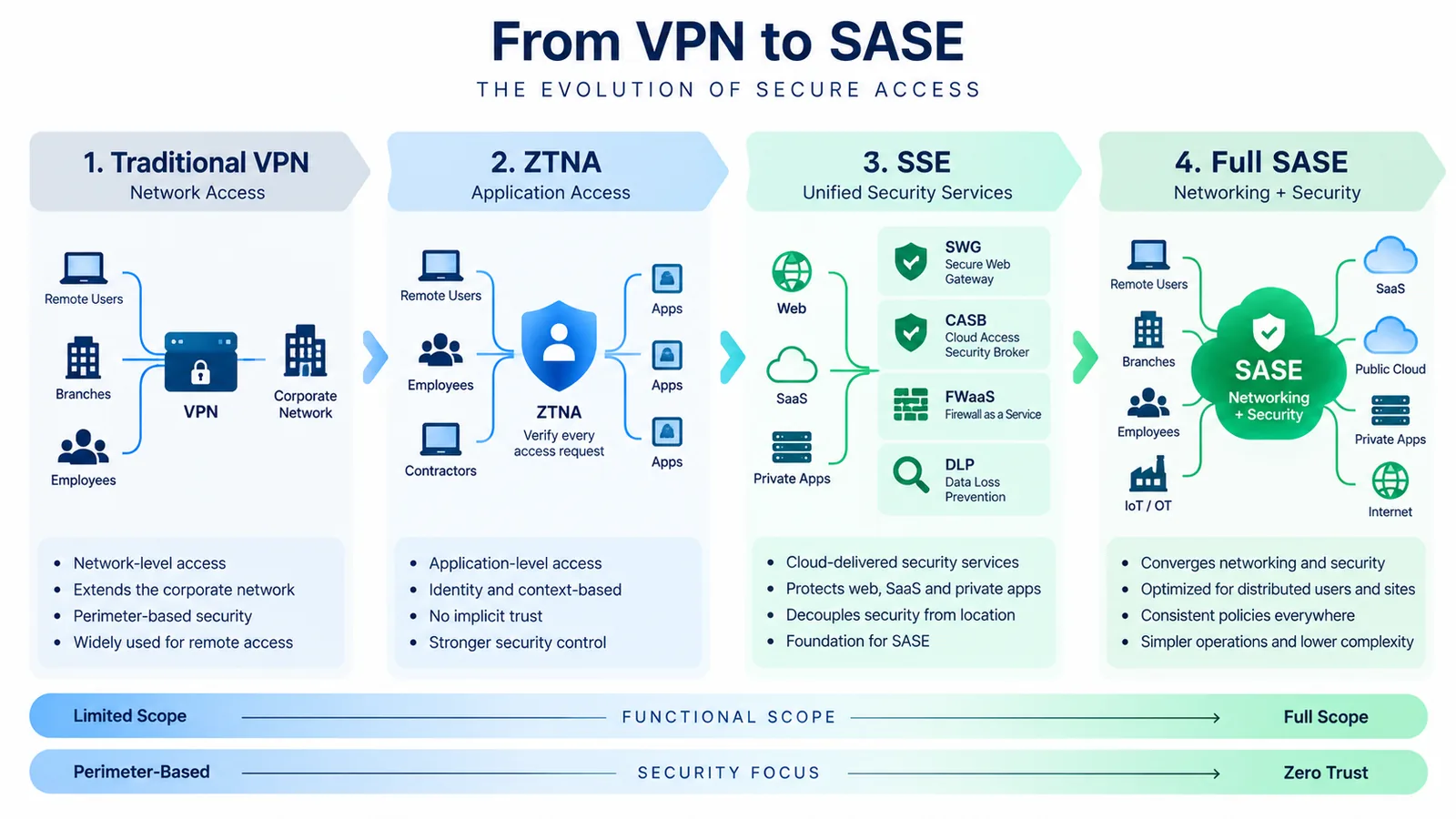
SASE vs SSE vs VPN
These three terms represent different scopes.
| Technology | Primary Role |
|---|---|
| VPN | Protected network connectivity |
| SSE | Cloud-delivered security for access to web, SaaS and private applications |
| SASE | Networking + security architecture |
SSE can therefore be particularly relevant for organizations that want to modernize security without changing the entire WAN at the same time.
VPN vs SASE Migration Strategy
Organizations should avoid starting with:
“We need to eliminate VPN.”
Start instead by understanding access patterns.
Step 1: Inventory Current VPN Usage
Identify:
- Users
- Applications
- Sites
- Partners
- Cloud connections
- Protocols
Step 2: Classify Applications
Group applications into categories such as:
- SaaS
- Private web applications
- Legacy applications
- Infrastructure services
- Cloud workloads
Step 3: Review Access Requirements
Determine whether each use case really requires network-level access.
Some users may only need access to one application.
Step 4: Strengthen Identity
Modern remote access depends heavily on:
- Strong authentication
- Identity management
- Device context
- Least privilege
Step 5: Pilot ZTNA
Select suitable private applications and test an application-specific access model.
Step 6: Modernize Web and SaaS Security
Evaluate SSE/SASE capabilities where cloud application usage justifies them.
Step 7: Retain VPN Where Appropriate
Do not migrate a use case simply because VPN is considered old technology.
Step 8: Remove Obsolete Access
As applications migrate successfully, remove unnecessary VPN access and unused rules.
How to Choose Between VPN and SASE
Ask these questions:
- Where are our users located?
- Where are our applications located?
- How much traffic goes to SaaS?
- Do users require full network access?
- Can access be application-specific?
- How many security platforms do we operate?
- What identity and device information is available?
- Do we have many branches?
- What legacy systems must remain?
- What are the actual security and operational problems we are trying to solve?
The answers determine architecture better than simply labeling VPN “legacy” and SASE “modern.”
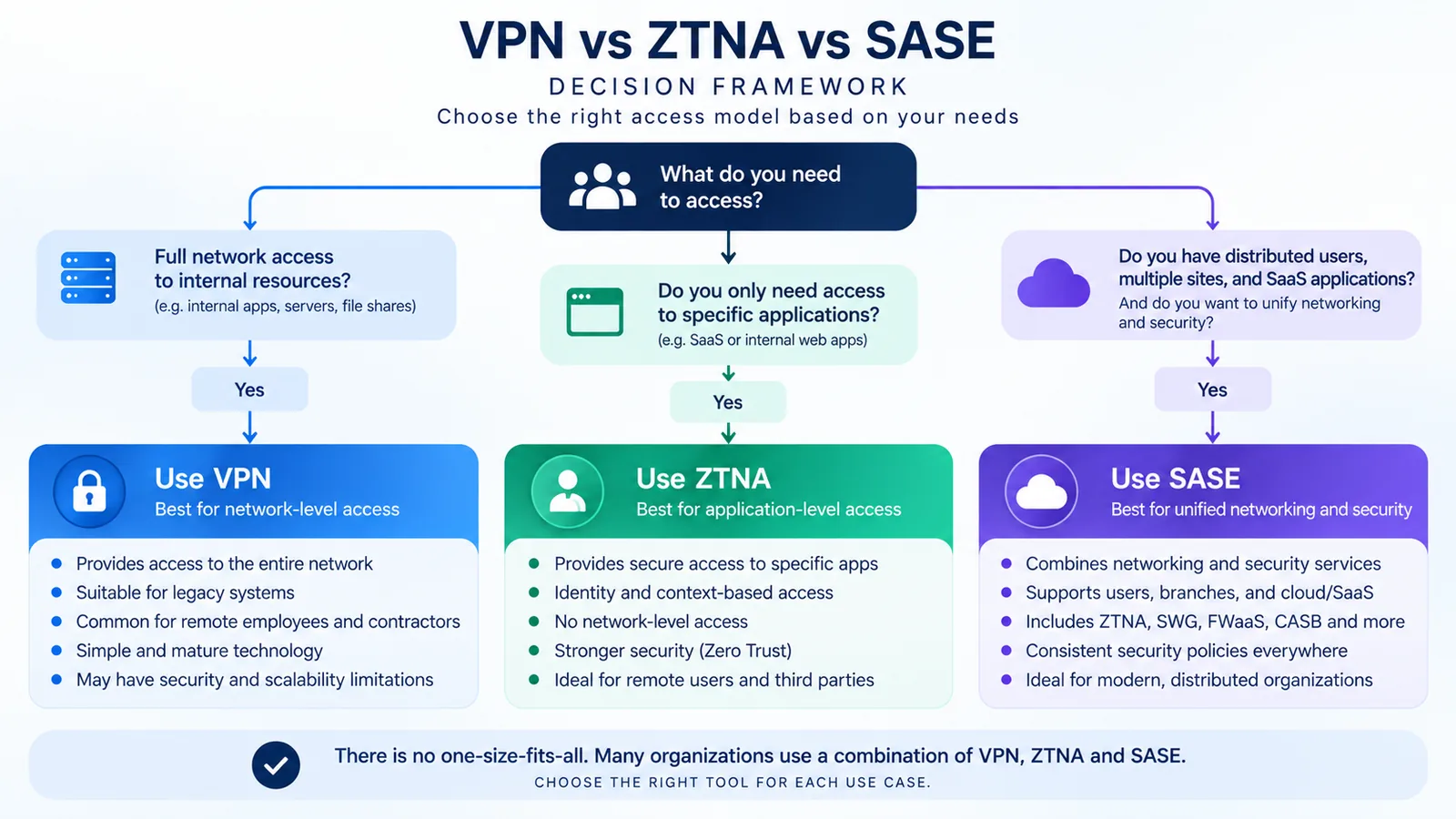
VPN vs SASE Decision Matrix
| Scenario | VPN | SASE / ZTNA |
|---|---|---|
| Small remote workforce accessing one data center | Strong candidate | Possible but may exceed requirements |
| Large distributed workforce | Possible | Strong candidate |
| Heavy SaaS usage | Possible with additional controls | Strong candidate |
| Application-specific private access | Possible through careful segmentation | ZTNA can fit well |
| Site-to-site network connection | Strong candidate | May coexist with SASE |
| Cloud-first enterprise | Useful for selected connections | Strong candidate |
| Legacy network applications | Often appropriate | Depends on application compatibility |
| Consolidating network and security services | Limited scope | Strong candidate |
Common VPN vs SASE Myths
Myth 1: VPN Is Insecure
VPN technology itself is not automatically insecure.
Security depends on architecture, authentication, configuration, endpoint protection, segmentation, maintenance and monitoring.
Myth 2: SASE Automatically Implements Zero Trust
No.
SASE can support Zero Trust capabilities, but Zero Trust requires broader architecture and policy decisions.
Myth 3: SASE Always Replaces VPN
No.
Some remote-access use cases may migrate to ZTNA while other VPN uses remain.
Myth 4: SASE Is Always Faster
No.
Performance depends on the complete network path and service architecture.
Myth 5: VPN Cannot Scale
VPN architectures can scale, but large deployments can require significant infrastructure and operational management.
Myth 6: SASE Is Just a Security Product
SASE represents a broader networking and security architecture rather than one isolated security feature.
The Future of Remote Access
The direction of enterprise remote access is moving from a primarily network-centric model toward more resource-centric and identity-aware access.
That shift does not make encrypted tunneling irrelevant.
It changes the question from:
“How do we connect this user to our network?”
toward:
“Which resource does this user need, under what conditions, and which security controls should apply?”
SASE, SSE, ZTNA and Zero Trust architectures reflect this shift.
VPNs can continue to coexist where protected network connectivity remains the right requirement.
Frequently Asked Questions
What is the main difference between VPN and SASE?
A VPN primarily provides protected network connectivity. SASE is a broader networking and security architecture that can combine connectivity with security capabilities such as ZTNA, SWG, CASB and firewall services.
Is SASE more secure than VPN?
Not automatically. SASE can provide a broader set of integrated security capabilities, but security depends on architecture, implementation, policy and operations. A properly configured VPN can still provide strong secure connectivity.
Can SASE replace VPN?
SASE and ZTNA can replace some traditional remote-access VPN use cases, particularly where users need access to specific applications rather than entire networks. VPNs can remain useful for other connectivity requirements.
Is VPN obsolete?
No. VPNs remain widely useful for protected remote, site-to-site, cloud and specialized network connectivity.
Is ZTNA better than VPN?
ZTNA can provide more granular application-level access for certain remote-access requirements. VPN may remain more appropriate where network-level connectivity is required.
Does SASE include VPN?
SASE implementations may use encrypted tunnels and other secure-connectivity mechanisms, but VPN should not be treated as the defining component of SASE.
Does SASE require SD-WAN?
SD-WAN is an important networking component in many SASE deployments, especially for branches, but remote-user SASE access does not necessarily require an SD-WAN appliance.
What is the difference between SASE and SSE?
SSE focuses on security services for web, SaaS and private application access. SASE adds the broader networking/connectivity dimension.
Is SASE part of Zero Trust?
SASE can support implementation of Zero Trust principles and technologies, but SASE and Zero Trust are distinct concepts.
Should a small business use VPN or SASE?
The decision should reflect the actual environment. An organization with limited users and centralized applications may find VPN sufficient, while a highly distributed organization using many SaaS services may benefit more from SASE or SSE capabilities.
Can VPN and SASE coexist?
Yes. Many organizations can use ZTNA or SASE for modern access while retaining VPNs for selected applications, site-to-site connections or legacy requirements.
Conclusion
The VPN vs SASE decision should not be framed as a battle between an obsolete technology and its replacement.
They operate at different architectural levels.
VPN solves protected connectivity.
SASE addresses the broader challenge of securely connecting distributed users, sites and devices to distributed applications.
VPN remains valuable where network-level connectivity is required.
SASE becomes particularly attractive when organizations need:
- Distributed access
- Cloud and SaaS security
- Identity-aware policies
- ZTNA
- WAN and security convergence
- Consistent controls across remote users and branches
The transition also does not need to happen all at once.
A practical architecture may use:
SASE/SSE for cloud security + ZTNA for modern private applications + VPN for remaining network-level requirements.
Over time, organizations can reduce legacy remote-access dependency where more granular approaches provide better security and operational outcomes.
The key question is therefore not:
“Should we replace our VPN with SASE?”
It is:
“What is the safest and most efficient way to connect each user, device and site to the resources it actually needs?”
That question leads to a much stronger enterprise access architecture.
Continue Learning
Continue exploring the TechTeamSynergy enterprise networking cluster with these related guides:
Comments are closed.